
Planning meals ahead is one of the simplest ways to cut weeknight stress and wasted groceries. The best meal prep app depends on whether you want curated batch-cooking plans, macro-driven automation, retailer-connected grocery shopping, or a personal recipe library.
Which part of meal prep keeps breaking down for you, choosing what to cook, preparing several portions at once, or turning a week of recipes into one usable grocery list? Meal prep apps solve different bottlenecks, so the right choice depends on your workflow rather than a universal ranking.
This comparison focuses on batch-cooking support, saved recipes, meal planning, grocery-list generation, free access, and current pricing. It covers apps, not printable planners or templates. If you prefer a paper-based system, see our guides to the best meal prep planner and meal prep planner template.
Recipe One is the natural fit for cooks who already save recipes from blogs and social platforms and want to plan around that personal library. eMeals suits people who want ready-made menus, MealPrepPro focuses on batch cooking, and Eat This Much automates plans around calorie and macro targets. Here are the strongest options for each kind of cook.
1. Recipe One
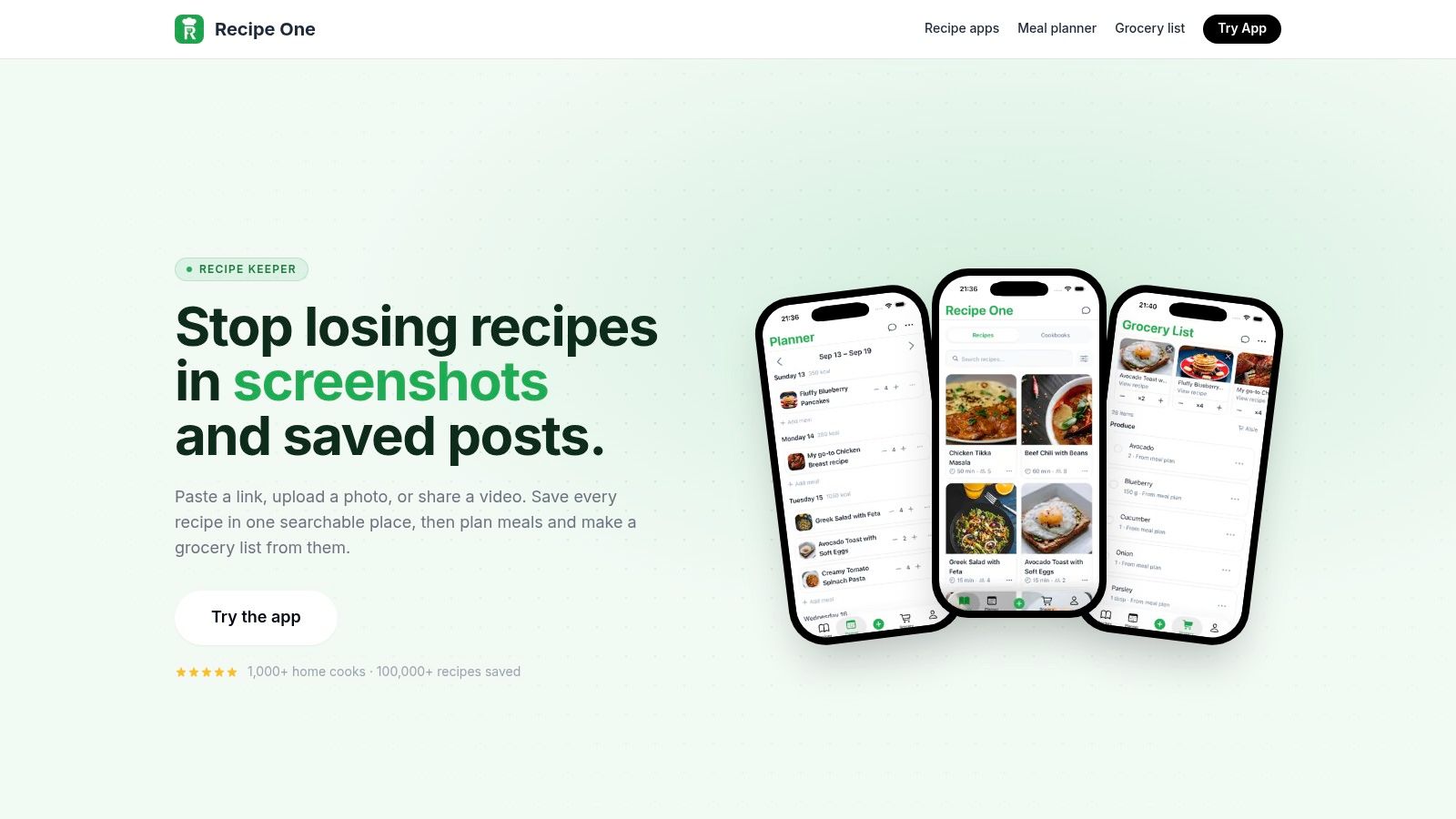
Recipe One is the strongest match for cooks whose recipes already live across websites, Instagram, TikTok, YouTube, screenshots, cookbook photos, PDFs, or handwritten cards. Instead of forcing you into a fixed recipe catalogue, it turns scattered inspiration into a searchable personal library.
The app's AI extracts ingredients, steps, cook times, and measurements from imported recipes. You can then organize them into custom cookbooks, tag and filter by diet or cook time, rate favorites, and search by ingredient. That matters for meal prep because choosing meals becomes a matter of using recipes you already trust, not rebuilding your collection inside another platform.
Best for planning around your own recipes
Recipe One connects the full workflow in one place:
- Save from anywhere: Import recipes from social posts, videos, websites, photos, screenshots, or handwritten cards.
- Plan the week: Add saved recipes to an integrated weekly meal planner.
- Build the shopping list: Generate a grocery list from the recipes scheduled in your plan.
- Cook without distractions: Use a reading view with no ads and a screen that stays awake.
- Keep everything synced: Access your cookbook across devices, share recipes, or export them as PDFs.
Its free Cook with Ingredients tool suggests dishes from ingredients you already have, which is useful for using prep leftovers before buying more food. Recipe One also includes cups-to-grams and grams-to-cups converters, oven-temperature conversion, rice-to-water ratios, and a nutrition calculator.
The trade-off is clear. Pricing isn't published on the website, so check the Recipe One website or the relevant app store for current plans and premium features. AI extraction can also need manual cleanup when a source has unclear quantities, regional measurements, or unusual formatting. The app is available on iOS and Android.
2. eMeals
eMeals is the best meal prep app for people who want the app to make most of the decisions. It provides rotating weekly menus organized around food styles such as Budget, 30-Minute, Keto, Diabetic, and Kid-Friendly options.
You choose a plan, review the menu, and send the resulting grocery list to supported retailers. eMeals connects with Walmart, Kroger, Amazon Fresh, and Instacart, so the path from meal selection to grocery pickup or delivery is unusually direct.
The app also lets you edit selections and combine ingredients into a consolidated list. That makes it practical for families that want a ready-to-shop plan without importing recipes or manually assigning every dinner to a day.
Best fit: Choose eMeals when decision fatigue is the main problem and you want curated menus with retailer handoff.
The limitation is ownership. eMeals' recipes come from its own library, so it isn't the right choice if your weekly routine depends on saved family recipes, blog recipes, or social-media discoveries. Breakfast and lunch plans are paid add-ons, which can affect the total cost depending on how much of the day you want to plan. For budgeting ideas, see this guide to a weekly meal planner with a grocery list on a budget.
3. Samsung Food
Samsung Food, formerly Whisk, is the best meal prep app for cooks who want a capable free starting point. It lets you save recipes from websites, organize them into collections, share recipes, plan meals, and create shopping lists from those plans.
The free tier covers the core recipe-saving and planning workflow. That makes it a sensible option for someone who wants to test whether a meal planner fits their routine before paying for more automation.
Where Food+ fits
Samsung Food's optional Food+ tier adds AI-designed meal plans, macro and micronutrient tracking, and ad-free use. Those features make the platform more relevant to nutrition-conscious users, but the basic experience remains useful without the subscription.
The app is available on the web, iOS, and Android. Its cross-platform availability also helps households that switch between a computer while browsing recipes and a phone while shopping.
The main trade-off is feature separation. Users who want advanced AI plans, detailed nutrition tracking, or an ad-free experience need Food+. Users who only need recipe saving, a meal calendar, and grocery lists can stay with the free version.
Samsung Food works best when you want broad recipe discovery and basic meal planning without committing to a paid service immediately.
It isn't as specialized as MealPrepPro for batch cooking or Eat This Much for precise nutrition targets. It also won't suit cooks who want a highly personal library built from many types of imported media as directly as Recipe One.
4. AnyList
AnyList is the best choice for households where grocery coordination matters more than recipe discovery. It started as a grocery-list tool, and that focus remains visible in shared lists, store categories, per-item prices, totals, and voice support through Siri and Alexa.
You can save and import recipes, add recipe ingredients to a list, and use a meal-planning calendar. Google Calendar sync helps households connect meal plans with the rest of their schedules. Online shopping shortcuts also support Walmart, Instacart, Kroger, and other services.
AnyList's strongest feature is the shared list. A partner can add an ingredient while you're at the store, and per-item pricing helps households keep a closer eye on the expected total. That makes it more useful for couples, roommates, and families than for solo cooks seeking guided batch menus.
The free-versus-paid trade-off
The free tier limits recipe imports to five, so frequent recipe collectors will likely need the premium version. AnyList also isn't a curated-menu service. You choose the recipes yourself, then use the app to organize shopping and scheduling.
Best fit: Pick AnyList if your recurring problem is getting everyone in the household onto the same grocery list.
For a deeper look at tools built around shopping coordination, compare it with this grocery list app guide. If you want macro targets, batch-cooking templates, or a large editorial recipe catalogue, another app will serve you better.
5. Plan to Eat
Plan to Eat is built for hands-on planners who maintain a large personal recipe collection. Import recipes from the web, drag them onto a calendar, and let the app combine the ingredients into a de-duplicated grocery list.
The calendar is the main attraction. You can plan across weeks or months, move recipes between dates, and build a repeatable system around recipes your household already knows. The app doesn't try to replace your judgment with automatic menus, which is useful if you plan around sales, dietary preferences, leftovers, or family traditions.
A flexible calendar, not a menu generator
Plan to Eat offers web and mobile apps, along with export and sharing options. Its grocery list is generated from planned meals, so you don't need to retype every ingredient after filling the calendar.
The trade-off is that list handoff happens outside the app. There are no built-in grocery delivery buttons, and the service relies on your own recipes rather than offering curated weekly menus.
Plan to Eat is the right tool when you enjoy choosing meals but want the calendar and shopping math handled for you.
Its model suits organized cooks who want flexibility, not users who want an automated plan based on nutrition goals. If that describes your workflow, this meal planner app comparison offers another useful point of reference.
6. MealPrepPro
MealPrepPro is the best meal prep app for batch cooking, especially if you prefer to cook in bulk once or twice during the week. Its plans emphasize repeatable meal sets, leftovers, container portions, and nutrition-aware recipes.
The app creates weekly menus based on goals and diet preferences, then supports swaps and automatic scaling for batch preparation. Its grocery lists are generated around the weekly prep plan, so the shopping process follows the same bulk-cooking logic as the recipes.
Built for cook-once workflows
MealPrepPro makes sense for users who don't want a different cooking project every evening. The plan can emphasize preparing larger batches and eating them across several meals, which reduces the number of decisions required during a busy week.
It offers a seven-day free trial and is available on iOS and Android. Comparisons describe its annual price at approximately $29.99 per year in this meal-planning software comparison. Verify the current price in the app before subscribing.
The limitations are just as specific. Advanced macro customization may feel constrained beside a full nutrition tracker, and the batch-focused structure can feel restrictive if you prefer spontaneous, freshly cooked meals.
Choose MealPrepPro when your ideal week has a dedicated prep session and planned leftovers, not a new recipe every night.
It's less suitable for cooks who collect recipes from social media and want to plan around that collection. For those users, Recipe One offers the more natural capture-to-calendar workflow.
7. Eat This Much
Eat This Much is the best meal prep app for people whose main requirement is calorie- and macro-driven automation. Set your preferred diet, calorie targets, macros, budget, and schedule, then let the app generate daily or weekly plans.
It also supports ingredient and food filters, pantry tracking, leftover logic, and grocery delivery integrations with Instacart, Amazon Fresh, Walmart, and other services. That combination gives nutrition-focused users a fast route from target setting to a shopping list.
Best for numbers-first planning
The free tier supports same-day planning and logging. Premium access provides weekly planning and delivery integrations, so the free option works as a way to test the planning logic before upgrading.
The experience is functional rather than editorial. Eat This Much prioritizes target alignment, filters, and repeatable planning over recipe browsing or a polished personal cookbook. Plans can also feel rigid until you learn how to use swaps and filters effectively.
Choose this app when your meal plan must serve a specific calorie or macro target first.
It isn't the strongest choice for cooks who want to preserve recipes from blogs, videos, or cookbook photos. It also asks users to accept more automation and less control over the creative side of meal selection. For a weight-loss-oriented comparison, see this guide to the best meal planner for weight loss.
Top 7 Meal Prep Apps Comparison
| Product | Implementation complexity 🔄 | Resource requirements ⚡ | Expected outcomes 📊 | Ideal use cases 💡 | Key advantages ⭐ |
|---|---|---|---|---|---|
| Recipe One | Moderate, AI OCR/ML extraction, mobile + cloud sync | Mobile (iOS/Android), cloud storage; possible paid tier | Centralized, searchable recipes; accurate imports; meal plans + grocery lists | Save recipes from social/video sources; beginners to pros who want one system | ⭐ AI extraction from images/videos; all‑in‑one workflow; distraction‑free cooking view |
| eMeals | Low, curated menu engine with retailer handoffs | Subscription; retailer accounts for one‑tap pickup/delivery | Ready weekly menus and retailer‑ready grocery lists | Families wanting minimal decision‑making and quick checkout | ⭐ Done‑for‑you curated menus; broad US retailer integrations |
| Samsung Food (Whisk) | Low, recipe saver + planner; Food+ adds AI features | Free web/mobile tier; optional Food+ subscription for AI/nutrition | Organized collections, meal planner, shopping lists; AI plans with premium | Collectors of web recipes who want free planning and lists | ⭐ Robust free tier; cross‑platform sync; clear premium options |
| AnyList | Low, list + calendar focus with sharing | Low annual cost for premium; mobile apps; optional shopping shortcuts | Shared shopping lists with store categories, pricing, calendar sync | Households co‑shopping and budgeting; store‑by‑store lists | ⭐ Store categories, per‑item pricing, calendar and voice assistant support |
| Plan to Eat | Low–Moderate, clipper + drag‑and‑drop calendar planner | Paid subscription (transparent); web + mobile | Calendar‑based plans and de‑duplicated grocery lists; exportable data | Users with large personal recipe libraries who prefer calendar planning | ⭐ Flexible drag‑and‑drop planner; simple combined shopping lists |
| MealPrepPro | Moderate, personalized macros + batch scaling logic | Subscription; mobile apps; initial goal setup | Batch‑friendly weekly menus, macro‑aware recipes, auto‑scaled shopping lists | Fitness‑focused batch cookers who meal‑prep 1–2 times/week | ⭐ Auto‑scale for batch prep; goal‑based templates to reduce decision fatigue |
| Eat This Much | Moderate, algorithmic plan generation by calories/macros | Free tier for single‑day; premium for weekly plans and delivery integrations | Macro‑aligned weekly plans, pantry tracking, grocery lists with leftovers logic | Users needing calorie/macro‑driven automated plans | ⭐ Fast path to calorie/macro‑aligned plans; pantry and leftovers management |
Choose the Workflow You Will Actually Use
The best meal prep app isn't the one with the longest feature list. It's the one that matches how you choose recipes, cook in batches, shop, and recover when the week changes.
Choose eMeals for done-for-you menus and retailer handoff. It removes much of the menu-building work and connects plans with grocery services, but it expects you to use its recipe library. Choose Samsung Food or Plan to Eat for broad recipe libraries and planning around saved recipes. Samsung Food is the better free starting point, while Plan to Eat gives hands-on planners a stronger calendar workflow.
Choose AnyList when shared shopping and budgeting are the priority. Its household list, voice support, store organization, and per-item pricing are more important than curated menus or nutrition automation. Choose MealPrepPro for batch cooking, container portions, repeatable meal sets, and a weekly prep routine. Choose Eat This Much when calorie and macro targets drive every meal decision.
Recipe One serves a different kind of cook. It's for people who already collect recipes from websites, Instagram, TikTok, YouTube, cookbook photos, screenshots, or other sources and want those recipes to become usable plans. Save them into one library, organize them, schedule them in the meal planner, and generate a grocery list from the meals you'll cook.
That positioning matters because many meal prep apps push their own catalogues or generated diet plans. Recipe One plans around the recipes you already saved, then connects those recipes to the week and the shop. Its free Cook with Ingredients tool also helps suggest dishes from ingredients already available, which is useful when meal-prep leftovers need a second use.
If you want to explore wellness tools that support broader routines, you can also find the right Android wellness app. For Recipe One, check the current app-store listing before subscribing because pricing and premium features can change.
Start with the workflow you'll repeat. If your recipes are scattered across social feeds and saved posts, open Recipe One on the App Store or Google Play, import a few trusted recipes, schedule them, and see whether the resulting grocery list fits the way you shop.
Recipe One brings recipes from websites, Instagram, TikTok, YouTube, photos, screenshots, and handwritten cards into one searchable library, then connects them to a weekly meal planner and grocery list. Visit Recipe One to turn the recipes you already save into a practical meal-prep system, and check the App Store or Google Play for current plans.


