
Eat This Much is a strong choice for automated weekly meal planning and grocery lists, but it may frustrate users who prefer building plans from their own saved recipes rather than accepting the app's generated suggestions. Its early adoption and current app-store reach show a durable product, but popularity doesn't remove the need to check whether each planned meal works in your actual kitchen.
You know the routine. It's late, everyone is hungry, and you're trying to decide whether dinner should fit your calorie target, your child's preferences, the food already in the pantry, and tomorrow's schedule. Eat This Much can remove much of that decision-making, but it does so by asking you to accept a generated plan and adjust it when reality gets in the way.
Eat This Much Review - The Quick Verdict
If you want a computer to decide what to eat from your calorie goals, macronutrient targets, dietary preferences, schedule, and budget, Eat This Much is worth considering. The service generates meal recommendations and grocery lists around those constraints, rather than asking you to browse recipes and assemble a plan manually. Its historical company-reported growth moved from 26,000 users in September 2013, including 1,800 paid subscribers, to 180,000 web users by June 2015 and more than 400,000 registered users by April 2016. Those figures are not independent audits, but they show that the product found an audience early. StartupBeat documented those milestones.
The current distribution picture is also substantial. Google Play lists more than 1 million downloads, about 10,500 reviews, and a 4.7-star rating out of 5. An independent app analytics listing estimated 2.3 million lifetime Android downloads as of September 2025, with an average rating of 4.67 based on about 9,700 ratings. These are changing market indicators, not proof that every plan will suit your household. Google Play provides the public app-store figures.
My recommendation
Choose Eat This Much if:
- Your priority is automation: You'd rather review a generated menu than start from a blank week.
- You think in nutrition targets: Calories and macros matter more to you than building every meal around favorite recipes.
- You want shopping support: A planned week that produces a grocery list can reduce repetitive admin.
Skip it if your family meal planning starts with saved recipes, leftovers, pantry ingredients, or a personal recipe collection. The app's strength is generator-first planning. That becomes a weakness when you want the planner to organize meals you already love.
Practical rule: If you want the app to choose the menu, Eat This Much makes sense. If you want the app to organize your menu, look elsewhere.
For a broader look at tools built around preparation rather than automatic generation, compare these meal prep apps.
How the Auto-Generated Meal Planner Works
Eat This Much uses a constraint-based meal-generation model. You provide the conditions, and the system generates meals intended to satisfy them. That differs from a conventional recipe calendar, where you select dishes first and fit them into a schedule afterward.
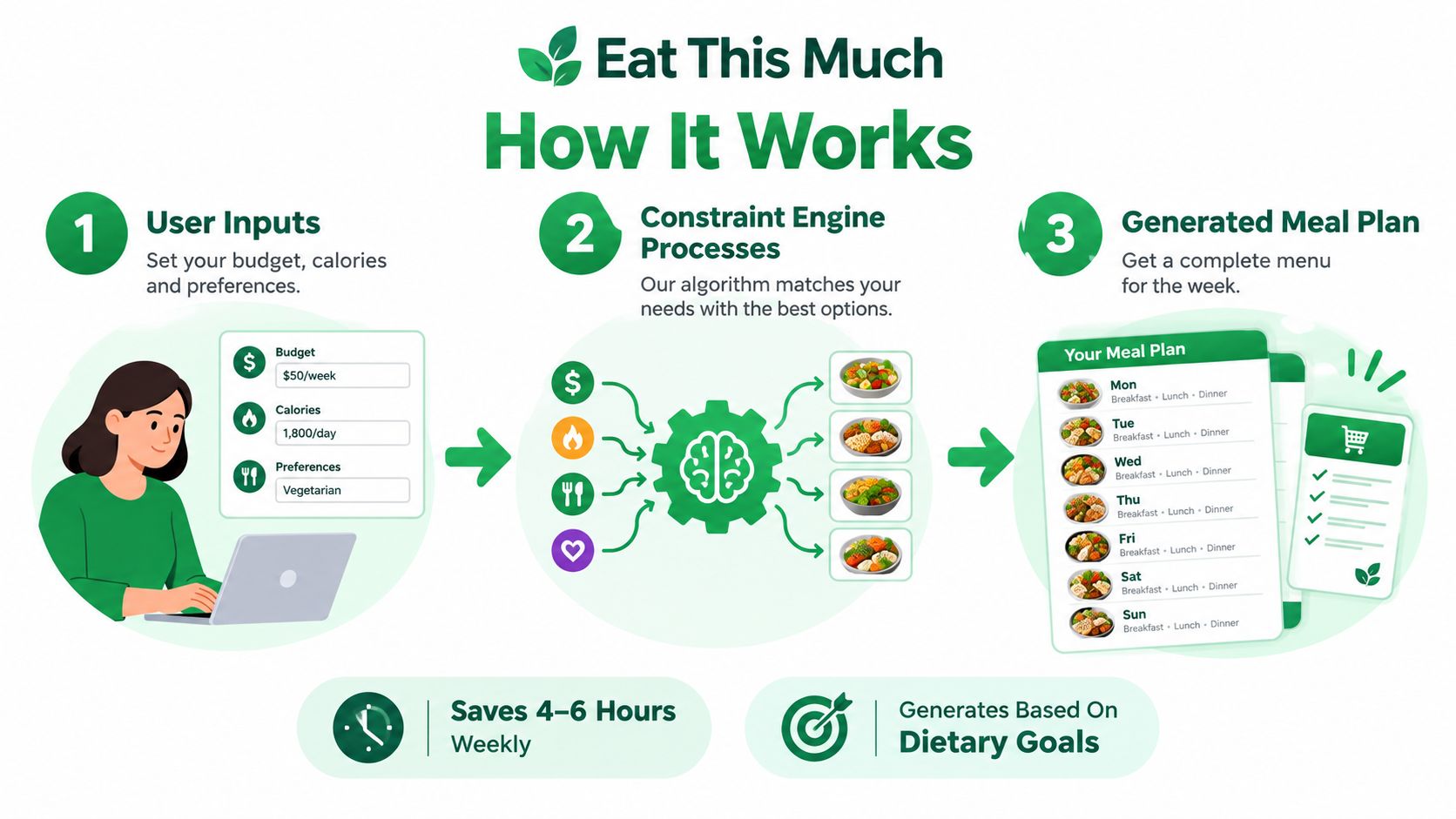
Step 1, set the targets
The public product description says users can enter height, weight, activity level, and health goals, set calorie and macro targets themselves, or have the service calculate targets. You can also specify a dietary pattern, preferred foods, meal frequency, exclusions, schedule, and budget. The system then works from those inputs rather than just selecting popular recipes.
You can adjust per-meal nutrition targets, serving sizes, recurring foods, cooking-time limits, and dietary filters. That gives you meaningful control over the rules, especially if you follow a quantified eating plan or need to avoid particular ingredients. It doesn't mean the resulting plan is medically appropriate, and it doesn't guarantee that every portion or recipe entry matches what you'll cook.
Step 2, let the engine match meals
The system searches its food and recipe data for combinations intended to meet your constraints. Its core advantage is target-driven planning, not manual recipe discovery. You don't need to calculate each meal from scratch, but you do need to give the app accurate preferences and review what it proposes.
The quality of the result depends on the quality of the underlying food and recipe data. Custom foods and recipes are especially important. If you estimate portions by volume or enter incomplete information, the calculated result can become less dependable. For macro-sensitive goals, weighing ingredients in grams is the safer habit.
Step 3, review the plan and shopping list
Premium users can generate a week ahead, edit the plan, and create a grocery list from those meals. That is useful when you accept the generated menu. It's less useful when you routinely replace most meals with family favorites or ingredients already in the house.
The practical gap is planned versus cooked. A plan may match its database values, while your cooked version changes because you use another brand, drain more fat, measure by cups, alter the serving size, or substitute an ingredient. Treat the numbers as planning estimates, not laboratory results.
For a wider comparison of automated nutrition tools, this guide on AI diet apps compared by ThriveXDNA can help you identify whether a target-based system fits your routine. If your planning starts with recipes and ingredients, a grocery list generator from recipes follows a different workflow.
Eat This Much Free vs Premium Tiers
The free and Premium accounts solve different problems. The free tier lets you test the basic planning engine without committing to a full weekly workflow. Premium is designed for people who want the service to keep planning beyond the current day and turn those plans into shopping actions.
| Capability | Free account | Premium |
|---|---|---|
| Meal planning | Current day | Automatic weekly planning plus daily planning |
| Custom foods and recipes | Included | Included |
| Food tracking | Included | Included |
| Preferences and exclusions | Included | Included |
| Grocery lists | Not the full Premium workflow | Automatic grocery lists |
| Weekly email plan | Not included | Full week of meals and grocery list |
| Delivery integration | Not included in the free workflow | Available through supported providers |
The official help documentation says a free account can plan the current day, create custom recipes and foods, customize preferences, and track intake. That makes free useful for trying the system, checking whether the generated meals feel realistic, and learning how much editing your household requires.
Premium adds the automatic weekly planner. It can email a full week of meals and a grocery list based on your targets, tastes, schedule, and budget. It also supports distinct settings for different days, including different nutrition profiles, meal types, and recurring foods. That matters if weekdays and weekends don't look alike.
Which tier fits a busy household?
Choose free when you want to experiment, track food, or plan one day at a time. It may be enough if you enjoy making the rest of your decisions manually.
Choose Premium when your real problem is the weekly planning session. A seven-day plan and generated shopping list can reduce the work of deciding what to cook, checking ingredients, and transcribing items. It won't remove the need to inspect the list, especially if you already have food at home or expect leftovers.
The grocery list is built from the planned meals. Premium users can export lists to grocery-delivery providers including Instacart and Amazon Fresh, and the official pricing page lists automatic grocery lists and delivery integration among Premium features. Check the current pricing page or the App Store before subscribing, because pricing and plan details may change.
If you're comparing no-cost options, this guide to the best free meal planner apps gives useful context. Don't pay for weekly automation unless you'll use it.
Pros and Cons of the Service
Eat This Much is focused. That helps it feel straightforward, but it also makes the trade-offs clear. The app is strongest when you provide targets and want the system to generate a workable starting point. It's weaker when your household has an established recipe library, irregular ingredients, or a strong preference for choosing dinner first and calculating nutrition afterward.
The editorial evaluation from CNN's meal-planning coverage praised the service's setup simplicity, customization, recipe breadth, editable grocery lists, and customer support. It also distinguished the free tier from Premium, with weekly planning and instant grocery-list generation associated with the paid workflow. CNN's meal-planning review provides that product comparison and includes dietitian-informed context about the potential time and variety benefits of meal-planning apps.
Eat This Much Feature Evaluation
| Feature | Status | Impact on Workflow |
|---|---|---|
| Target-based generation | Strong fit for quantified planning | Reduces the need to select and calculate every meal manually. |
| Dietary preferences and exclusions | Useful control | Helps narrow suggestions for picky eaters or specific eating patterns. |
| Weekly planning | Premium-focused | Moves planning from day-by-day decisions to a repeatable weekly routine. |
| Grocery lists | Convenient but plan-dependent | Creates a list from generated meals, but may require pantry checks and edits. |
| Custom foods and recipes | Flexible with accuracy limits | Supports personal entries, though portion and ingredient data affect results. |
| Recipe variety over time | Potential limitation | Repetition can become noticeable, particularly on restrictive diets. |
| Macro calculations | Useful as structured estimates | Helps with target-based planning, but cannot account perfectly for every substitution or cooking method. |
What works well
The setup is relatively direct. You state the outcomes and preferences that matter, then let the engine build around them. The ability to edit servings, recurring foods, exclusions, cooking time, and per-meal targets gives you more control than a static meal calendar.
The grocery workflow can also help busy parents. A list generated from the plan reduces manual copying, and scaling ingredients for family members can multiply the quantities added to the list. That convenience depends on following the plan closely, so review quantities before ordering.
Where I'd be cautious
An independent review identified recipe repetition after roughly four to six weeks, especially for restrictive diets. User feedback has also reported incorrect quantities in generated grocery lists and inconsistent support for adding micronutrients to custom foods. The independent Eat This Much review explains these limitations and why output quality depends on the food data behind the system.
That's why I wouldn't treat every calorie number as exact. Use the app as a structured planning aid, then verify brands, weights, cooked yields, and substitutions yourself. Readers comparing tools for a specific nutrition goal can also review these meal planners for weight loss, while keeping the focus on practical fit rather than promises the app cannot make.
Who Should Skip This Meal Planner
Skip Eat This Much if your first step is opening a personal recipe collection. Some households plan by asking, “Which saved recipes can use the vegetables we need to finish?” Others save dishes from social media, cooking videos, family notes, or old meal plans, then build the week around those favorites. A generator-first app starts from the opposite direction.
The grocery list explains the mismatch. Eat This Much generates the list from its planned meals, and Premium can export that list to grocery-delivery services such as Instacart and Amazon Fresh. That's helpful when you accept the menu. It doesn't function primarily as a general pantry manager or a personal recipe-library planner.

The recipe-first household
A recipe-first workflow usually looks like this:
- Save first: You collect recipes from places you already browse.
- Organize next: You keep ingredients, instructions, and measurements together.
- Plan around real preferences: You choose dishes your family recognizes and will eat.
- Shop from the chosen menu: The grocery list reflects your decisions, not an algorithm's suggestions.
Eat This Much can still help if nutrition targets are the main filter, but it may create extra work when every generated dinner needs replacing. That defeats the purpose of automation. A parent with limited time doesn't need more meal suggestions to reject. They need a plan that starts closer to the meals their household already accepts.
Who should choose another tool?
You should probably look elsewhere if:
- You rely on saved recipes: Your favorite dishes are the foundation of the week.
- You cook from pantry inventory: Ingredients already on hand should drive the plan.
- Your family needs different meals: One target-based plan may not reflect several people's tastes.
- You value culinary variety: A fixed recipe database can feel repetitive when dietary filters narrow the options.
- You want ownership of the menu: You'd rather select meals and have software organize them.
For a different workflow, compare this Mealime alternative. The right choice depends less on which app has more features and more on whether your kitchen starts with targets or recipes.
Kitchen test: Open your last saved recipe collection. If those recipes are what you want to cook next week, a generator may be solving the wrong problem.
No meal planner can validate every allergy, medical diet, label difference, or portion assumption for you. If your needs are clinical or medically restricted, get individualized advice from a qualified professional instead of relying on an automated menu.
Frequently Asked Questions
Is Eat This Much free?
Yes. The free account supports current-day planning, food tracking, custom foods and recipes, and preference customization. Weekly planning and the fuller grocery-list workflow are associated with Premium. Check the official site or App Store for current pricing before subscribing.
How should picky eaters customize it?
Start with the public settings for dietary type, preferred foods, and exclusions. Add recurring foods only when they fit your household's routine. Then review the generated plan before shopping. A filter can remove foods you dislike, but it can't understand every family negotiation around texture, leftovers, or what a child will eat.
Are the calorie and macro numbers exact?
No. Eat This Much generates meals intended to meet the targets you provide or select, but the final accuracy depends on food records, recipe details, portion sizes, brands, and preparation. We didn't conduct a hands-on test, so there's no valid claim about how closely a particular generated menu would match a cooked meal.
What if the suggestions become repetitive?
Treat repetition as a signal to edit the plan rather than forcing yourself to follow it. Broaden preferences where appropriate, adjust exclusions carefully, and replace meals that don't suit your family. An independent review noted that repetition may become noticeable after roughly four to six weeks, particularly with restrictive diets. For broader common questions answered, use a general FAQ resource, but rely on Eat This Much's own documentation for current product behavior.
How do grocery integrations work?
Premium grocery lists come from the meals in your plan. Eat This Much says users can export lists to providers including Instacart and Amazon Fresh, and changing the number of family members or scaling a meal multiplies the ingredients added. Check the list against your pantry, package sizes, leftovers, and substitutions before placing an order.
If you want an app to choose meals from nutrition constraints, try the free tier first and judge the amount of editing it requires. If you want to organize your own saved recipes into a practical week, use a recipe-first tool instead.
Recipe One helps you save recipes from social posts, videos, photos, or text, organize them into a searchable personal library, plan meals, and generate a grocery list from what you cook. Visit Recipe One if you want your meal plan to start with recipes your household already wants to eat.


