Several separate apps use the Mise name, and four of them appear as distinct Google Play listings with different jobs. Treating a Mise app search as one product is how people install the wrong kitchen tool.
A single icon in search results hides that split. One listing is built for cooking several dishes at once. Another keeps recipes and plans a week. A third digitizes cookbooks. A fourth is a shared family cookbook. The table in the first section lists each verified listing by store and purpose, so you can match the exact name before you compare anything with another recipe app.
Which Mise App Matches Your Search
There is no single Mise app. Several products share the name, with different features, stores, and purposes. Identify the listing you opened before you judge "the" app.
The table below covers four products verified from their Google Play listings. Other Mise listings exist on the App Store and were not checked for this guide, so do not assume an iPhone result matches a row.
| Listing | Store | Main purpose | Platform as listed |
|---|---|---|---|
| Mise: Recipe Saver & Importer | Google Play | Recipe box with voice-guided cooking and parallel timelines for two to four recipes | Android |
| Mise: AI Sous Chef & Meal Plan | Google Play | AI recipe keeper with weekly planning and grocery list | Android |
| Mise: Cooking companion | Google Play | One-tap imports from social media and OCR scanning of cookbooks | Android |
| Mise: Family Recipe Cookbook | Google Play | Shared family cookbooks with AI recipe creation and meal-type filters | Android |
Mise: Recipe Saver & Importer is a recipe box and digital sous-chef. Its Google Play listing describes imports from websites, photos, and text, step-by-step voice guidance, and a meal-prep mechanic where you pick 2 to 4 recipes and get a parallel cooking timeline plus a consolidated mise-en-place checklist. Contextual AI cooking questions are limited to premium users. The listing does not show a dollar price, so check the official listing for current pricing.
Mise: AI Sous Chef & Meal Plan is a different Android product. Its separate Google Play page describes drafting a recipe from a photo, a pasted link, or a short description, with imports named from websites, TikTok, Instagram, and YouTube, plus weekly planning, an aisle-organized shopping list, and hands-free step guidance. That page does not list a dollar price or a pantry system.
Mise: Cooking companion and Mise: Family Recipe Cookbook are separate brands again. On Google Play, Cooking companion stresses one-tap imports from TikTok, YouTube, Instagram, Reddit, and food blogs, plus OCR scans of cookbooks or printed recipes, and it sorts ingredients into aisles such as Produce, Dairy, Pantry, and Meat. Family Recipe Cookbook instead stresses shared digital cookbooks, family "Kitchens," AI-generated recipes and images, and filters for Breakfast, Lunch, Dinner, Snack, and Dessert. Those are different jobs: digitizing recipes, versus keeping a household cookbook.
Store names and descriptions change. Match the exact name and the developer on the store page before you install. If a listing does not match a row, it may be another product. Dollar prices were not shown on these Play pages, so check each official listing for current pricing and supported platforms.
What the Mise Apps Do for Saving and Cooking
Once a recipe is inside a Mise app, the useful part is what the listing turns that save into. A video link alone does not shop or time a step. Structured fields do.
From a clip to fields you can use
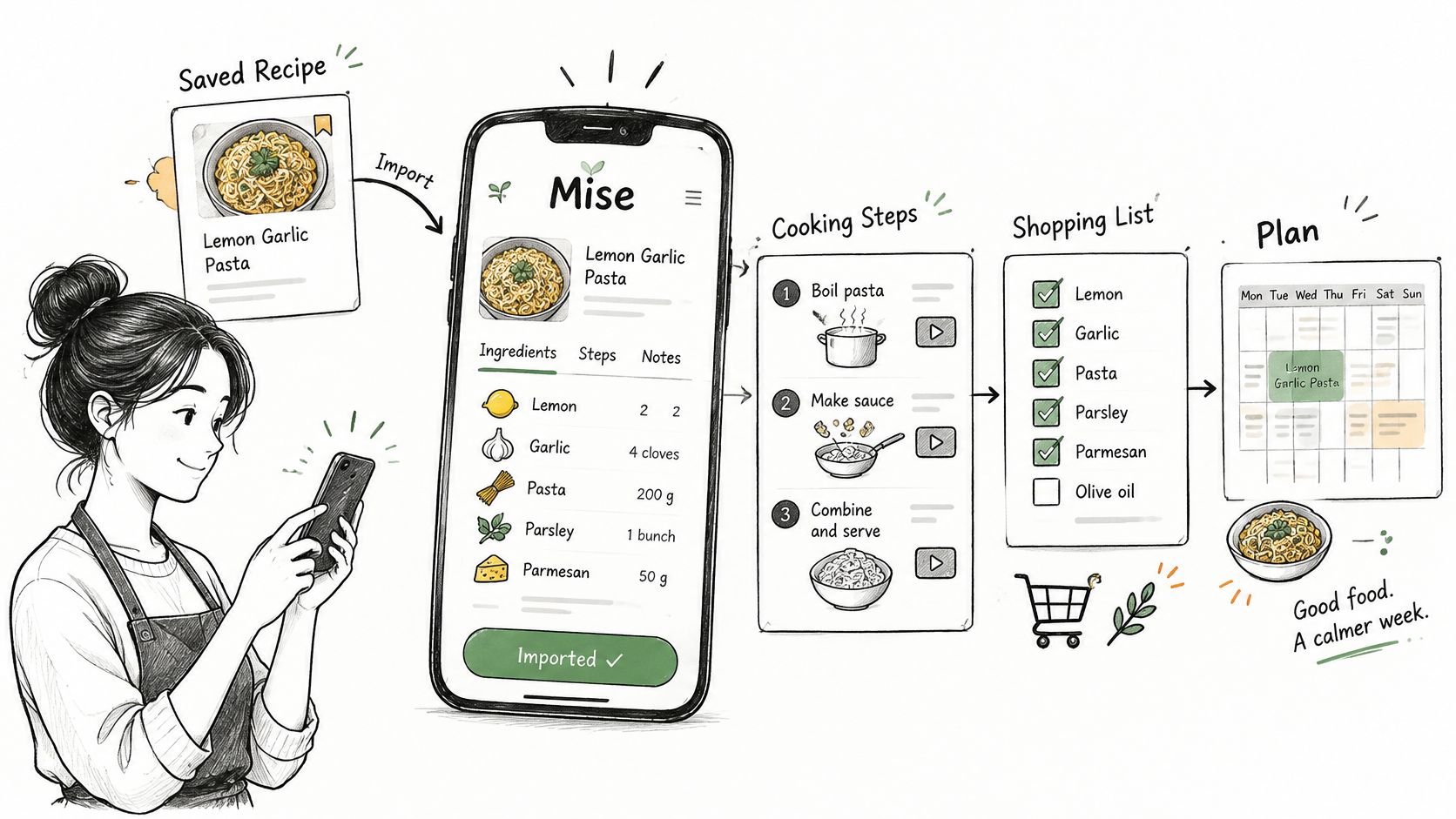
One Mise recipe keeper lets you share short-form cooking videos from Instagram Reels, TikTok, or YouTube Shorts. The App Store description says the app then identifies ingredient names, quantities, and cooking steps, and it can generate an image for each step. That structure is what makes search, step-level guidance, timers, serving changes, and a shopping list possible. A stored URL cannot do those jobs.
Mise: Recipe Saver & Importer also takes websites, photos, and pasted text, so the path is not only short video. Read the saved card the same way either way.
Practical rule: After every import, check quantities and where one step ends before you trust the grocery list. A wrong amount or a merged step travels into the list and into the pan.
If you also keep recipes on the web, an online recipe organizer is a useful contrast, because the same "did the import parse correctly" question applies outside any one Mise listing.
Cooking without hunting for your place
Cooking mode is the next stop. Listings describe directions as discrete cards, built-in timers, and voice commands that move you to the next step. One Google Play description describes step-by-step cards and a screen that stays awake, which cuts scrolling when your hands are wet.
Hands-free reliability was not verified here. Listings can promise voice and still stumble with noise, accents, or a dropped connection. Cook one short recipe with voice on before you rely on it for a full dinner.
Planning after the recipe is clean
Planning comes last, and it differs by listing. Mise: AI Sous Chef & Meal Plan pairs a weekly plan with a grocery list. Mise: Recipe Saver & Importer adds the parallel timeline and mise-en-place checklist when you select two to four recipes, which suits a cook running more than one dish.
Before you shop from any of these:
- Quantities: Confirm each amount and unit against the original video, photo, or page.
- Step breaks: Split or join steps so a timer sits on the action it belongs to.
- Voice: Run one recipe hands-free and note whether you had to touch the phone.
What Mise Costs and How to Confirm It
No single price covers every Mise app. A figure on one press page is not the charge on every store listing that happens to use the name.
The press kit at that URL now describes Kitchen Playbook (formerly Mise) and does not list a current Mise subscription price. The store pages reviewed for this guide did not show verified dollar prices of their own.
Two extra limits matter before you pay. Mise: Recipe Saver & Importer keeps contextual AI cooking questions for premium users. The listing for Mise: AI Sous Chef & Meal Plan does not list a dollar price.
People comparing paid recipe apps often look at a Pepper recipe app write-up for the same reason: the number on a marketing page and the number on the store you downloaded can diverge.
Use this routine each time, because subscriptions, trials, and feature gates move.
- Open the exact store listing for the app you found, and match the developer name.
- Read whether the download is free, a trial, or a subscription, and note the amount if one is shown.
- Check which features need premium. AI cooking answers are one example.
- Confirm the platforms the listing supports. Do not copy platforms from a similarly named app.
- Write down the price and the date you checked.
A free download, when the listing offers one, lets you see whether import and step guidance fit your kitchen before a subscription. Check the official site or App Store for current pricing before you pay.
How Recipe One Saves, Plans and Shops
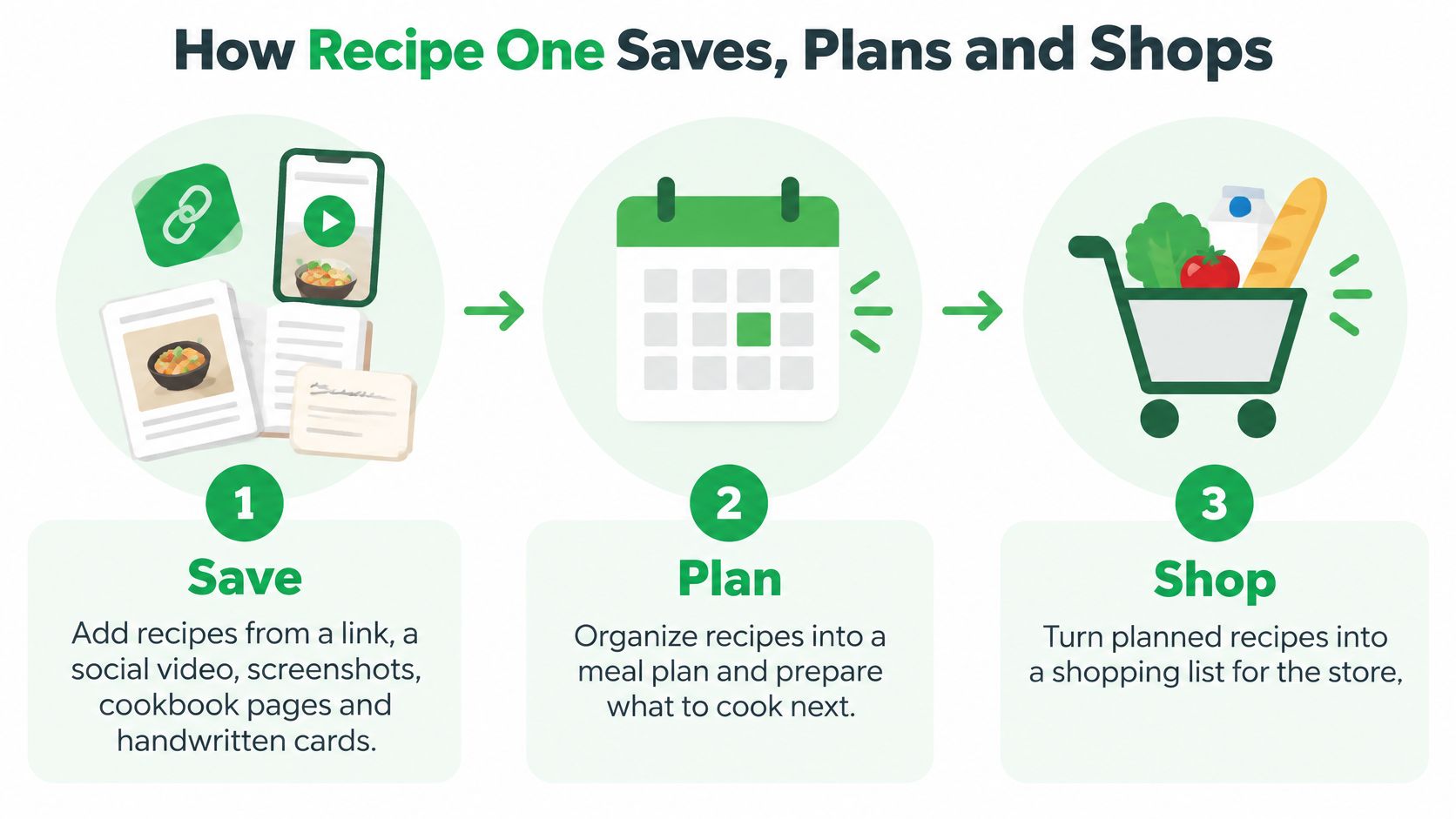
Recipe One's path is three steps: save it, plan it, and shop it. Saving accepts far more than short video, since websites, cookbooks, photos, and screenshots all land in the same library.
Save
Say you want two weeknight dinners. The first is a social video where the cook says the salt and shows the oil on screen. The second is a stained cookbook page. You share the link or snap a photo, and Recipe One extracts the ingredients and steps without the ads and extra page content.
The same save works from any recipe website or blog, a handwritten card, or a screenshot. You then file those recipes with tags and cookbooks, such as weeknights, baking, or family classics. A single recipe or a whole cookbook can be shared with family.
Plan
The meal planner builds a week of dinners from recipes you already saved. Put the video dinner on Tuesday and the cookbook dinner on Thursday. Maya, the AI cook inside the app, can suggest what to make, plan that week, or turn fridge ingredients into a recipe. That is the AI recipe app workflow: the plan starts from your library, not from a fresh search every night.
Shop
One grocery list combines every ingredient from the week's planned recipes, so the video dinner and the cookbook dinner become a single shop. A grocery list generator from recipes shows the list step on its own if you want to try it before downloading.
Cooking mode shows one big step at a time and keeps the screen on, which is the in-kitchen half of the same save. Each recipe also shows calories, protein, carbs and fat per serving. The app is free to start on iPhone, Android and web. The Chrome extension is available now.
Recipe One and Other Recipe Managers Compared
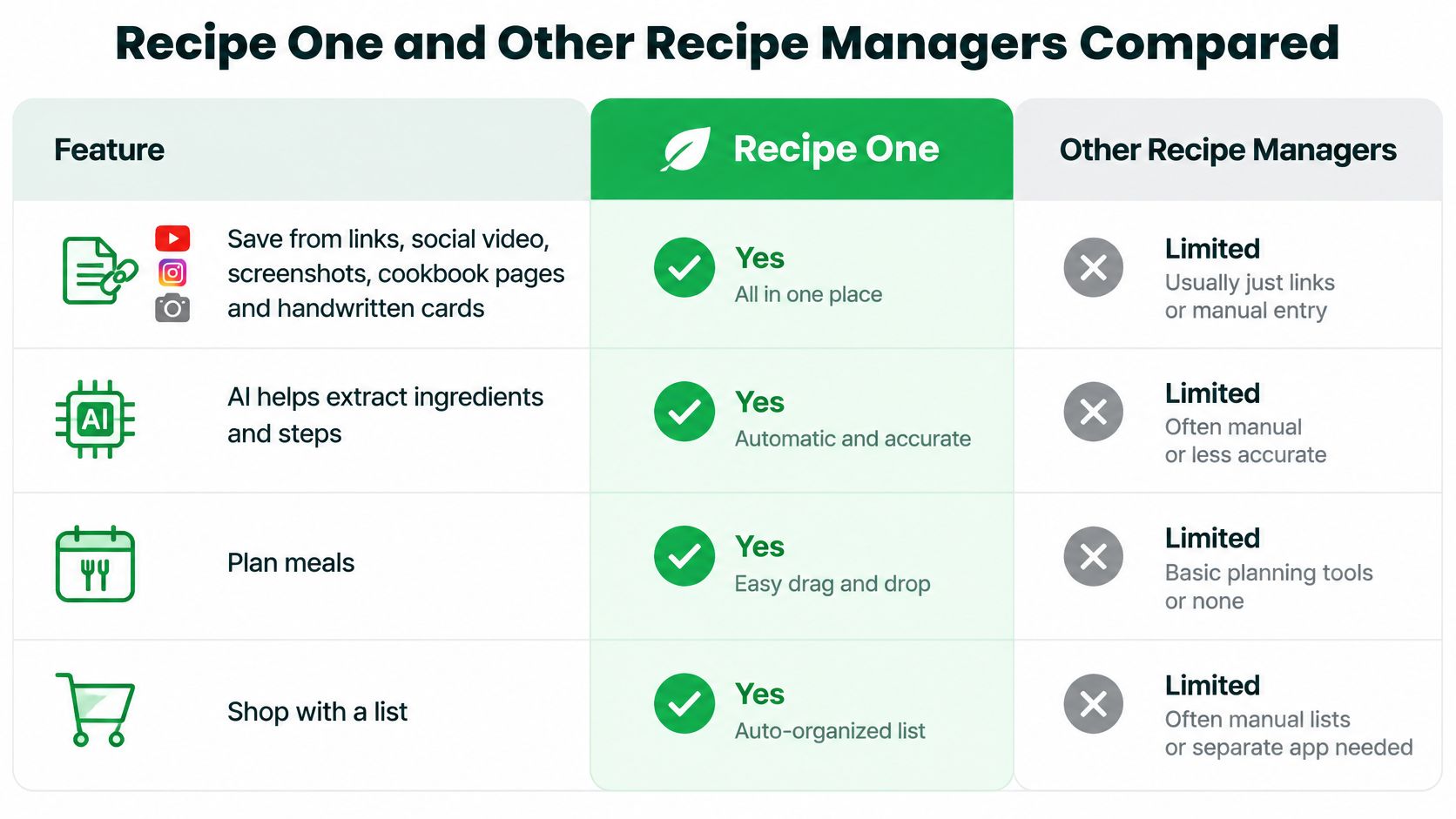
The wider set of best recipe manager apps splits along library size, phone platform, and whether planning is included. Read the rows before you pick a favorite name.
| Option | Best strength | One real limit |
|---|---|---|
| Recipe One | Saves from links, social video, screenshots, cookbook pages, and handwritten cards; AI plans the week and builds the grocery list | Cookbooks shared with other people can be read from an AI assistant but changed only in the app |
| Paprika 4 | Managing a mature recipe library | Paprika 3 and Paprika 4 are separate products, so the exact title and platform listing matter |
| Mela | Apple-oriented recipe organization | Best fit only when an Apple-centered library is the goal |
| ReciMe | Importing and organizing social recipes | Strongest when the recipe pile starts on social apps |
| Mob | Recipe discovery and meal planning | Built around finding and planning meals, so saver breadth should be checked in its listing |
| Mealime | Was a meal-planning service | Closed on October 21, 2026; recipes moved to Meals Hub |
Paprika 4 is a different app from Paprika 3, and both still exist. Paprika 4 fits a large, mature library, while Recipe One is pitched at a mixed pile that arrives from everywhere. A closer look at Mela vs Paprika makes sense only after you decide whether that kind of library management is the chore you are solving.
Mela, ReciMe, and Mob each lead with a narrower promise. Mela suits Apple-oriented organization, ReciMe suits cooks who find dinner through social posts, and Mob suits discovery plus meal planning. For current prices, platform coverage, and feature gaps, use the exact official site or store listing for the name you intend to install, because these brands are easy to confuse in search.
Recipe One's case is narrower in a different way: it is an AI-powered recipe keeper built around save it, plan it, and shop it. One App Store reviewer, DLZ1321, calls it "the easiest way I've found to save recipes from anywhere and use them without all the annoying ads and clutter"; another, Zengardener, says it "works exactly as advertised."
Mealime should be read in the past tense only. Its official notice said the service would be discontinued on October 21, 2026, with recipes and related functionality moving to Meals Hub. It is not a current recommendation.
Pick Mise or Recipe One for Your Cooking Need
Match the chore you care about this month, not the brand that ranked first in search.
| Your situation | Better fit | Why |
|---|---|---|
| Voice-guided cooking and timelines for several dishes | Mise: Recipe Saver & Importer | Lists a parallel cooking timeline and mise-en-place checklist for two to four recipes |
| Android AI recipe keeper with weekly planning and a grocery list | Mise: AI Sous Chef & Meal Plan | Combines social import, weekly planning, and a shopping list |
| One place for links, videos, screenshots, cookbook pages, and handwritten cards | Recipe One | Saves from every source and builds a weekly plan and one combined grocery list |
| Using your recipes inside ChatGPT or Claude | Recipe One | A remote MCP server lets assistants see your recipes, meal plan, and grocery list |
| Pantry inventory, expiry, or stock tracking | Check each Mise listing | Recipe One has no pantry inventory; no Mise listing reviewed here confirms these features |
| Large, mature recipe library | Paprika 4 | Built for managing a mature recipe library |
If you want voice plus a multi-dish timeline, start with Mise: Recipe Saver & Importer and confirm you are on that developer's page. If you want an Android keeper that already pairs a week view with a list, start with Mise: AI Sous Chef & Meal Plan. If your pile is mixed (a blog, a Reel, a card from a relative, a photo of a book), Recipe One is the fit, because one save path covers those sources and the week plan comes out of what you saved. One App Store reviewer, DLZ1321, calls it "the easiest way I've found to save recipes from anywhere and use them without all the annoying ads and clutter."
The AI route reaches the same library without living only in the phone app. Recipe One runs a remote MCP server at https://mcp.recipeone.app/mcp over Streamable HTTP, so Claude, ChatGPT, and other AI assistants can see your recipes, meal plan, and grocery list with nothing to install. Sign-in runs through OAuth, and the assistant gets an access token, never your password or your Google or Apple sign-in. Search "Recipe One" in ChatGPT Plugins or Claude Customize > Connectors; setup is at the Recipe One docs.
People leaving older clip-and-save tools sometimes compare a Copy Me That app alternative for the same "one library, then a list" job.
No Mise listing reviewed here confirms pantry inventory, expiry dates, or stock counts. Open each store page and read the feature list before you choose an app for that job.
Choose by the need that matters most. Then open Recipe One on the App Store or Google Play and save one recipe so you can see the save, plan, and shop path with your own dinner.
Common Questions About Mise and Recipe One
Does Recipe One work with ChatGPT or Claude? Yes. Recipe One runs a remote MCP server at https://mcp.recipeone.app/mcp that lets Claude, ChatGPT, and other AI assistants reach your recipes, meal plan, and grocery list. You sign in with Google, Apple, or email and password, a free account works, and there is nothing to install. The assistant can search, create, edit, and delete recipes, change the weekly meal plan, and manage grocery items, while Recipe One receives only the requests sent to its tools, never your conversation. Importing recipes from links through the assistant uses the same import credits as the app, limited to at most 30 a day, and cookbooks other people shared with you can be read there but changed only in the app.
Can Recipe One save recipes from TikTok or Instagram only? No. Video is one source. Recipe One saves from any video, website, cookbook, or photo, so a blog post, a filmed recipe, a scanned book page, and a handwritten card all land in the same library.
Is there a free option? Recipe One is free to start on iPhone, Android and web. For a broader look at no-cost libraries, see free recipe organizer apps. For every Mise app and every other competitor in this guide, check the store listing or official site for current pricing.
Prices and feature lists change. Confirm them on the official site or the store page for the exact app name and developer before you pay or plan a week around a tool.
Recipe One keeps mixed recipe sources in one library, then helps you plan the week and pull one grocery list from those meals, which is the gap a vague "Mise app" search usually leaves open. If your recipes arrive as links, videos, screenshots, cookbook pages, and handwritten cards, that save-plan-shop path is the one to try. Visit Recipe One and save a single dinner to see whether it fits your week.