
You open a recipe on your phone, save it, and then never cook it because the app turned dinner into a messy archive. That is the genuine test for any Copy Me That app review, not whether it can store a URL. The question is simpler: can it turn a saved recipe into a dinner you will truly make, with a shopping list that makes sense and a meal plan you'll follow?
Copy Me That has real staying power. Its Android version has been around since March 2015, and that history matters because it shows the product isn't a weekend experiment. If you want a broader framework for what a good recipe saver should do, this guide pairs well with how Taja AI repurposes video because both are really about turning messy inputs into usable output.
| What matters most | Copy Me That | Practical read |
|---|---|---|
| Website recipe saving | Yes | Strong for blog recipes and saved links |
| Social recipe capture | Publicly says it can save from most apps, including social media apps | Useful, but verify the exact import behavior for your sources |
| Meal planning | Yes | Good if you want recipes to lead to a weekly plan |
| Shopping list | Yes | More useful than a plain bookmark folder |
| Cross-device use | Yes | Good for households that move between devices |
My verdict is blunt. Copy Me That is worth considering if your recipe life starts on websites and you want a simple path from saved recipe to meal plan to shopping list. It's less convincing if most of your inspiration comes from Instagram, TikTok, photos, or other modern capture formats. In that case, the weak spot isn't organization, it's how reliably the app turns modern food content into a trustworthy, cookable recipe.
You should also check the official site and app stores for current pricing, reviews, and availability, because those details can change. For the current alternatives context, the right comparison is not “which app stores the most links,” it's “which app gets dinner on the table with the least cleanup in your head.”
What Copy Me That Does and How It Works
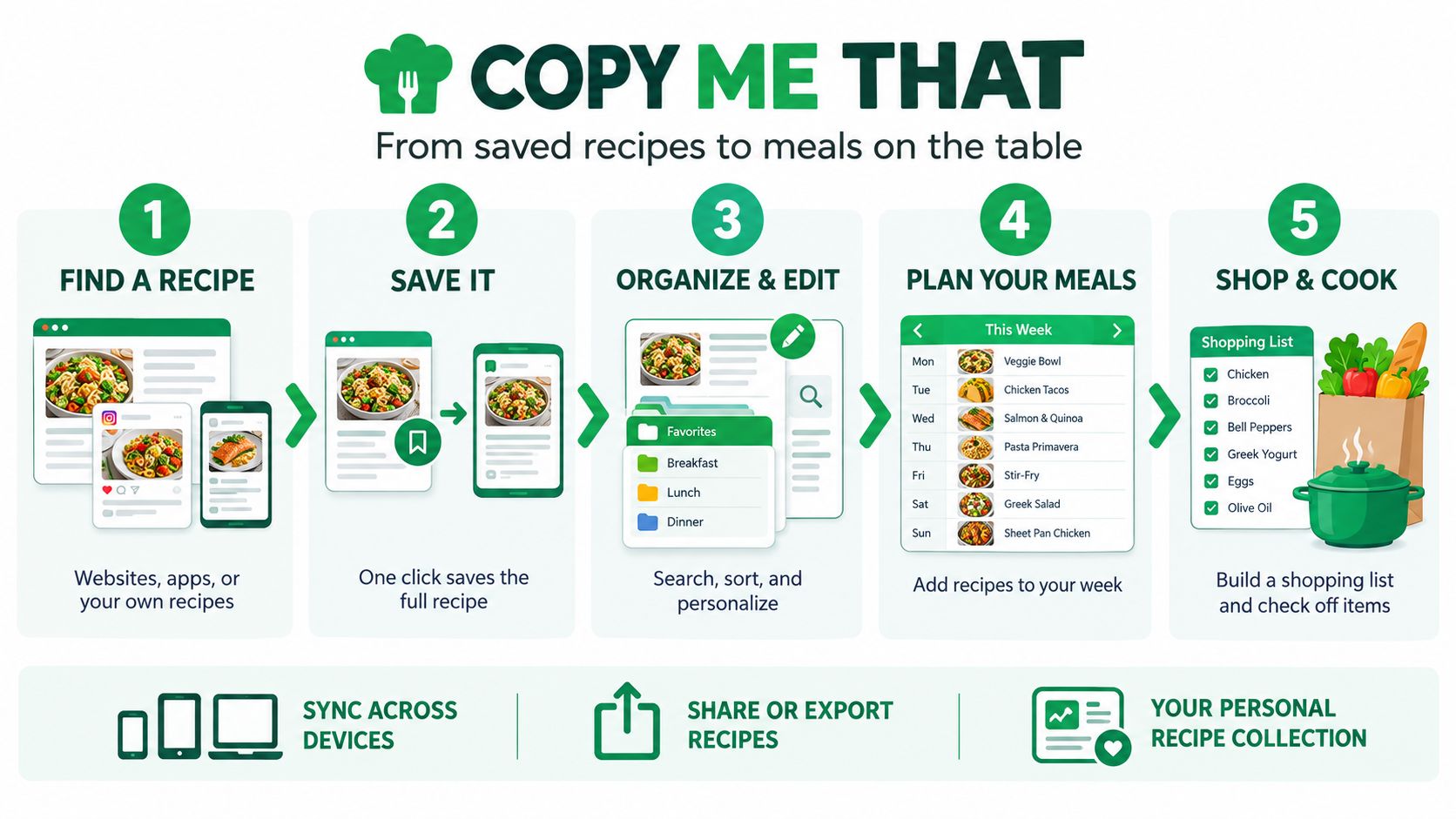
Copy Me That's core workflow is straightforward. You save a recipe from a website, edit the structured fields it creates, organize it, and then use that recipe inside a meal planner and shopping list. The public app listing says you can save recipes from websites and most apps, including social-media apps, and you can also add recipes manually. It's designed for people who want a reusable kitchen record, not just a bookmark list.
The app's import flow matters because it reduces transcription. Its browser button or mobile share sheet can extract a recipe into editable fields like title, ingredients, instructions, and you can correct the result when automated extraction misses something. That makes the app more practical than a plain “save link” tool, because the content becomes structured enough to cook from later.
Practical rule: if a recipe can't survive a messy week later, it isn't organized enough.
Meal planning is where Copy Me That becomes more than a folder. Users can add a recipe directly to a meal plan, view a weekly overview, and reuse a day or more of recipes and notes later. The shopping list can be created from a weekly meal plan or from individual recipes and items, and it automatically categorizes food by aisle or by recipe. That's a real kitchen workflow, not a cosmetic feature.
The feature set goes further with multiple lists, custom categories, category reordering, and ingredient merging, including cases like combining “1 chopped onion” and “2 onions” into “3 onions.” The official feature page lays out those mechanics clearly, and they're the sort of details that matter when you're standing in a store wondering whether you already counted an ingredient somewhere else.
If you want a broader overview of recipe organizer behavior, this is a good place to compare it with recipe saver app basics. The key distinction is that Copy Me That is built around saving, editing, planning, and shopping, with structured recipe storage as the center of the product.
The app is useful when the saved recipe turns into a planned meal, not just a nicer bookmark.
Pricing changes over time, so the only safe answer is to check the official site and app stores for current costs. If you care about meal-plan subscription math in general, the pricing logic is similar to what people compare in meal plan subscription costs, where the key question is whether the paid tier removes enough friction to justify it.
Free Versus Paid Details at a Glance
If you're asking is Copy Me That free, the honest answer is that you need to check the current official listing. Don't buy the app for a number someone quoted months ago, buy it for the workflow it gives you now.
The free-versus-paid decision should be about friction, not labels. If you only need a straightforward recipe archive, the free side may be enough.
Here's the practical comparison against Recipe One, using only publicly documented capabilities.
| Feature | Copy Me That | Recipe One |
|---|---|---|
| Website import | Yes | Yes |
| Instagram and TikTok import | Publicly says it can save from most apps, including social-media apps | Yes |
| Photo import | Not clearly documented in the public sources used here | Yes |
| Meal planner | Yes | Yes |
| Combined grocery list | Yes | Yes |
| Pricing | Check the official site/App Store for current pricing | Check the official site/App Store for current pricing |
Bottom line: pay for workflow, not for a badge.
For readers comparing free tiers more broadly, the cleanest follow-up is best free recipe organizer app. That's where this category gets less about hype and more about whether a free tool survives a normal week of cooking.
Pros and Cons Based on Public Capabilities
Copy Me That's strengths are easy to respect. It has been around a long time, it saves recipes from websites, it lets people add recipes manually, and it ties saved recipes into meal planning and shopping lists. For a lot of home cooks, that combination is enough. It's practical, not flashy, and it doesn't need a long setup.
Why it works in real kitchens
The best thing about Copy Me That is the workflow discipline. You clip a recipe, adjust it, plan a meal, and generate a list. The app's aisle sorting and ingredient merging are especially useful because they match the way people typically shop. If you're tired of copying ingredients into notes by hand, this kind of structure is a real upgrade.
The downside is just as clear. Publicly documented material doesn't show the app as a modern capture powerhouse. If your recipe discovery lives in short-form video, images, or mixed social posts, you'll want to verify how well it handles those formats before you rely on it.
Use this rule: if the app doesn't make the source recipe more cookable, it's only half solving the problem.
| Copy Me That Quick Pros and Cons | |
|---|---|
| Pros | Cons |
| Long-running product with established history | Modern capture formats aren't the obvious strength |
| Saves recipes from websites and most apps | |
| Supports manual entry and editing | |
| Meal planner plus shopping list | You'll still want to verify current platform behavior before committing |
| Aisle sorting and ingredient merging | Pricing and availability can change |
For a wider look at the category, best recipe manager apps is a useful comparison point because it shows where Copy Me That fits against more feature-heavy tools. My opinion is plain, though. Copy Me That is a good organizer. It's not the most modern capture tool.
Copy Me That Compared to Recipe One
If you're shopping by workflow, the comparison is easy. Copy Me That is strongest when the source is a website and the goal is structured saving, planning, and shopping. Recipe One is built around newer capture paths, especially when recipes arrive from social posts, photos, or mixed formats that need more than a simple clip.
Here's the short factual table.
| Feature | Copy Me That | Recipe One |
|---|---|---|
| Platforms | Publicly described as working across web and mobile, with synchronization across devices | Publicly positioned as an app for modern recipe capture and organization |
| Website import | Yes | Yes |
| Instagram import | Publicly says it can save from most apps, including social-media apps | Yes |
| TikTok import | Publicly says it can save from most apps, including social-media apps | Yes |
| Photo import | Not clearly documented in the public sources used here | Yes |
| Meal planner | Yes | Yes |
| Combined grocery list | Yes | Yes |
The difference matters most on weeknights. Copy Me That works well if you save a recipe from a blog, tidy it up, and then use it later for meal planning. It's less obviously built for the messy modern habit of saving a cooking post from social media, then needing to turn that into something reliable enough to cook tonight. That's the gap many app comparisons miss.
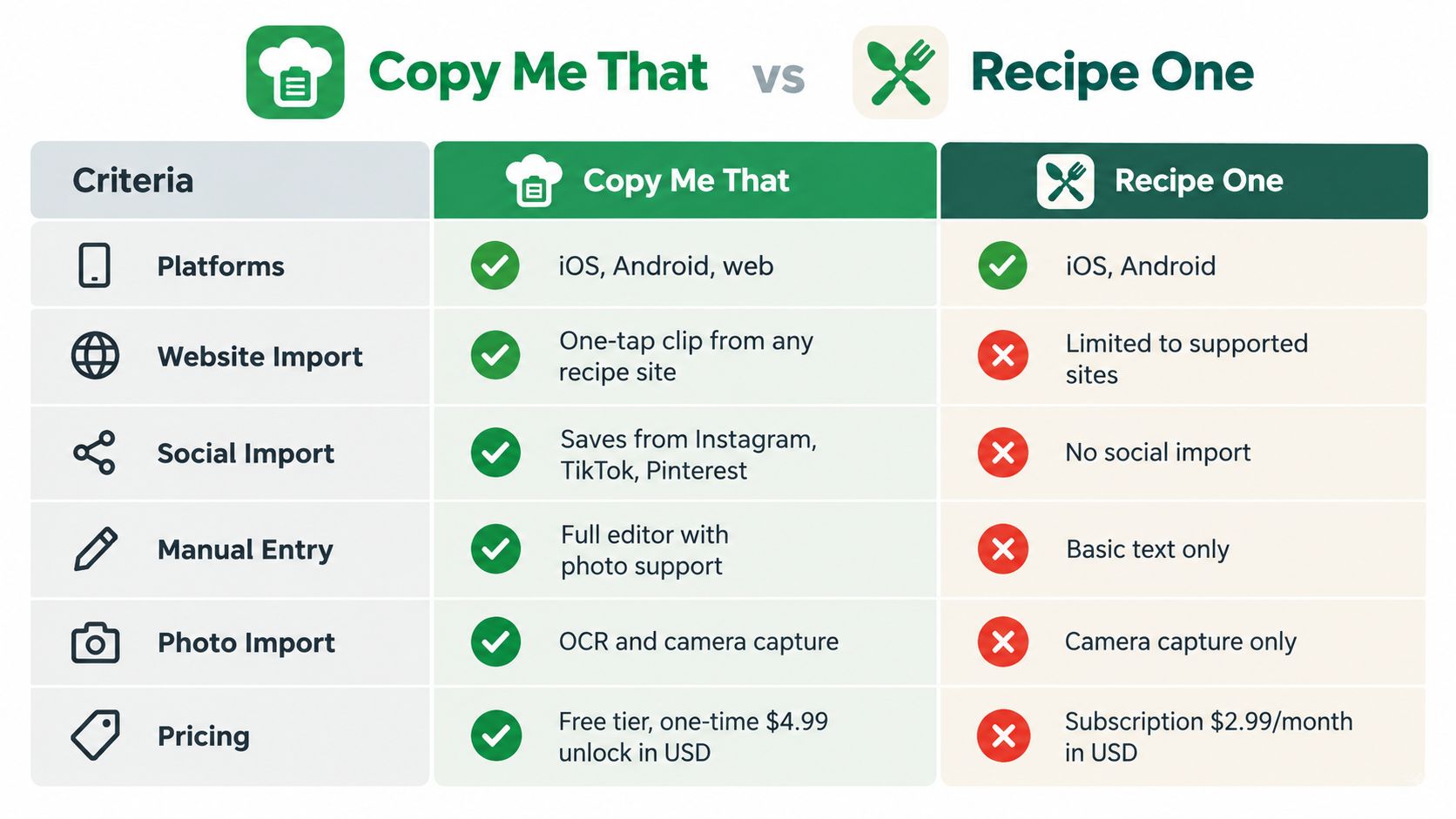
If you're reading this because you searched for best recipe saver app, then the decision point is simple. Do you want a long-running recipe organizer with meal planning, or do you want a tool built for modern capture formats too? If you're also weighing broader platform fit, the page on Paprika alternatives is useful because it frames this category around actual kitchen use, not just app-store features.
Who Should Use Copy Me That and When
Use Copy Me That if your recipe habit starts on websites and you want one clean place to save, edit, plan, and shop. That's the best fit for cooks who prefer a steady, uncluttered workflow over bells and whistles. It also suits households that care about aisle sorting, ingredient merging, and sharing the same account across devices.
It's a stronger fit for planners than for social-first cooks. If your saved recipes live mostly in browser tabs, email links, or classic food blogs, the app makes sense. If most of your inspiration comes from Instagram Reels, TikTok clips, screenshots, or photos, I'd be more cautious, because the core value of the app is still tied to structured recipe saving rather than modern media capture.
A simple way to decide is to ask what annoys you most in the kitchen.
- If you lose recipes in browser tabs: Copy Me That is a sensible fix.
- If you want a weekly meal plan plus grocery list: Copy Me That can handle that workflow.
- If you need more confidence from social recipes: look at a newer capture-first option before committing.
- If you manage groceries for a family: the shared-account and list structure are more useful than a bare bookmark app.
The right choice also depends on how often you cook from saved recipes. If you only save recipes and rarely revisit them, any organizer will feel unnecessary. If you turn saved recipes into dinner every week, then the quality of the meal planner and grocery list stops being a nice-to-have and becomes the whole point.
If you want a more modern recipe system that handles social posts, photos, and weeknight planning in one place, Recipe One is the better next step. It's built for cooks who don't want to lose a good idea just because it showed up in the wrong format. Visit it, compare the workflow against your own kitchen habits, and choose the app that gets dinner on the table with less friction.


