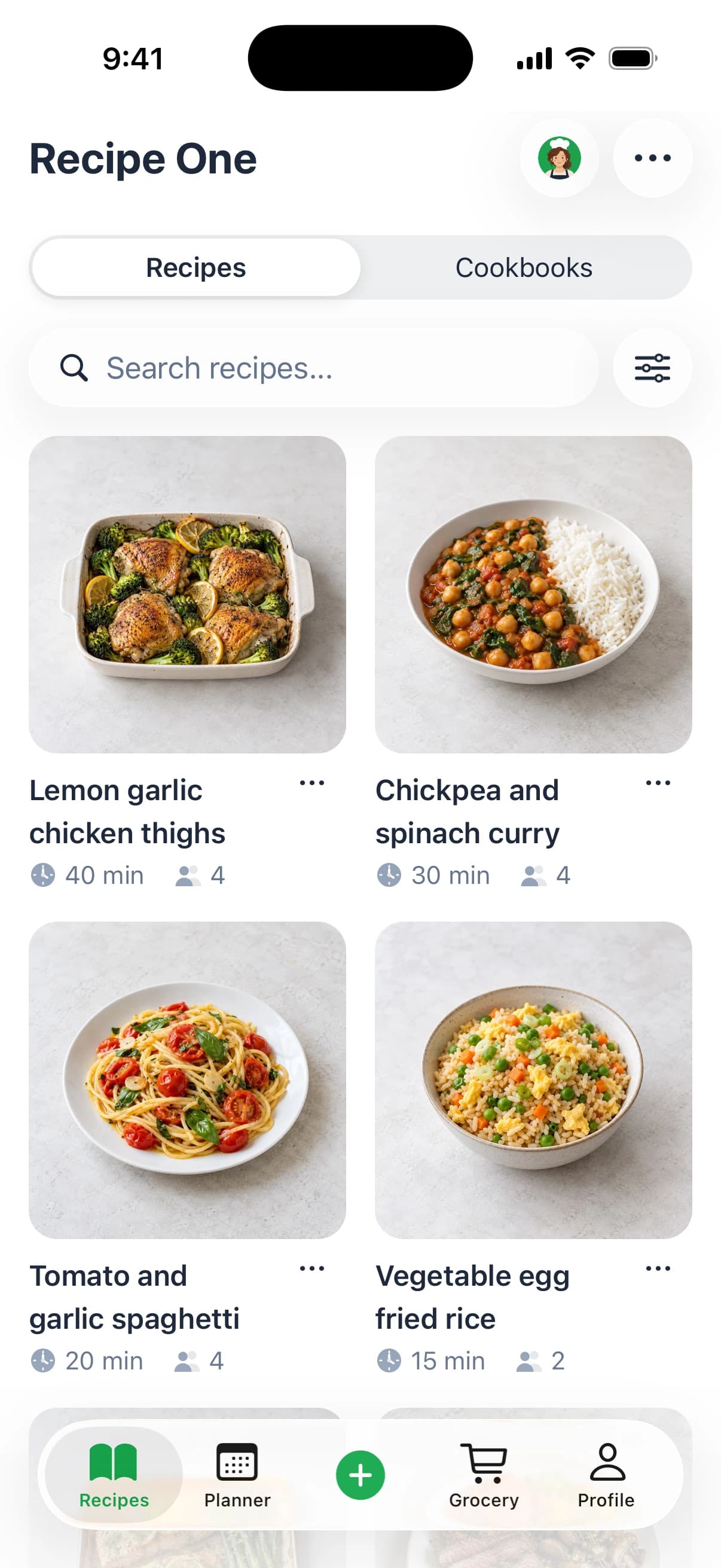
You know the feeling. It's 5:40 p.m., someone asks what's for dinner, the fridge looks half-full and half-forgotten, and the recipe you saved last week is buried in three different apps. Then you're at the store buying "just one more thing," except that one more thing turns into a second trip tomorrow.
A meal planning app with grocery list is supposed to stop that loop. The useful version doesn't just hold recipes, it connects the whole kitchen routine, from "what are we cooking?" to "what do we need to buy?" That matters for busy parents, students, couples, and anyone who wants dinner to feel calmer than it does now. If you already want the step-by-step basics of weekly planning, this guide pairs well with how to plan weekly meals.
Quick answer: the best meal planning apps with a grocery list
The best meal planning app with a grocery list depends on where your recipes come from. If you save recipes from social media and websites, pick an app that imports them and builds the list from your plan, like Recipe One or ReciMe. If you want chef-made recipes, try Mob. For calendar planning, try Plan to Eat.
- Mob: good for planning the week from Mob's own chef-tested recipes and adding every ingredient to a shopping list in one tap. It centers on Mob's recipe library, and full access needs Mob Premium.
- ReciMe: good at saving recipes from Instagram, TikTok, Facebook, Pinterest, YouTube and screenshots, with a meal planner and grocery list. The free version is limited to 5 recipe imports per week.
- Plan to Eat: good for calendar planning. Its recipe clipper saves recipes from websites, and the shopping list fills in as you plan. There is no free plan after the 14-day trial; it costs $5.95 a month or $49 a year.
- Samsung Food: good for saving recipes from any website, planning the week and turning the plan into a shopping list for free. Tailored meal plans and nutrition tracking need Samsung Food+ ($6.99 a month or $59.99 a year in the US).
- Recipe One: saves recipes from TikTok, Instagram, YouTube and any website. AI helps you plan the week, get the grocery list out of it, and find your recipes easily. It is free to start. It does not keep a pantry inventory.
The big shift in this category is simple. A recipe saver keeps inspiration in one place, but a planning app turns that inspiration into an organized shopping task. That's why apps in this space now try to bridge recipes, meal calendars, pantry checks, and shared grocery lists, instead of treating them as separate chores. Independent reviews of food-purchasing apps also point out that the most useful tools support the full decision chain, planning, list creation, aisle organization, barcode or product feedback, and household synchronization, because that's what keeps the store trip from falling apart PMC review on food-purchasing apps.
If you've ever stood in an aisle wondering whether you already have cumin at home, or whether your partner already added tomatoes to the list, you're in the right place. The goal here isn't to convince you to use more technology. It's to help you find a kitchen system that cuts mistakes, trims wasted effort, and makes the week feel manageable.
Keep every recipe in one place
Save from any website, scan handwritten cards, and organize your kitchen.


Introduction to Stress Free Weekly Meals
Monday night can start with a full fridge and still end with a rushed grocery run for things you already had. One person saved a recipe from Instagram, another wrote a list on paper, and someone else used the last onion. Dinner is not falling apart because nobody can cook. The problem is that recipe saving, pantry checks, and shopping never stayed in the same system.
A meal planning app with grocery list works like a calm kitchen coordinator. You collect the meals you want, decide what fits the week, and let the app turn that plan into a store-ready list. That cuts the extra mental work that usually shows up right before cooking starts. It also helps with list hygiene, because ingredients can be grouped, checked, and shared instead of scattered across notes and messages.
Practical rule: if an app only stores recipes, it is a library. If it turns meals into a clean shopping list, it is a workflow.
That difference matters because the useful version has to handle more than recipe storage. The meal-planning app market overview treats meal planning plus shopping automation as a real category, and some apps already generate grocery lists from menu plans for specific periods. The point is simple. People want fewer repeats, fewer forgotten items, and fewer store mistakes caused by bad coordination.
A shared list also changes how the household works. If one person checks the pantry while another adds dinner ideas, the app gives both people the same picture. If onions already live in the crisper, they do not need to appear twice. If your partner adds tomatoes from the office, you can see that before you leave for the store. That is why a better app feels less like another gadget and more like a weekly kitchen system.
For readers who save plenty of recipes but still struggle to use them, this setup can bring real relief. It helps busy parents handling mixed tastes, students shopping once a week, and home cooks trying to waste less food while forgetting fewer items. If the problem is coordination, not inspiration, how to plan weekly meals is a useful next step.
How a Meal Planning App With Grocery List Actually Works
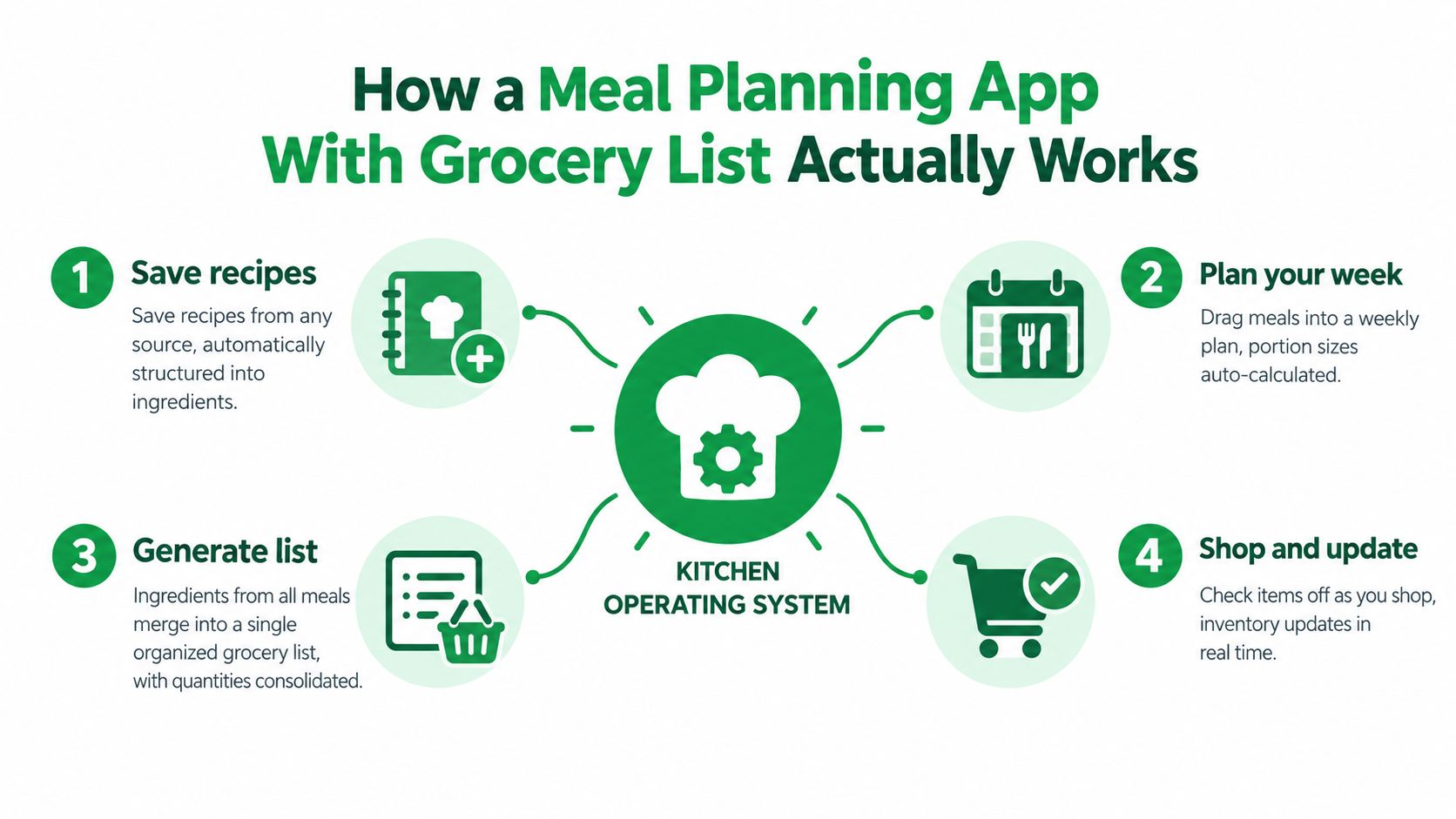
Think of the app as a kitchen operating system. Your saved recipes are the apps, your weekly plan is the desktop, and the grocery list is the printout that gets you out the door without guessing. When that system works well, you're not retyping ingredients, and you're not mentally reconciling five recipes while pushing a cart.
From saved recipes to one clean plan
It starts when you save a recipe from a website, a social post, a photo, or text. A good app extracts the ingredients and turns them into structured data, not just a screenshot in a folder. Once those recipes are in your library, you drag them into the days you want to cook them, or let the app help build the week.
That planning step matters because ingredients stop being isolated notes and start becoming part of a bigger total. If Monday and Thursday both need onions, a useful app doesn't make you buy onions twice. It gathers everything into one working list, with quantities merged where possible.
For a simple visual of the flow, this is the mental model to keep in mind.
Why the shopping output matters
The list only becomes useful when it's organized for the store. The best apps group items by category or aisle, so produce, dairy, pantry items, and frozen foods aren't mixed together in one messy scroll. A useful list also updates when you change the plan, because a weeknight swap should not force you to rebuild the whole shopping plan.
That same workflow shows up in apps that go a step further and connect recipe planning directly to shopping output. For another view of that recipe-to-cart translation, see recipe to shopping list, or start from typed items with the grocery list generator.
A grocery list is only as good as the plan behind it.
That's the cleanest way to think about the category. The app isn't just saving food ideas, it's translating meal intent into a shopping system you can trust at the shelf. If that translation is accurate, the whole week gets easier.
Must Have Features That Make Shopping Effortless
A meal plan can look organized on paper and still fall apart at the store. The difference usually comes down to list hygiene, how well the app keeps ingredients clean, merged, and ready for a shared household run. Independent reviews of food-purchasing apps point to the same needs across the whole workflow, from planning and list creation to aisle organization, product feedback, and household sync PMC review on food-purchasing apps.
The feature checklist that actually matters
Start with recipe capture. If an app cannot pull recipes from websites, social posts, or photos, you end up retyping ingredients by hand and losing momentum. The point is to turn scattered saves into something the app can read, not just store as a bookmark.
Next comes smart list generation. The app should turn your meal plan into a grocery list without making you enter every ingredient yourself, which is the core job of a grocery list app. See also the best grocery list app for iPhone. Stronger tools also merge duplicates, so if two recipes call for onions, garlic, or yogurt, the list shows one combined total instead of separate lines.
Android households comparing list apps can start with the best grocery shopping list app for Android.
A few details make the difference between a neat list and a messy one:
- Aisle or store grouping: items should be sorted so you can move through the store in a sensible order.
- Pantry awareness: ingredients already in your kitchen should be flagged, so you do not buy them again by mistake.
- Household sync: more than one person should be able to edit the same list without creating confusion.
That last point matters because shopping is often shared work. If one person adds cheese while another checks the pantry, the app needs to keep both updates in one place. User feedback on meal-planning tools often points to duplicate ingredients, awkward item merging, weak household sync, and lists that cannot be customized by aisle or store, which is why "a grocery list" is not the same thing as a usable shopping workflow discussion of busy-home-cook pain points.
Simple test: if two people can edit it and the list stays clean, the app is working with your household, not against it.
For a practical way to judge the planning side, start with a tool that keeps recipes organized and see whether it carries those recipes into shopping without extra cleanup. A recipe keeper app should feel like a tidy pantry shelf, not a pile of clipped notes.
What to ask before you commit
A quick check can save a lot of frustration. Does the app keep ingredient quantities intact? Can it group items by store section? Can it recognize what you already have on hand? Can another person update the list in real time?
If the answer is mostly yes, the app is more likely to handle a real week, not just a demo.
Keep every recipe in one place
Save from any website, scan handwritten cards, and organize your kitchen.
Comparing Common Approaches to Planning and Shopping
You save a handful of recipes on a Monday night, then Wednesday's shopping trip turns into a guessing game. The question is not which app has the most recipes. It is which workflow keeps your household's shopping list clean, current, and easy for everyone to use.
Recipe-first, planner-first, and pantry-first
A recipe-first app starts with collection and sorting. You save recipes, tag them, and then turn them into shopping output. The Recipe Keeper review looks at one recipe-first option. That suits cooks who already know what they like and want one place to store it all, but it can feel like a shelf full of clip art if you still need help deciding what to make.
A planner-first app begins with the week. You place meals on the calendar first, then the grocery list follows from that plan. That works well for homes that shop by routine, because the list is tied to specific days, leftovers, and one trip instead of a loose pile of ideas.
A pantry-first app starts with what is already in the cupboard. It helps when overbuying and food waste are the bigger problems, because the app has to compare planned meals with existing ingredients and avoid repeating them. That is list hygiene in practice, the same kind of careful checking that underpins food storage tricks for UK cooks. If the pantry view is stale, the shopping list will be too.
| Approach | How It Works | Best For | Watch Out For |
|---|---|---|---|
| Recipe-first | Save recipes first, plan later | Recipe collectors | Easy to build clutter |
| Planner-first | Build the week, then generate the list | Busy households | Can feel rigid if you like spontaneity |
| Pantry-first | Match meals to what's already at home | Waste-conscious cooks | Only works if pantry data stays current |
| Manual list | You enter items yourself | People who want full control | More typing, more missed items |
| Auto-generated list | Recipes or plans create the list | Busy shoppers | Depends on clean recipe data |
| Household-synced workflow | Multiple people edit one list | Couples, parents, roommates | Weak sync creates duplicate work |
Matching the app to the way you live
Manual list apps give you full control, but they also ask you to remember every item yourself. Auto-generated lists save time, yet they only stay useful if ingredients merge cleanly and pantry checks are accurate. Shared household tools work best when updates stay in one place, so one person can add milk while another removes what is already in the cart.
For a closer look at recipe management styles, best recipe manager apps is a useful place to compare library-based workflows with planning-based ones, and a meal planner app covers the calendar side of that same loop. If you were affected by Mealime's October 21, 2026 shutdown, read our guide to switching from Mealime.
The better choice is usually the one that causes the fewest shopping mistakes in your real kitchen. AI meal planner apps are one place to compare tools that turn suggested meals into a grocery list.
Setting Up Your Weekly Planning and Grocery Workflow
A weekly workflow should feel like clearing a counter, not reorganizing the whole house. The first pass is about making the routine simple enough that you use it. If you try to perfect everything on day one, the system usually slips by midweek.
Start with your recipe library
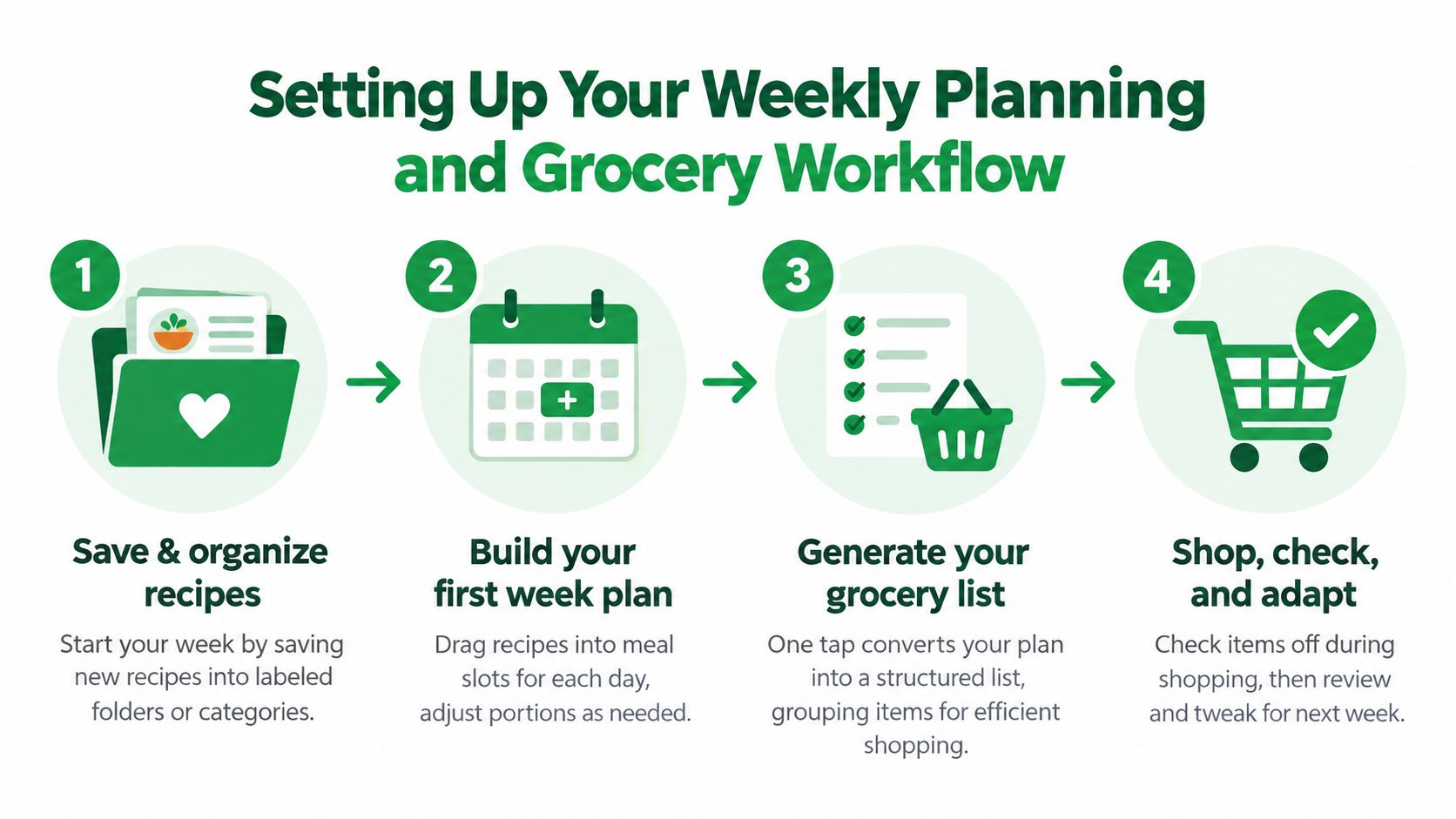
Save the meals you already plan to cook, not the ones you only liked in passing. Group them into plain categories, such as quick dinners, batch-cook lunches, and family favorites. That gives the planner a smaller set of real choices instead of a cluttered pile of inspiration.
Build the first week from familiar meals before you try anything fancy. A chicken dinner, a pasta night, a repeatable breakfast, and one leftover slot are enough to begin. The app can then turn that week into a grocery list that matches what your household will eat.
For a hands-on visual of the process, this workflow is the one to remember.
Clean the list before you shop
Once the grocery list appears, scan it for duplicates and odd quantities. This is list hygiene in practice. A list that includes rice, onions, and herbs you already have is acting like a draft, not a finished shopping plan. Pantry checks keep that from happening, and aisle grouping helps when you are walking the store with a full cart in mind.
Shared households need one more habit, a final review before shopping. One person may change dinner while another already bought the ingredients. The app should keep that update in one live list so everyone is working from the same version. That kind of coordination matters in busy homes, and it also supports routines built around broader planning needs, including nutrition strategies for menopause support, where consistency matters as much as the menu.
Weekly rule: if the list does not match the plan, fix the list before you fix the recipe.
Batch cookers can set one anchor meal that deliberately creates leftovers. People cooking around specific goals can use portion converters so the ingredient amounts match the number of eaters. If your pantry changes often, update it right after shopping, while the trip is still fresh in your head.
The goal is a system that gets easier after week one. A shorter list, fewer forgotten items, and one less store run are enough to show that the routine is working.
Common Pitfalls That Make Grocery Lists Messy and How to Avoid Them
A grocery list usually gets messy because the workflow is messy. If ingredients are entered in inconsistent ways, if pantry items are never updated, or if several people edit from different places, the app starts acting like a half-finished recipe card instead of a shopping plan. That is why one week it feels organized, and the next week it feels like everyone is shopping from a different note.
The mistakes that cause store-day chaos
Duplicate ingredients are the first trap. One recipe asks for onions, another calls for the same item in a different quantity, and the app may display both versions without combining them cleanly. The fix is straightforward, the list needs to merge repeats without losing the amount that matters.
Pantry checks are the next weak point. If the app does not reflect what is already in the cupboard, the list can send you to the store for a second jar of mustard or another bag of rice you already own. Pantry-aware list hygiene keeps those extra purchases from sneaking in.
Household coordination can create a different kind of confusion. One person edits dinner in one place, another person removes items somewhere else, and the family ends up with split versions of the same shopping trip. Shared editing works only when one live list stays current for everyone.
Small fixes that prevent big annoyances
- Use one shared list: keep every change in one place, instead of scattering notes across texts and apps.
- Check how duplicates are merged: repeated ingredients should collapse clearly before shopping day.
- Refresh pantry items after unloading groceries: stale pantry data is a common cause of repeat purchases.
- Keep aisle grouping consistent: if the app sorts by category, use that structure every week so the list stays easy to follow.
Spices are a good example. One recipe adds cumin, another meal needs cumin again, and the cupboard slowly fills with duplicate jars. That is more than clutter. It shows the list did not catch the overlap at the right moment.
The strongest apps do more than save typing. They help you leave the store with the right items, avoid buying what is already at home, and keep the whole household working from the same shopping list. After that list is set, compare apps that save money on groceries.
Keep every recipe in one place
Save from any website, scan handwritten cards, and organize your kitchen.
How Recipe One Fits Into Your Meal Planning System
Recipe One fits this workflow by turning recipe saving, meal planning, and grocery list creation into one connected system. You can save recipes from social posts, videos, photos, or text in one tap, then keep them in a searchable library with ingredients, steps, and measurements that are usable at cooking time. That matters because a meal planning app with grocery list only works when the recipe side is clean enough to support the shopping side.
Its meal planner lets you organize a week or a month, and the grocery list comes straight out of the meals you planned. That makes it a practical option if your main goal is to stop rebuilding lists by hand every week. It also supports custom items, which helps when your pantry or household needs something that isn't tied to a saved recipe.
Recipe One also works inside ChatGPT and Claude through the Recipe One plugin: search "Recipe One" in ChatGPT Plugins or in Claude under Customize > Connectors, with setup at recipeone.app/docs. There is also a Chrome extension to save recipes from any site. Both are available now.
If you already like cooking from a shared set of ingredients, the free Cook with Ingredients tool and the built-in converters make the system more forgiving on busy nights. A recipe like healthy fish stir fry from Everti becomes easier to fit into a real week when you can store it, plan it, and turn it into a list without retyping everything.
This is the promise of a calmer kitchen system. You don't need to remember every detail, because the app keeps the recipe, the plan, and the shop list in the same place. If you want to try that kind of workflow, start with one planned week and see how much smoother shopping feels when the list is built from meals instead of memory.
Recipe One keeps recipe saving, weekly planning, and grocery lists in one place, so you're not rebuilding dinner from scratch every week. If you want a calmer way to turn saved recipes into a store-ready plan, visit Recipe One and try a simple weekly workflow for yourself.