
You arrive at the store with half a list in your head, one item scribbled on a receipt, and another buried in a phone note. Then you get home with a second bag of rice nobody needed, but no onion for tonight's dinner. The best grocery shopping list app for Android should prevent that exact routine, but the right choice depends on how your household shops, plans meals, and shares tasks, not on the longest feature list.
The seven picks below serve different household jobs. Recipe One is built for turning saved meals into an actionable shopping list. AnyList focuses on polished family collaboration. Bring! keeps shared shopping visual and simple. Listonic adds smart categorization and cost tools. OurGroceries suits voice-first households. Out of Milk helps with pantry restocking. Google Keep remains a strong choice for a basic shared checklist.
Each app gets a practical card covering its best use, useful features, trade-offs, and sync or privacy considerations. You'll also find selection tips, a simple way to move from paper or notes, and a closing decision guide. For broader grocery planning ideas, compare your routine with this plant-based grocery guide from Louisville Jerky Co..
The best app is the one your household will open at the store.
1. Recipe One for recipe-to-list planning
Best for: home cooks who plan shopping from recipes instead of starting with a blank checklist.
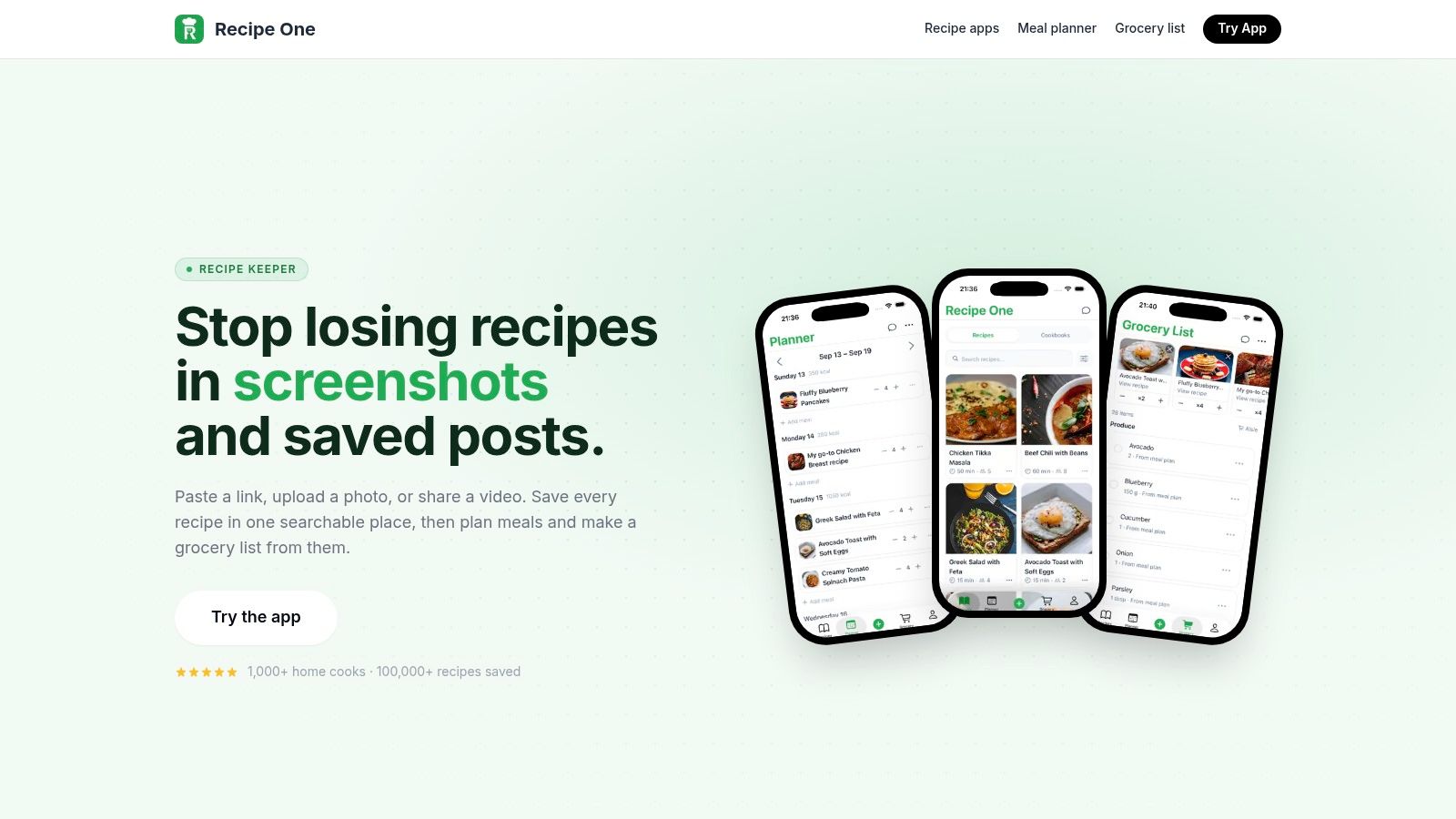
Recipe One fits households that save meal ideas all week, then need those ideas to turn into a usable list fast. You can pull recipes from TikTok, YouTube, Instagram, blogs, photos, screenshots, or pasted text. The app extracts ingredients, measurements, steps, and cooking time into a recipe card, which is much more practical than leaving dinner plans scattered across bookmarks and camera roll images.
Its real value is the workflow. Save recipes into custom cookbooks, sort them by diet or cooking time, and map out meals before you shop. Recipe One then builds an editable grocery list from those planned meals, combines overlapping ingredients across recipes, lets you add regular household items, and groups the list around store aisles. If your weekly friction is writing the same staples over and over, the grocery list generator from recipes explains that part of the process well.
What works well
- Fast recipe capture: Save cooking ideas from social posts, videos, links, photos, or plain text without retyping every ingredient yourself.
- Connected planning: Go from saved recipe to meal plan to shopping list in one place, which suits households where the shopping trip starts with "what are we cooking this week?"
- Useful cooking support: The focused cooking mode keeps the screen awake, while converters, oven-temperature tools, rice-to-water guidance, a leftover recipe generator, and a nutrition calculator help once you are back in the kitchen.
- Organized recipe ownership: Cookbooks, tags, filters, ratings, cross-device sync, and PDF export make the collection easier to reuse, not just save once and forget.
This app makes the most sense for busy families, students, beginner cooks, and meal-prep planners who collect recipes from several sources. The fit is narrower than a general shared list app, but that is also the point. Recipe One is strongest when recipe capture and meal planning drive the shopping list, not when you only need a quick place to jot down milk and paper towels.
Where it falls short
AI extraction still needs checking. Paywalled pages, odd layouts, and recipes trapped inside hard-to-read formats can require manual cleanup before the list looks right.
Pricing is another thing to verify before you commit, because the website does not clearly spell out the current free and premium split. For Android users, the upside is clear. Recipe One keeps the reason for the trip attached to the list itself, so planning, ingredient building, and in-store checking off happen in the same workflow.
2. AnyList for shared family lists
Best for: families and couples who need dependable collaboration across Android, iOS, and the web.
One person is in the kitchen, another is already at the store, and both keep editing the same list. That is the job AnyList handles well. Shared lists sync across devices, categories keep items grouped in a familiar order, and autocomplete speeds up the repetitive stuff, like adding bananas, yogurt, or dishwasher tablets for the fifth time this month.
It also fits households where the list starts with dinner planning, but recipe management is still secondary to sharing. You can store recipes in the app and pull ingredients into a shopping list, which is useful when one person plans meals and someone else shops. That gives it a different role from Recipe One. Recipe One is more focused on recipe capture and planning depth, while AnyList is the better fit when shared editing matters more than building a larger cooking library.
The useful trade-off
AnyList works best for households that want fast list entry, sharing, categorization, recipe tools, and cross-platform access in one place without asking every family member to learn a more involved system. On Google Play, AnyList is listed at 4.8 stars from about 30.8K reviews and a 1M+ download threshold. Those figures are useful as public marketplace signals, though app store ratings are still self-selected and rounded.
The trade-off is the paywall. Some convenience features and more advanced planning tools sit behind a subscription, so the free version may feel limited if you want the app to handle both household coordination and deeper meal planning. Check current availability and pricing on Google Play, because platform details can change.
Choose AnyList when your main problem is shared household coordination. It is the stronger pick for families who keep asking who added an item, who already bought it, and which list belongs to which store.
3. Bring! for visual shared shopping
Best for: households that need a quick, approachable list that reluctant users will readily adopt.
Bring! uses visual item tiles instead of presenting every grocery as plain text. That design lowers the learning curve for family members who don't want another productivity app. You can switch to a list view, create multiple lists for different stores, and share them across Android, iOS, and the web.
The app also supports local store offers and partner deals where available. Those extras may appeal to shoppers who like seeing promotions inside the same place as their list, although availability and commercial arrangements can vary.
Why it works for mixed-tech households
Bring! is effective when the goal is shared visibility with minimal setup. A partner can add milk, a student can check off cereal, and another shopper can see the update without learning a detailed recipe system. The core shared-list functions are free, which makes it easier to test with the whole household.
Recipe tools are more limited than those in Recipe One or AnyList. Bring! can support recipe-based input, but it isn't the strongest option if your week begins with a large personal recipe collection, detailed ingredient management, or extensive meal planning. Premium features and pricing can also differ by platform.
For a practical introduction to building a useful list, use this guide on how to make a grocery list. The main lesson applies here too. Make the list specific enough to shop from, with quantities, preferred brands, or pack sizes where those details matter.
Bring! is a good fit for visual coordination, not maximum planning depth. Pick it when the biggest risk is that someone in the household won't use the app at all.
4. Listonic for fast categorized shopping
Best for: shoppers who want smart list assistance, cost estimation, and quick execution.
Listonic sits between a bare checklist and a full planning system. You can share lists in real time across Android, iOS, and the web, while smart suggestions and automatic categorization reduce repetitive organization. Add item photos when a generic name isn't enough, then use total cost calculation to keep a rough view of the basket.
That combination suits people who shop from habits rather than recipes. You remember items in fragments, add them quickly, and rely on the app to place them into useful categories. The web app is also helpful when one household member prefers planning from a computer while another shops from Android.
Better for execution than meal planning
Listonic's practical advantage is its low interaction cost. Automatic categories can save time before the trip, and cost estimates give you more information than a simple checked box. It's a useful middle ground for roommates, couples, and solo shoppers who want more assistance without adopting a recipe organizer.
Its limitation is equally clear. If your list should come directly from saved meals, Listonic won't provide the same recipe-centered experience as Recipe One or a dedicated meal planner. It's designed around shopping execution, not maintaining a rich cooking library.
The grocery list organizer guide is relevant if your main challenge is keeping recurring items, categories, and household additions under control. Listonic can help organize the list, but you'll still need a separate meal-planning habit if dinner decisions are the actual source of shopping chaos.
Exact premium pricing isn't clearly listed on the website and may vary by store or region. Check the current Android listing before committing.
5. OurGroceries for hands-free voice entry
Best for: households that add items by voice while cooking, cleaning, or moving around the home.
You are stirring pasta, wiping a counter, or carrying laundry, and that is exactly when missing items come to mind. OurGroceries fits that moment well. It keeps the job simple: shared grocery lists across Android, iOS, and the web, plus voice entry through Amazon Alexa and Google Assistant.
That setup suits homes where the list is built in small bursts during the day. Say “add dish soap” when the bottle runs low, then clean up the list later before the store run. For repeat household staples, that is often faster than opening a meal planner or typing with wet hands.
The reliability-first choice
On its Google Play listing, OurGroceries shows 4.7 stars from roughly 56K reviews and sits in the 1M+ download threshold. Store ratings usually skew positive because reviews come from motivated users, so treat that as a useful signal, not a promise. It still points to an app with a long-running user base and a clear purpose.
The trade-off is straightforward. OurGroceries is built for capture and sync, not deep planning. It does not try to manage a recipe library, estimate a full basket, or turn several saved meals into one shopping trip. If your household shops from quick reminders and recurring staples, that narrow focus helps. If dinner planning drives your list, another app will make more sense.
The pantry inventory app guide is useful if you are deciding between a shared reminder list and a real stock-tracking system. OurGroceries handles the reminder side well. It will not tell you what is still unopened in the cupboard.
The free version includes ads. There is also a paid upgrade that removes ads and adds extras. Choose it when voice capture and lightweight sharing matter more than advanced planning.
6. Out of Milk for pantry restocking
Best for: households that repeatedly buy duplicate staples because nobody knows what's already at home.
Out of Milk combines shopping lists with pantry and to-do lists. That gives it a different role from apps focused only on the next store trip. You can group items by category, track basic household stock, and use the built-in barcode scanner to add products quickly where that feature is available in your region.
The pantry list is the reason to choose it. If your household buys bulk staples or frequently forgets what sits behind the cereal boxes, a separate inventory view can reduce unnecessary restocking. It's also useful when shopping and general household reminders need to live together.
Practical strengths and limitations
Out of Milk offers a familiar, no-frills workflow. Cloud synchronization and list sharing cover the basics, while the pantry module helps you think beyond the immediate trip. It makes more sense for restocking management than for recipe-led weekly planning.
The Android version currently displays ads. Some users may also find the interface dated compared with newer alternatives. Those limitations matter if you want a polished, distraction-free shopping experience, but they may matter less if pantry awareness is your main need.
Don't treat a pantry checklist as proof of what is physically available. Update it when you finish or open products, and check quantities before a large trip. The app can support that habit, but the household still has to maintain it.
7. Google Keep for simple checklists
Best for: Android users who want a free, familiar, shared checklist without grocery-specific complexity.
Google Keep isn't a grocery app, and that's exactly why it works for some people. Create a checklist, share it with another person, add reminders, and open it from Android, iOS, or any browser. If your shopping routine is short and stable, Keep may be all you need.
Google's ecosystem also makes capture easy. Voice input can help when you're in the kitchen, while time-based and location-based reminders can nudge you before or during a shopping trip. Many Android users already know the interface, so there's little onboarding.
Know when you've outgrown it
Keep lacks aisle sorting, recipe import, grocery-specific categories, and cost totals. A shared list can tell you to buy onions, but it won't connect those onions to a planned recipe or arrange the trip around your supermarket route.
That simplicity is an advantage for basic needs. It becomes a limitation when several people add items, when similar products need notes, or when you want to combine ingredients from multiple meals. The app also isn't designed to manage pantry inventory or detailed shopping workflows.
Google Keep is the right answer when the household wants a checklist and nothing more. It's not the best grocery shopping list app for Android for complex meal planning, but it's an excellent low-friction starting point.
Top 7 Android Grocery List Apps Comparison
| App | 🔄 Implementation complexity | ⚡ Resource requirements & efficiency | 📊 Expected outcomes | 💡 Ideal use cases | ⭐ Key advantages |
|---|---|---|---|---|---|
| Recipe One | Moderate, AI import + occasional manual cleanup | Mobile app with sync; likely freemium/subscription; high capture efficiency | Structured, cook-ready recipes and meal plans | Collecting recipes from social/web; busy families & meal planners | One-tap capture, AI extraction, integrated planner & grocery list |
| AnyList | Low, polished, purpose-built workflow | Free basic tier; household subscription for premium features; very responsive | Reliable shared lists and streamlined recipe-to-list workflow | Families wanting robust sync and weekly planning | Best-in-class sync, fast entry, strong recipe tools |
| Bring! Shopping List | Very low, tile-based simple UX | Core features free; lightweight and fast to use | Attractive, low-friction shopping lists | Non-technical household members; visual list preference | Visual tiles, easy sharing, store offers where available |
| Listonic | Low, simple with smart automations | Free core app; premium/options may vary by region | Smartly categorized lists with cost estimates | Shoppers who want quick categorization and budgeting | Auto-categorization, cost estimation, cross-platform access |
| OurGroceries | Very low, minimal, reliable setup | Lightweight app; strong voice-assistant integration; optional ad-free upgrade | Consistent, hands-free list entry and sharing | Households using Alexa or Google Assistant | Reliable voice support, simple shared lists |
| Out of Milk | Low, classic list & pantry workflow | Free with ads on some platforms; barcode scanner where available | Combined shopping, pantry, and to‑do management | Users who track pantry and restock between trips | Pantry list, barcode scanning, familiar no‑frills flow |
| Google Keep | Very low, straightforward checklist app | Free with Google account; works on web and mobile; no install cost | Simple shared checklists with reminders and voice input | Ultra-simple lists across mixed devices and Google users | Zero cost, cross-platform, integrated reminders and voice input |
Choose the app your household will actually open
Start with the household job, not the brand name. If several people add and check items, shortlist AnyList, Bring!, or Listonic. If you want to dictate items while cooking, look at OurGroceries. If pantry restocking causes duplicate purchases, consider Out of Milk. For a free, simple checklist, Google Keep may be enough.
If your grocery list starts with dinner ideas, choose a recipe-to-list workflow. Recipe One connects saved recipes, meal planning, ingredient extraction, and shopping in one place. It suits home cooks who save recipes from social media, videos, blogs, screenshots, and photos, then need those ideas to become a practical list rather than remain scattered inspiration.
Shortlist two apps that match your main job. Then check current pricing and feature availability on Google Play or the App Store. Premium access, browser support, ads, and regional features can vary by platform, so don't rely on an old comparison page.
Move your current list by copying or retyping the items you buy most often. Don't attempt a perfect archive on day one. Recipe-based lists are a separate step, and Recipe One is useful when you want planned meals to generate a grocery list instead of manually rebuilding ingredients.
Test the choice for one full shopping week. Share the list with everyone who buys groceries, add a few household staples, and see whether the app survives real interruptions, forgotten items, accidental taps, and imperfect connectivity.
A list app earns its place only when it's open at the store.
Choose one app today and add your next three grocery items to it. That small test will tell you more than another hour of comparing feature lists.
Recipe One turns recipes saved from videos, social posts, photos, blogs, and text into an organized cooking system, then helps turn planned meals into an editable Android grocery list. If your shopping trips begin with scattered recipe inspiration, visit Recipe One and try building your next meal plan from one place.


