You're on the sofa with your phone in one hand, watching a 40-second video of someone folding gochujang butter through pasta. You tap save. Three weeks later you're in a grocery aisle with a basket on your arm, scrolling a camera roll full of screenshots and a bookmarks folder you haven't opened since spring, trying to remember whether the sauce took two limes or three.
That's where most advice on how to save recipes on iPhone misses the point. The saving takes a second. The finding and the cooking are where the thread breaks. Apple gives you a few places a recipe can land, and none of them was designed for a recipe. Roughly 143 million people in the United States used iPhones in 2024, according to BankMyCell's iPhone user statistics, which is a lot of people doing exactly this fumble in a supermarket.
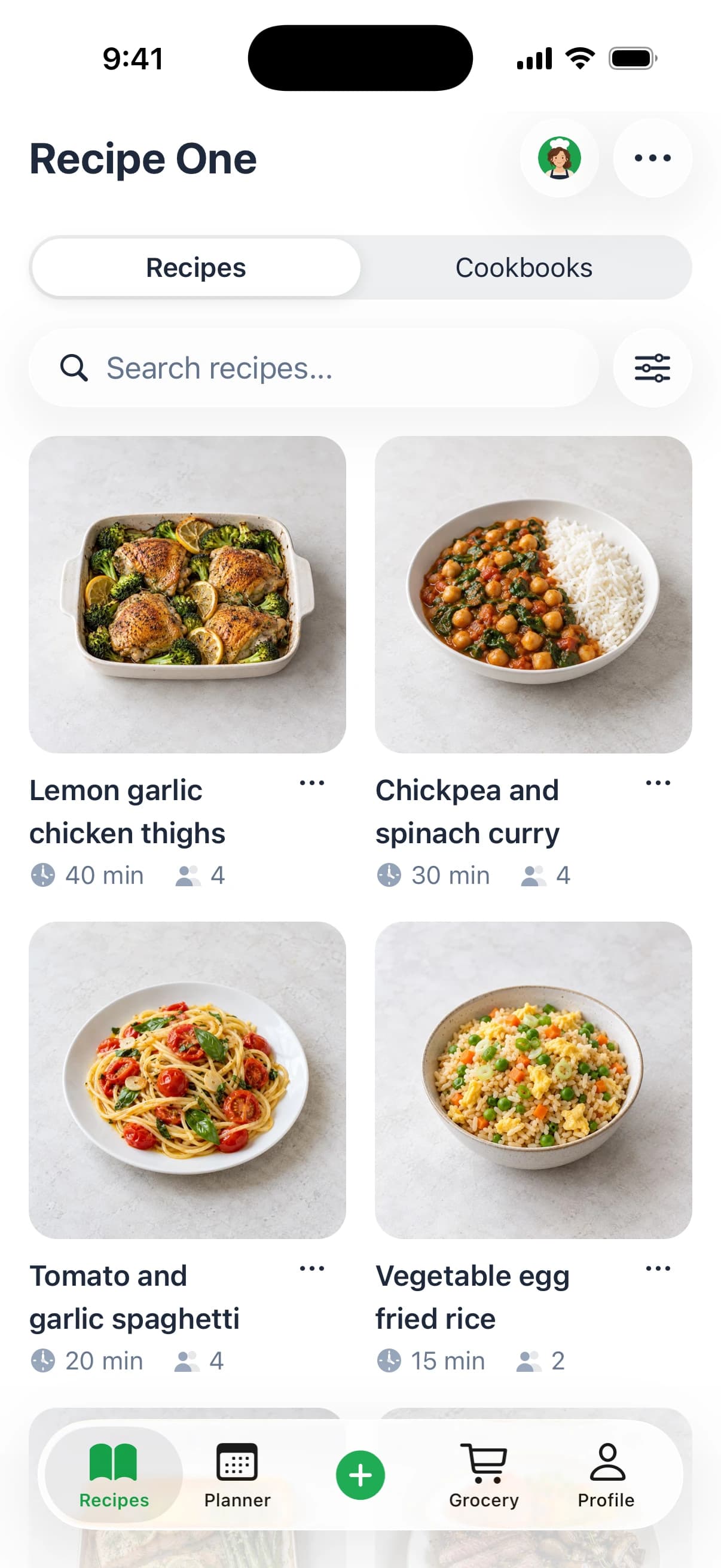
Keep every recipe in one place
Save from any website, scan handwritten cards, and organize your kitchen.


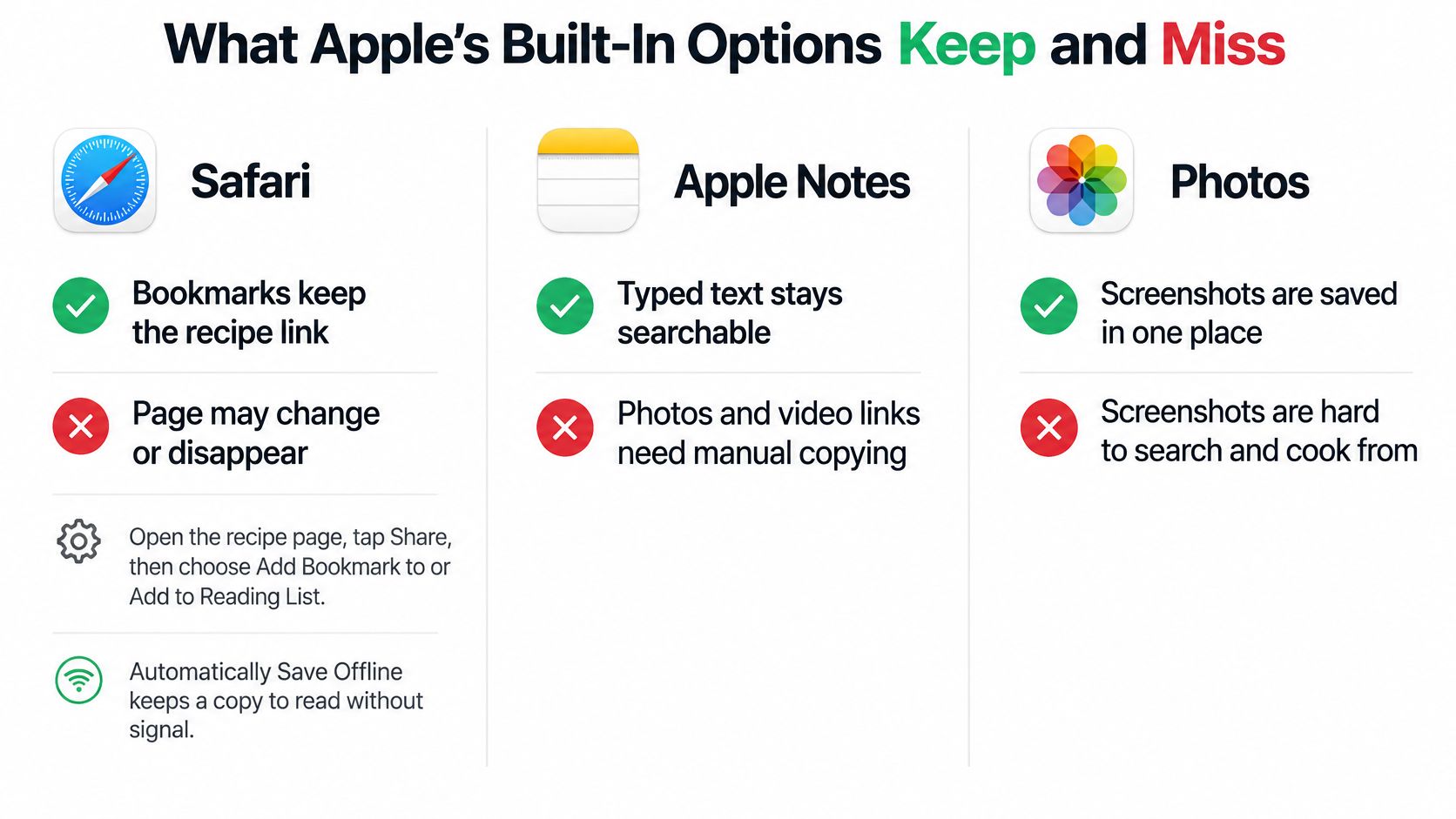
What Apple's Built-In Options Keep and Miss
Safari is the fastest place to park a page. Open the recipe in Safari, tap Share, then choose Add Bookmark to or Add to Reading List. Apple's iPhone User Guide describes both routes: bookmarks can be viewed and organized in Safari's bookmarks area, while Reading List saves the link and the webpage so it can be read offline once Automatically Save Offline is turned on under Settings > Safari > Reading List. That offline copy earns its keep in a shop basement with no signal.
The limitation is what Safari holds. It stores a webpage or a link, not an ingredient list you can shop from, and a bookmark only works if you go back to the source page.
Notes behaves like a file box. A single note can hold a webpage link, photos, videos, PDFs and scanned documents, and Scan Documents captures each page of a paper recipe, corrects the corners and adds the pages to the same note. For a card from a relative or a page torn out of a magazine, it's a good home.
Search is the weak spot. Notes can find typed text, handwriting and text inside scanned documents, but locating a PDF or an attachment means selecting Include Attachments in the search field first.
Photos is the capture shelf. A screenshot or a cookbook photo stays in the library, and Live Text lets you select the words inside it. Keeping the evidence is easy. Cooking from it means zooming into an image with the screen dimming while your hands are covered in flour.
Here's where each one stops short:
- No shopping structure. None of the three turns ingredients into rows you can check off or push into a list.
- No servings, tags or plan. There's no field for how many people it feeds, no tag system, no week plan.
- Search is text matching, not cooking. You can find the page again, but you can't ask what you can make with chicken thighs.
- Retrieval collapses under volume. Twenty screenshots of recipe cards look identical in a grid.
The aisle test: if you can't cook from the saved item with the phone in one hand in a grocery aisle, you've saved a bookmark or a file, not a recipe.
That isn't a fussy standard. In a 2023 survey summarized by SmartBrief, over 71% of respondents had viewed an online recipe on a smartphone while in a store, and 53.43% had added grocery products to an online cart after seeing them listed in a recipe. The phone is already the shopping tool. The saved item should behave like one. For a longer treatment of how to build a library rather than a pile, the guide to a digital recipe book covers the structure.
How to Send Recipes from the Share Sheet to Recipe One
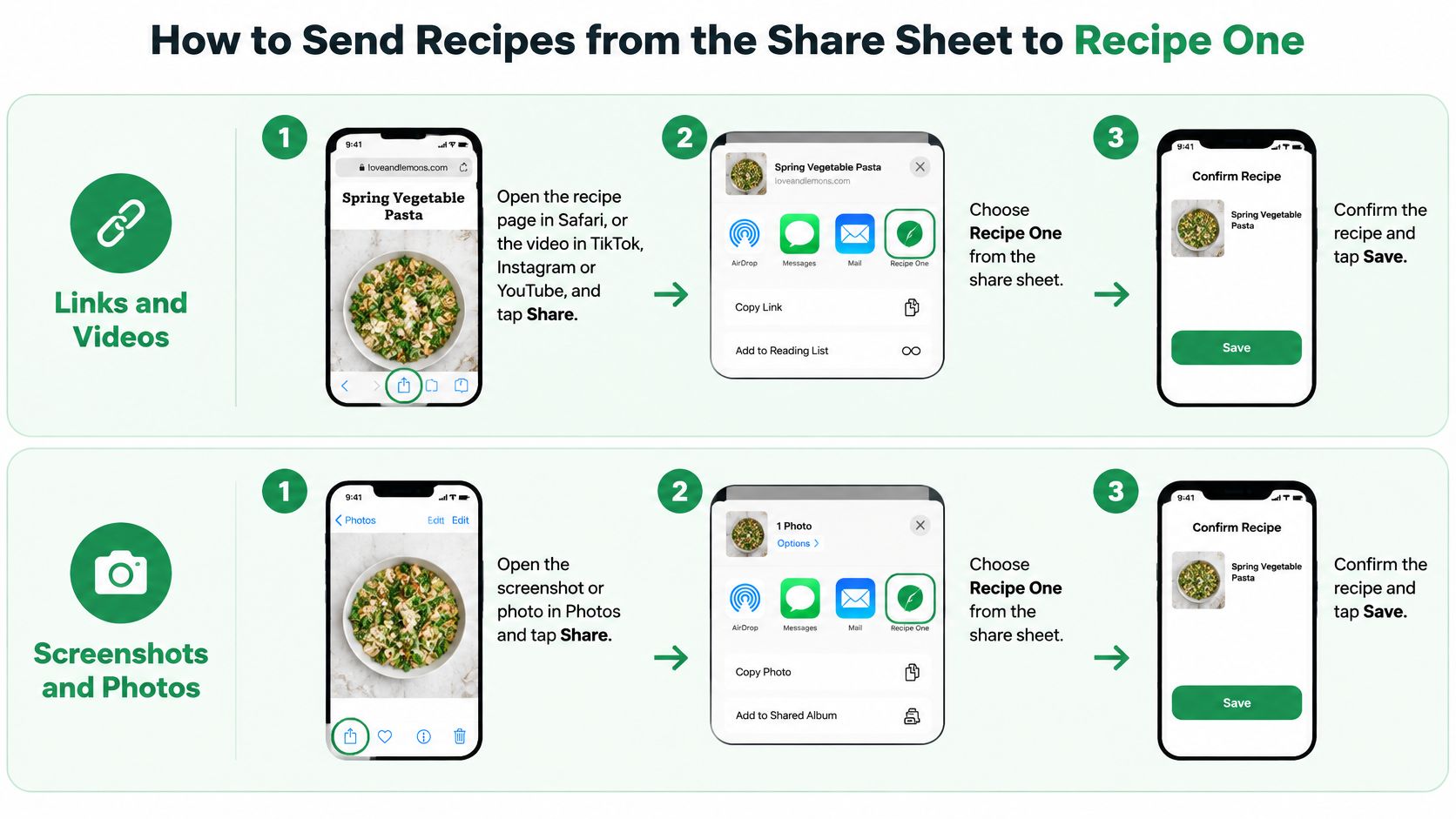
The share sheet is the part of iOS that solves this. Every app holding a recipe, Safari, TikTok, Instagram, YouTube, Facebook, Photos, exposes the same Share button, and an app that accepts a link or a photo turns all of them into sources. In Recipe One, you share a link or snap a photo, and the app extracts the ingredients and steps without ads or the rest of the page furniture.
Links and videos
- Open the source and tap Share. A recipe page goes through Safari; a video goes through the TikTok, Instagram or YouTube app. Use the app's own Share button rather than a copied URL, because the share sheet carries the title and source with it.
- Choose Recipe One from the share sheet. If it isn't in the first row, scroll the app row to the end, tap More, then Edit, and add it to favourites so every later save is one tap.
- Let the import finish, then read it against the source. Check the title, the ingredient quantities and the step order. A video where amounts were spoken rather than written is the case that needs this most.
- File it before you leave the screen. Pick a cookbook and add tags while the recipe is still open. Filing is the step people skip, and it's the step that makes the recipe findable in six weeks.
Screenshots, cookbook pages and handwritten cards
- Open the image in Photos and tap Share. Screenshots, a photo of a cookbook page and a photo of an index card all take the same route. Straighten the card and fill the frame first, because skewed text is where recognition fails.
- Choose Recipe One. The app reads the ingredients and steps out of the picture instead of storing the picture as a picture.
- Compare every number with the image. Fractions and unit abbreviations are where errors appear, and the check takes ten seconds.
- Add the cookbook and tags, then save. Same filing rule as links.
For a Facebook post, share the post itself, or the recipe page it links to when the post points at a blog. Posts where the recipe exists only in the caption or across a carousel need a different handling, and that case has its own walkthrough.
Each source has one correct share route and one backup worth keeping:
| Recipe source | Share route | Backup to keep |
|---|---|---|
| Recipe website or blog | Share the page link from Safari | Original URL or Reading List entry |
| TikTok, Instagram or YouTube video | Share the video link | Saved video link in Notes |
| Facebook post | Share the post or its recipe link | Screenshot of the post |
| Screenshot | Share the image from Photos | The screenshot itself |
| Cookbook page | Share a photo of the page | The photo in Photos |
| Handwritten card | Share a photo of the card | The photo in Photos |
What you should hold at the end is a recipe with ingredients and steps as cooking data, a cookbook and two or three tags. Keep the backup as well. The URL preserves the source and any updates the author makes to it, while a screenshot or the original photo survives a deleted post, a paywalled page or a recipe card that gets thrown out. Together they mean a bad extraction never costs you the recipe, because you can always go back to the original and correct the import.
One habit ties the whole procedure together: verify before filing, not before cooking. The ten-second comparison at the save screen is cheap. Discovering the error at the stove, with butter already in the pan, is not. If Instagram is where most of your recipes start, the guide to saving recipes from Instagram covers that share route in detail.
Check Recipes Captured from Images and Video
One-tap saving is not the same as a cookable recipe. A badly captured card creates more friction at the stove than a plain screenshot ever did, because you trust it. A clean capture of a printed cookie recipe is the easy end of this.
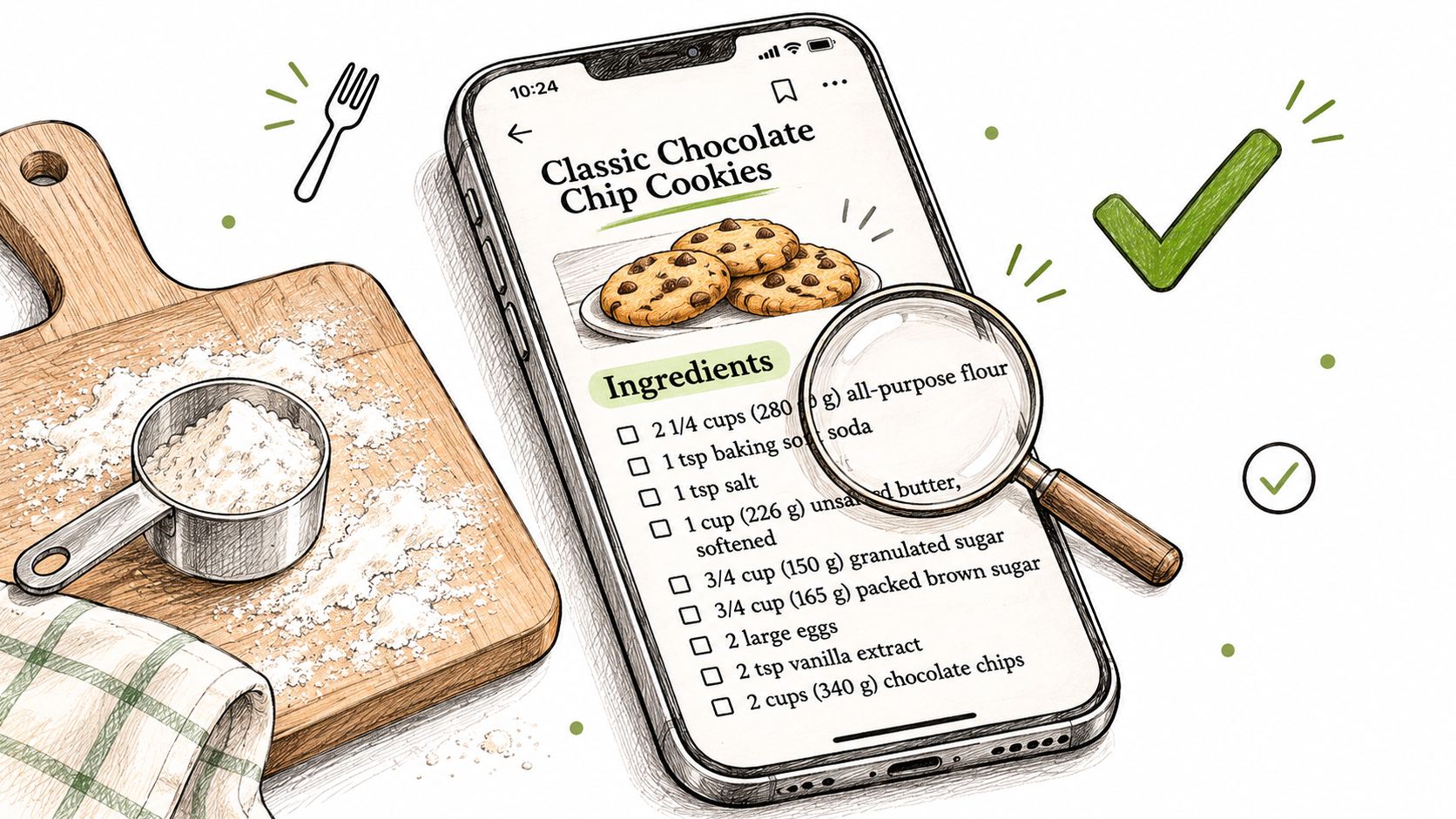
The failures happen at the edges: handwriting, glare, a card shot at an angle, a video where the ingredients flash past in four seconds.
Three checks before you cook
- Compare every number with the source image. Text recognition misreads fractions, degree symbols, minus signs and unit abbreviations, and a single error such as "1/2" arriving as "12" changes the dish entirely.
- Normalize the units. Reconcile tbsp against tsp, and settle whether the recipe means °C or °F, before you start rather than halfway through.
- Test the quantities against the servings. If the card says serves 4 and the flour looks like it feeds 12, one of those two numbers was read wrong.
Video recipes need a fourth check
Compare the extracted ingredient list with the video description and any on-screen text. A quantity that was only spoken is the one to flag, because a creator who says "a good glug of oil" and types "2 tbsp" has given you two different recipes.
Live Text, the feature that makes words selectable inside photos and paused video frames, needs an iPhone XS, XR or later on iOS 15 or newer, and it isn't available in every region or language, per Apple's Live Text support page. Apple documents camera-based text insertion and multi-page scanning in Notes, but publishes no universal accuracy rate for reading recipes, because accuracy depends on language support, lighting, typography, contrast and image quality.
Keep the original image beside the transcribed text so every measurement can be audited, and leave an uncertain field marked uncertain rather than guessing at it.
A recipe is cookable only after each number has been checked against its source. If you're weighing dedicated apps side by side, the guide to the best recipe saver app sets out what matters, and the recipe scanner app walkthrough covers the capture side in more depth.
Organize Saved Recipes for Easy Finding
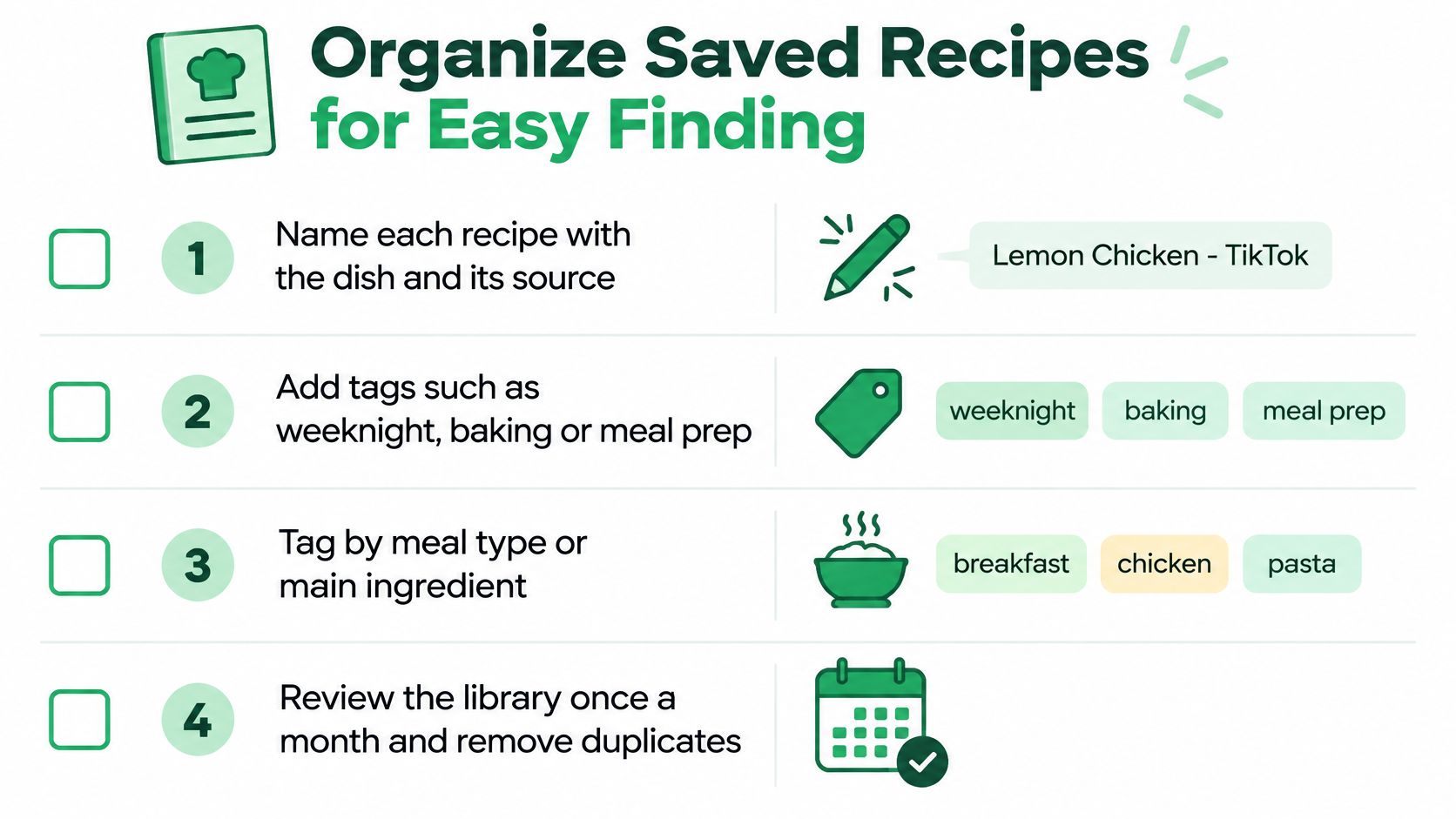
It's 6pm, the fridge is open, and the chicken you saved last month is buried under untitled screenshots. Scrolling a long library is a slow way to decide dinner. A library stays usable when you file each recipe in a fixed order:
- Name it with the dish and the source. "Lemon chicken, TikTok, March" beats "Untitled recipe 4", because the name is what you'll type months later.
- Tag by what you're doing. Weeknight, baking, meal prep, lunchbox. Then tag by main ingredient, so chicken thighs surfaces every recipe that uses them.
- Put one recipe in several cookbooks. A traybake can sit in Weeknight and Guests at once. Cookbooks allow that overlap, which is the difference between a cookbook and a single folder.
- Search by name, ingredient or tag at 6pm, when you need an answer rather than a browse.
- Plan a few recipes into the week, so dinner is decided before 5pm instead of negotiated at the fridge.
- Pull the plan into one grocery list. Add the week's ingredients in one tap, then tick items off in the store.
Maya, the AI cook inside Recipe One, handles the nights when the plan isn't the problem and the decision is. She can suggest what to make, build the week, or turn what's already in the fridge into a recipe.
Two habits protect the library. First, keep the source beside the structured recipe. The original link or scan is still the fastest way to settle a disputed quantity. Second, don't delete the screenshot. Apple says Live Text recognizes text inside photos, videos and online images, and Notes search can find typed and handwritten text, objects in images and text in scanned documents, as the iPhone User Guide describes, so a screenshot kept in Photos stays searchable as a second copy.
On meal planning, ReciMe is a common comparison, and Mob is another planner people look at. Import limits, grocery lists, meal plans and cookbooks change by plan, so check each app's official site or App Store listing for current features and pricing. More naming and tagging patterns are in the guide to how to organize recipes.
The shape that works for a weeknight cook is modest: a set of named recipes you cook, two or three cookbooks, tags by ingredient, and one week planned at a time.
Choose Your Save Route Before the Next Recipe
If the saved item has ingredients and steps you'll cook from, send it to a recipe app. Safari and Notes can hold the backup link or snapshot.
A pasta video requires a different route from a cookbook page, so decide by source before you tap Share:
- Recipe website or blog: share the page to Recipe One, then keep the URL in Reading List as the backup.
- TikTok, Instagram or YouTube: share the video link, then compare every quantity with the caption and any text shown on screen.
- Facebook: share the post, or the recipe page it links to when one exists.
- Screenshot: share the image directly from Photos.
- Cookbook page or handwritten card: photograph it flat, square and well lit, then share the photo.
- Your own notes or clipped text: paste the recipe into Recipe One rather than leaving it split across apps.
Before you close the screen, run the five-point check: source saved, cookbook chosen, tags added, ingredients compared with the original, and one day picked in the meal planner. The comparison step matters most for anything captured from a photo or video. A blurred fraction, missing caption or spoken measurement can otherwise reach the stove as the wrong amount.
The rule that saves the most time: file the recipe while you're still looking at the source, never later.
Recipe One also runs outside the iPhone app: on the web at app.recipeone.app, through the Chrome extension. The Recipe One plugin for ChatGPT and Claude is available now: search "Recipe One" in ChatGPT Plugins or in Claude Customize > Connectors, or see the setup guide. Questions go to support@recipeone.app.
If Notes remains part of your backup workflow, compare iPhone note taking apps on how well each one searches typed text, handwriting and images. For the wider recipe-app choice, the guide to the best cooking apps for iPhone compares the alternatives. Search Recipe One on the App Store to install it; it is free to start, and the listing shows current pricing.
Frequently Asked Questions
Does saving a recipe as a Safari bookmark keep the ingredients? No. A bookmark stores the page or the link. The ingredient list only becomes structured data if a recipe app imports it and turns it into rows you can cook from.
Can I save a recipe from a TikTok, Instagram or YouTube video on my iPhone? Yes. Share the video link to Recipe One, then check every quantity against the video description and any on-screen text, since spoken amounts always need confirming.
What about a Facebook post with no link? Share the post itself. Where the recipe sits only in the caption or across several images, the save recipes from Facebook guide covers the handling.
Do I need a separate app if I already use Notes and Photos? Only if you want ingredients and steps as cooking data, plus tags, cookbooks, a week plan and one combined grocery list. Apple's tools keep the page or the image, which is a different job.
Where do I find Recipe One on the iPhone? Search Recipe One on the App Store. It's free to start, and the listing shows the current pricing details.
Recipe One takes the recipes you already save and turns them into something you can cook: share a link, a video or a photo from any app on your iPhone and it comes back as ingredients and steps you can file in a cookbook, tag, plan into the week and push into a single grocery list. It's free to start, and it runs on iPhone, the web, a Chrome extension. The Recipe One plugin for ChatGPT and Claude is available now: search "Recipe One" in ChatGPT Plugins or in Claude Customize > Connectors, or see the setup guide. Visit Recipe One and save the next recipe properly.