
You've probably got recipes scattered everywhere right now. A few are saved on Instagram, some are in texts from a friend, a couple live in Google Docs, and one or two are scribbled on paper you meant to file later. By 6 p.m., the problem isn't finding inspiration, it's turning those saves into something you can cook for dinner.
A digital recipe book is the bridge between those scattered ideas and a real meal on the table. It's not just a folder of bookmarks, and it's not a pile of screenshots pretending to be organized. It's a personal, searchable kitchen system, one you control, one you can query, and one that helps you cook instead of just collect.
What a Digital Recipe Book Actually Is
A digital recipe book is a structured personal collection of recipes stored electronically, usually with enough detail to make each recipe usable on its own. That means the entry holds the title, ingredients, steps, source, and notes in a consistent format, rather than hiding everything inside a random screenshot or a loose notes file. The difference matters because a recipe you can search, sort, and scale behaves like a tool, not just a memory.
Think of it as a working library
A good digital recipe book belongs to the cook, not the platform. You're not just saving links, you're building a library you can query by ingredient, cuisine, time, dietary need, or whatever matters in your kitchen. That's why a notes app list, a recipe app, a Notion board, or even an Airtable base can all count as a digital recipe book if the entries are organized and retrievable.
Practical rule: if you can't find a recipe fast enough to decide whether to cook it tonight, it isn't organized yet.
That idea lines up with how modern recipe libraries are built for search and structured retrieval, not just storage. For a practical example of how cooks think about a keeper library, this recipe keeper app guide is a useful reference point.
The key shift is simple. A digital recipe book is infrastructure, the thing that lets a saved recipe become dinner later. If the collection can't help you choose, shop, and cook, it's just a pile of digital clutter with nicer lighting.
Apps, PDFs, and Databases Compared
Three formats come up again and again when people try to build a digital recipe book. Each one can work, but they solve different problems. The right choice depends on how much setup you'll tolerate, how you cook, and whether you want convenience now or flexibility later.
The easiest way to think about it is effort versus payoff. Dedicated apps ask for less setup and give you more built-in cooking features. PDFs and cloud docs are low-friction and portable, but they don't do much for you once the file is saved. Databases take the most time up front, but they give you the most control over tags, filters, and custom fields.
| Comparing Digital Recipe Book Formats | Dedicated Apps | PDFs and Cloud Docs | Database (Notion, Airtable, Excel) |
|---|---|---|---|
| Setup | Fast to start | Very easy | More work at the beginning |
| Searchability | Good inside the app | Weak across many files | Strong with the right fields |
| Ingredient parsing | Often built in | Usually manual | Can be designed for it |
| Meal planning | Often included | Separate tool needed | Customizable if you build it |
| Sharing | Usually simple | Simple for single files | Flexible, but less automatic |
| Control over structure | Limited by the app | Low | High |
Match the format to your habits
A dedicated app like Paprika, Whisk, or Mealime is a good fit if you want grocery lists and meal planning without setting up your own system. PDFs and cloud docs work well if you mainly want portability and don't mind that search is clunky. A database works best if you love adjusting fields and want your recipe library to behave exactly the way your kitchen does.
If you're comparing software, this best recipe manager apps guide can help you think through the trade-offs without overbuilding on day one.
The mistake is choosing the fanciest option because it sounds more organized. Choose the one you'll keep using after the first week. A system you maintain lightly will beat a complex one you abandon.
Why Structure Matters More Than Storage
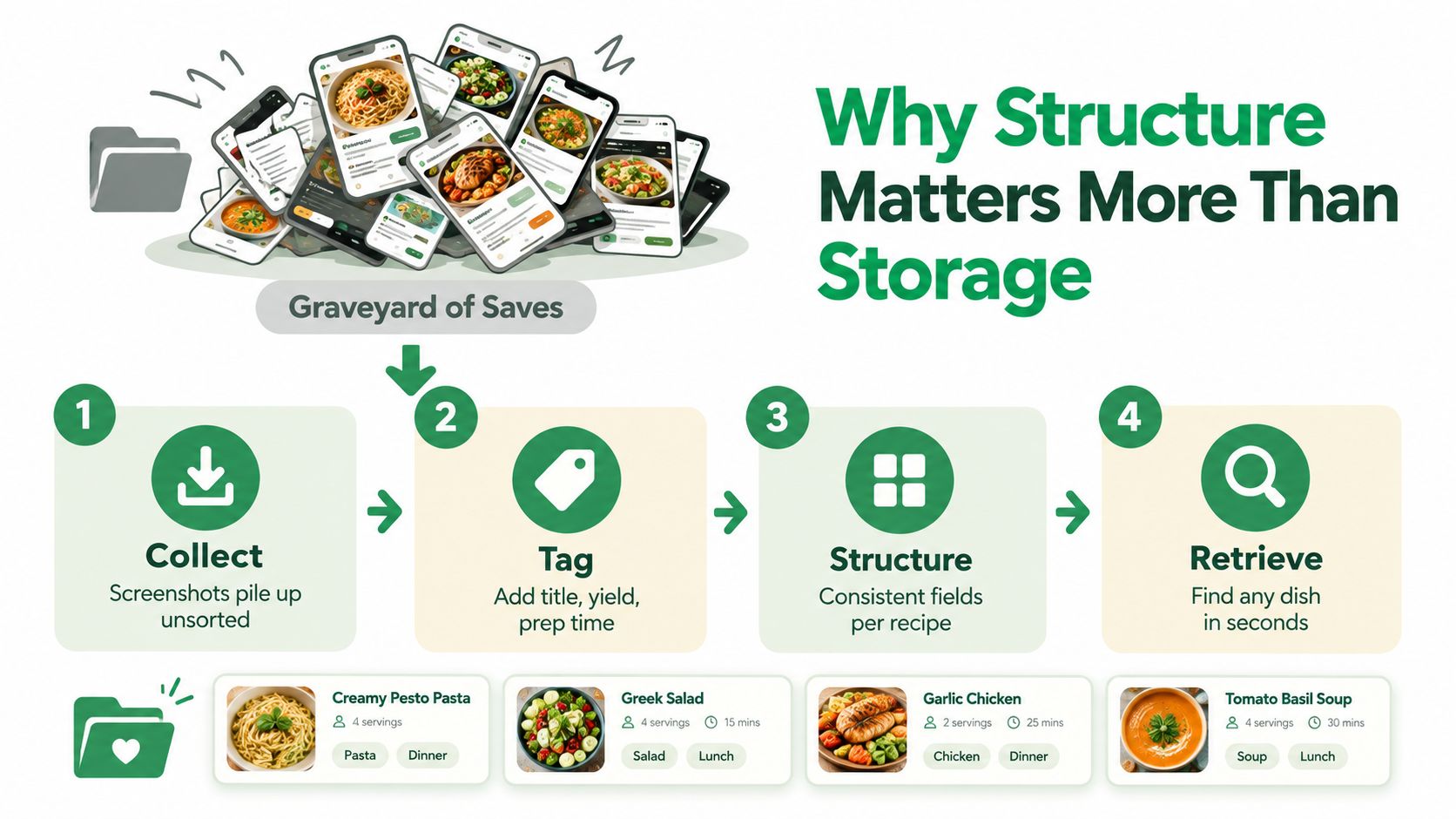
A folder full of screenshots is not a recipe book. It's a graveyard of saves. The thing that turns a pile of files into something useful is structure, which means every recipe follows the same basic shape, so your brain and your tools know where to look.
The fields that actually matter
At minimum, each recipe should have a title, yield, prep time, cook time, ingredients, steps, tags, and source. Once those fields stay consistent, you can filter for weeknight dinners, sort by time, and pull up the right recipe without scrolling through a wall of images. That structure is what makes a library usable at 5:30 p.m. instead of just neat on a Sunday afternoon.
Structured ingredient data is especially helpful because it separates name, quantity, unit, and other details into fields a system can understand. RecipeDB describes recipes as structured records with ingredient attributes like name, state, unit, quantity, size, temperature, and dry or fresh status, which is the kind of granularity that makes conversions and ingredient-centered searching more reliable. That's the difference between “some amount of onions” and a list you can shop from.
Good structure saves time later, not just during setup.
OCR, or optical character recognition, helps here too. If your recipe lives in a screenshot or scanned page, OCR can pull the text into editable form so you're not typing every line by hand. Once the text is editable, it becomes searchable, sortable, and much easier to use for planning.
The payoff is practical. Spend an hour defining fields and tags now, and you'll get that time back every week when you can scale, search, and shop without guessing.
Capturing Recipes From Social Posts and Screenshots
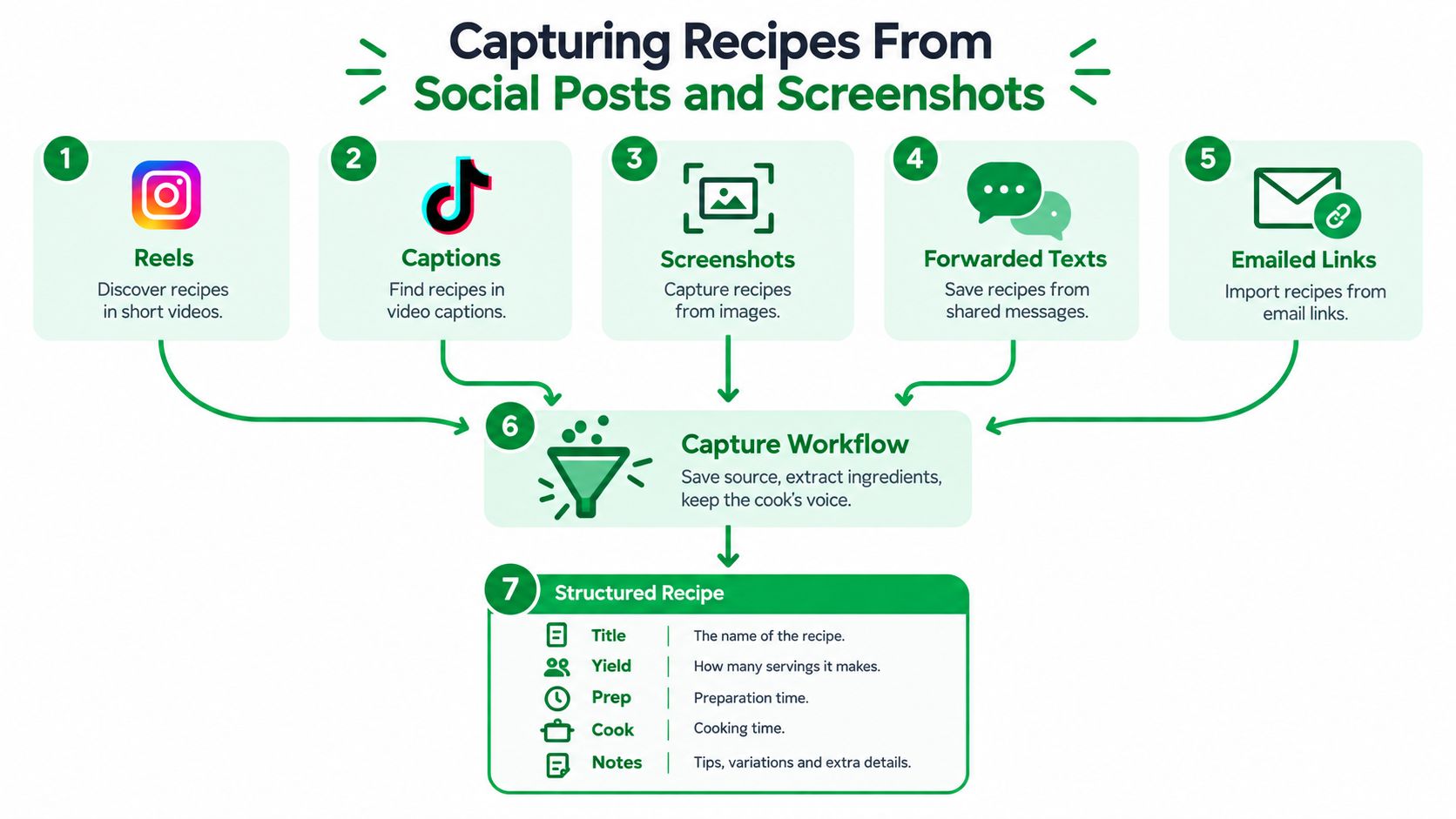
Social recipes disappear fast if you don't catch them well. A Reel gets buried, a TikTok caption gets cropped, and a text from your sister gets lost in a thread about school pickup. The trick is to capture the recipe without stripping out the voice that made you want it in the first place.
Save the recipe, not just the post
From Instagram or TikTok, grab the caption, ingredient list, pinned comments, and any on-screen measurements if they're visible. If the creator mentions timing in the voiceover, note that too, because those little details often explain why a recipe works. From a screenshot, use OCR or paste-in tools to extract the text, then clean it up so the ingredient list and steps are readable.
For forwarded texts and emailed links, keep the source link or sender note in the recipe record so you remember where it came from. That matters for credit, but it also helps if you want to revisit the original wording or check for updates. If a recipe mentions allergens, substitutions, or a yield note, keep those visible instead of burying them in comments.
There's a useful parallel in a content repurposing framework, because the core idea is the same: save the source in a form you can reuse later. A recipe saved well is just repurposed content that still cooks.
If you want a practical workflow for social saves, this guide to saving recipes from Facebook fits neatly into the same habit.
Capture first, clean later. If you wait until you have time to perfect every entry, most of them will never get entered at all.
Use a two-pass habit
The first pass is triage. Save the recipe into one holding folder or inbox with the source intact. The second pass is cleanup, where you normalize measurements, fill in missing fields, and move it into the main library within a couple of days. That short deadline keeps your system from turning into a digital junk drawer.
Connecting Recipes to Meal Plans and Grocery Lists
A recipe library becomes much more useful when it feeds directly into your weekly plan. Tags are the bridge. If you tag recipes by protein, cuisine, prep time, and season, you can pull together a week of dinners without opening twenty tabs and hoping something sounds easy.
The other key is ingredient format. If your recipes use parseable units like g, ml, tsp, and count, a list tool can combine amounts across dishes instead of treating every recipe as separate. That's how you avoid buying three half-onions when one or two would do.
| Recipe Tags That Power Meal Planning | Example Values | Planning Benefit |
|---|---|---|
| Protein | chicken, tofu, beans, fish | Helps balance the week |
| Cuisine | Thai, Mexican, Italian | Makes variety easier |
| Prep time | 20 minutes, 45 minutes, weekend | Matches the night to the schedule |
| Season | spring, summer, winter | Keeps meals aligned with what's fresh |
| Diet | gluten-free, dairy-free | Filters for household needs |
| Leftover use | lunch-friendly, next-day reheat | Reduces waste and repeats |
Plan from the tags, not from memory
Once those tags are in place, planning gets much faster. You can choose seven dinners in under ten minutes because you're filtering by constraints instead of browsing by mood. If your library supports it, a grocery list generator from recipes can also merge ingredients into one shopping list, which is where the real time savings show up.
Pantry cross-checks matter too. When a recipe says “olive oil” and another says “a splash of olive oil,” your system should still help you decide whether you're stocked or not. Leftover-friendly pairings, like using roasted vegetables in a grain bowl the next day, also become easier to spot when the recipe titles and tags are consistent.
If you print the final list, send it to your phone, or keep it on a smartwatch, the point is the same. The library should reduce friction before you ever turn on the stove.
A Real Week With Your Recipe Library
Maya is a parent with two kids, a Tuesday softball practice, and almost no patience for standing in front of the fridge at 6:10 p.m. On Sunday, she filters her digital recipe book for chicken thighs, under 45 minutes, and no nuts. Four dinners appear that fit her schedule, so she drags them onto the week and lets the grocery list fill itself.
On Monday, she shops from that list, pinned on her phone. Tuesday runs late, so she opens the recipe card while waiting at the field, checks the steps, and doesn't need to dig through old messages to remember what marinade she used. By Saturday, she searches for “lemony, no nuts” and finds a pasta she forgot she had saved months ago.
The quiet part is the best part. She rates each recipe in two taps, marks one as a keeper, and skips two that weren't worth repeating. Her library starts reflecting what her family actually eats, not just what looked good in the moment.
Migration, Search, and Sharing That Keep It Useful
A recipe system only stays useful if it survives the mess after setup. That means moving recipes cleanly, making search dependable, and sharing in a way that doesn't create more chaos for the rest of the household. If you've ever abandoned an app because it became harder to manage than the problem it solved, this is the part that keeps that from happening again.
Migration without losing structure
When you move recipes from one app or format to another, preserve the fields that matter most: title, ingredients, method, notes, and source. Some recipes will come from PDFs, some from screenshots, and some from URLs, but the goal is the same, keep the recipe readable and keep the structure intact. If you're starting to organize a bigger personal library, recipe management software is worth comparing before you settle into a system you can't export from later.
Search that works under pressure
Search only feels fast when the tags are consistent. A strong tagging set usually includes cuisine, protein, time-to-table, freezer-friendly, and kid-friendly, plus whatever your household asks for most often. Full-text search across ingredient lines matters too, because sometimes you don't remember the title, you just remember there was dill or harissa in it.
Sharing without friction
Sharing should be dead simple. A single recipe should export as a clean printable card, a family cookbook can live as a read-only link, and the grocery list should go straight to the person doing the shopping. If you need a practical way to share PDFs with link generator, that can be part of the workflow, especially when you want a clean handoff instead of another messy attachment thread.
A recipe library earns trust when it keeps working after the first month.
That's the true test. Maintenance matters more than the initial setup, because the system only helps if you keep feeding it clean entries, useful tags, and easy ways to share.
Your Getting-Started Checklist
Pick your format
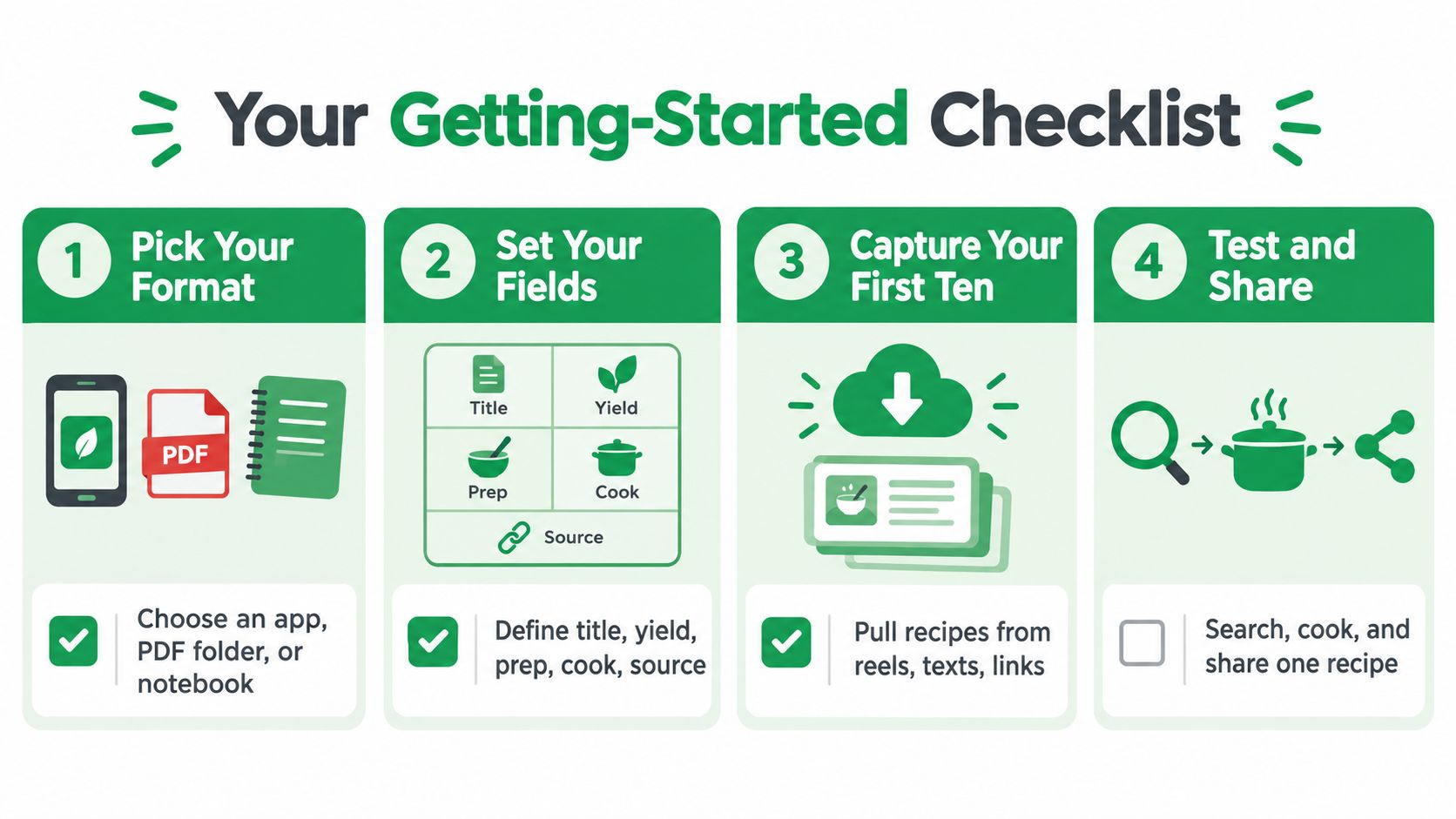
Choose an app, a PDF folder, or a database based on how you cook today. If you want speed, use an app. If you want portability, start with cloud docs. If you want total control, build the database.
Set your fields
Define the basics once, then reuse them. Title, yield, prep, cook, source, ingredients, steps, and tags are enough to make the library feel real instead of improvised.
Capture your first ten
Pick ten recipes you've already saved or cooked and enter them properly. Pull from reels, texts, links, screenshots, or notes, then clean them up into one consistent format.
Test and share
Search for one recipe, cook it, and share it with someone else in your house. If you can find it quickly, follow it without confusion, and send the list to another person, your system is working.
Recipe One turns saved recipes from social posts, photos, videos, and text into a searchable kitchen system with ingredients, steps, tags, and meal planning in one place. If you want a place to build a digital recipe book that stays usable at dinner time, visit Recipe One and start with the recipes you already keep meaning to organize.


