When did you last cook something you saved on YouTube? For many home cooks, the honest answer is never, and the saved list keeps growing anyway.
A playlist is a wish list rather than a cookbook. Video is good at showing technique: how fast onions soften, what a loose batter looks like, when a crust is ready. It is bad at answering the only questions that matter mid-recipe: how much, how long, and what goes in next.
The practical fix is to turn each clip into a text card. In Recipe One, sharing or pasting the link extracts the ingredients and steps into a card without ads or extra content. If the video has no written recipe, use the description, transcript or your own notes to fill the gaps.
Treat that card as a draft, not gospel. Check amounts, timings and doneness cues against the video before cooking, then keep a readable copy so the recipe still works if the clip is made private, edited or deleted.
Which App Pulls a Recipe From a YouTube Video
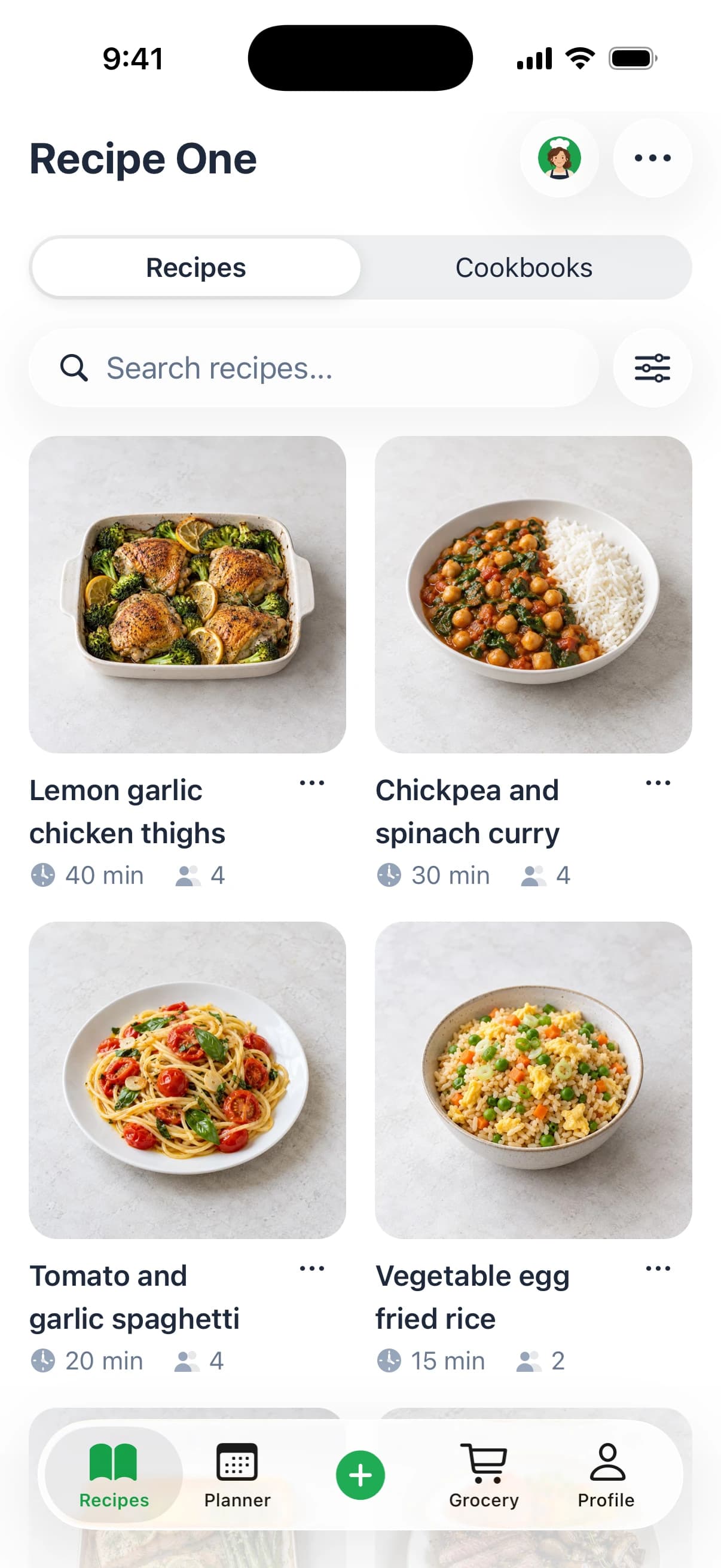
Recipe One is the direct answer: share or paste the link and the ingredients and steps come back as a recipe card. The card is the thing you keep, because it's the only version you can read with wet hands while a pan heats.
Bookmarking doesn't do this. A saved video keeps the title and the timestamp you stopped at, and it leaves every quantity inside the footage. YouTube's own growth explains why that becomes unmanageable: the company reported more than 2 billion video views per day by 2010, with the average user spending about 15 minutes a day on the site (YouTube company blog). A library that size doesn't sort itself.
Here's how the capture methods compare on the one thing that matters, which is what you're left holding when you start cooking.
| Method | Best for | What you keep | Effort |
|---|---|---|---|
| Recipe One link import | Videos with spoken or on-screen recipes | Ingredients, steps and a recipe card | Seconds, then a quick check |
| Video description | Creators who list quantities in text | Written amounts and links | Copy and paste |
| Pinned comment or creator blog | Creators who post corrections or full recipes | Missing amounts and fixes | Look up and copy |
| Show transcript | Spoken recipes with captions | Timestamped lines to read | Scan and type out |
| Notes or screenshots | Quick saves with no text | Visual reference only | Snap frames and label them |
A card also beats a bookmark because you can fix it. If the card says 1 teaspoon of baking powder and the video shows a tablespoon, you edit one line instead of remembering a correction for the next six months. The same import works on short-form links, so if your saves also come from Reels, the guide to save recipes from Instagram runs the identical pattern.
If you'd rather understand the underlying extraction step before you start, this explanation of what a recipe scanner app reads from a link is worth five minutes.
What comes next is the import itself, the fallbacks for videos with no written recipe, and the fields to check before anything hits a hot pan.
Import a YouTube Recipe and Plan Your First Week
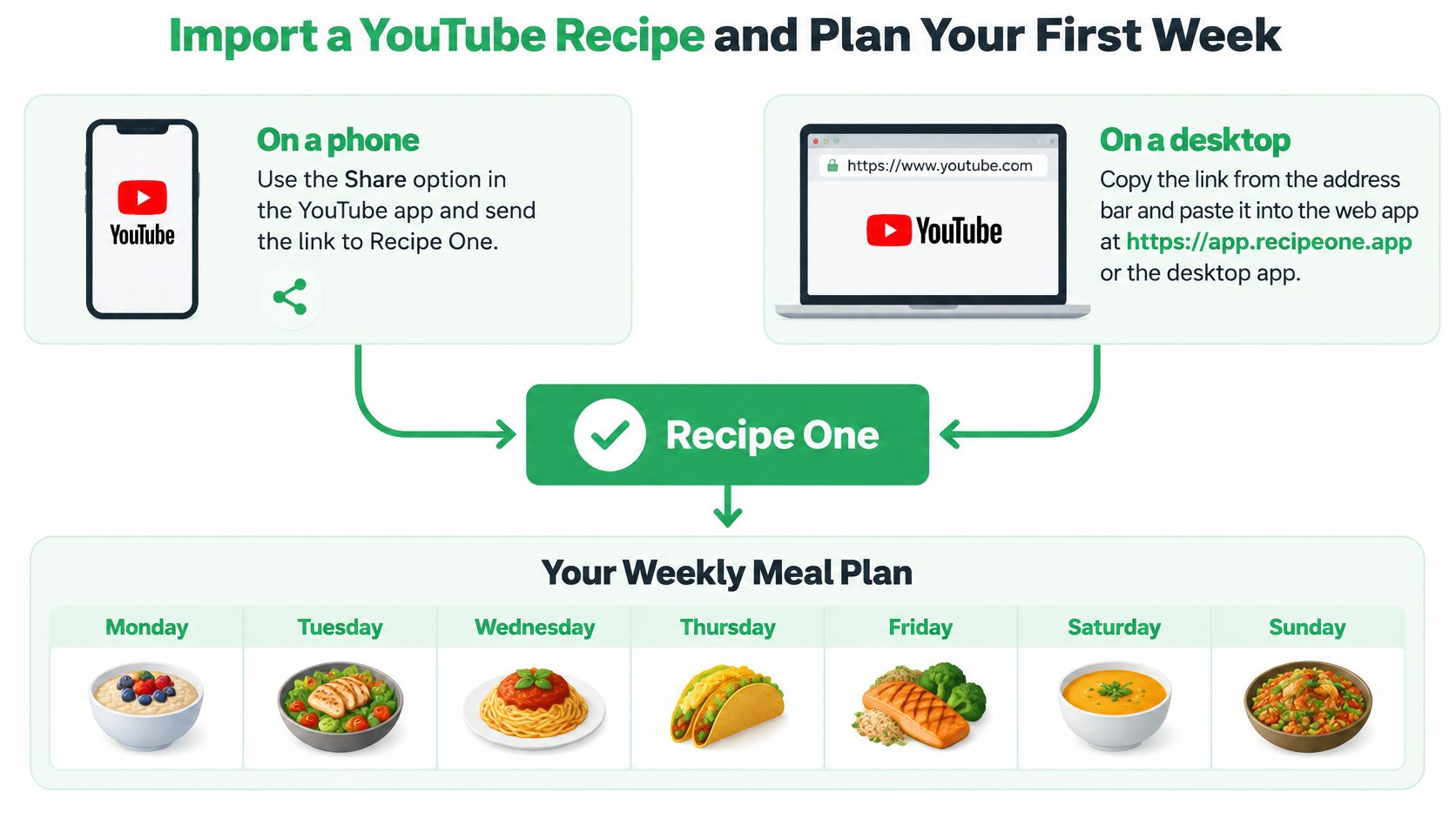
A saved YouTube card is a draft until you check it. On a phone, tap Share under the video in the YouTube app and send the link to Recipe One. On a desktop, copy the link from the address bar and paste it into the web app at app.recipeone.app. Phone and desktop land in the same place, so use whichever screen is already open when the video starts looking like dinner.
Five Steps from Link to Grocery List
- Paste or share the link into the import field. Give the card a moment to build before tapping away. Recipe One pulls the ingredients and steps from the link without ads or extra page clutter, so what lands in front of you is the part you cook from.
- Check the card against the video. Servings, every quantity, cook time, oven temperature. Read those fields while the video is still fresh, because the quick spoken amount and the on-screen text are the two places a draft card is most likely to drift.
- Add it to a cookbook. Weeknights, baking, mom's classics, whatever split matches how you cook. The point is retrieval: later you find the card by name, ingredient or tag instead of remembering which video it came from.
- Add it to the week's meal plan. One imported video becomes one planned dinner, and the rest of the week fills around it. A save turns into an actual meal instead of another bookmark.
- Generate the grocery list from the planned meals. Then check items off in the store. Because the list is built from the dinners you chose, it reflects what you intend to cook rather than what looked good at midnight.
You end with a card that has a title, an ingredient list, numbered steps and a link back to the source video. Recipe One is free to start.
If the plan needs filling beyond your imports, this collection of sheet-pan chicken, chili and modular bowls is built around dinners that survive as leftovers, which is what you want when Tuesday's import becomes Wednesday's lunch.
Keeping a weekly meal planning template open while you do this stops the plan from becoming another list you abandon by Thursday. Pick one video you intend to cook this week, import it, check the fields, cook it. That single loop teaches more than a folder full of saves.
If short-form links are part of the same collection habit, the TikTok recipe app guide uses the same save, check and plan pattern.
Fallback Methods When a Video Has No Written Recipe
Not every video gives you text. Some creators talk through the whole thing and never write it down. Work down this list in order, because each step is a little less reliable than the one above it.
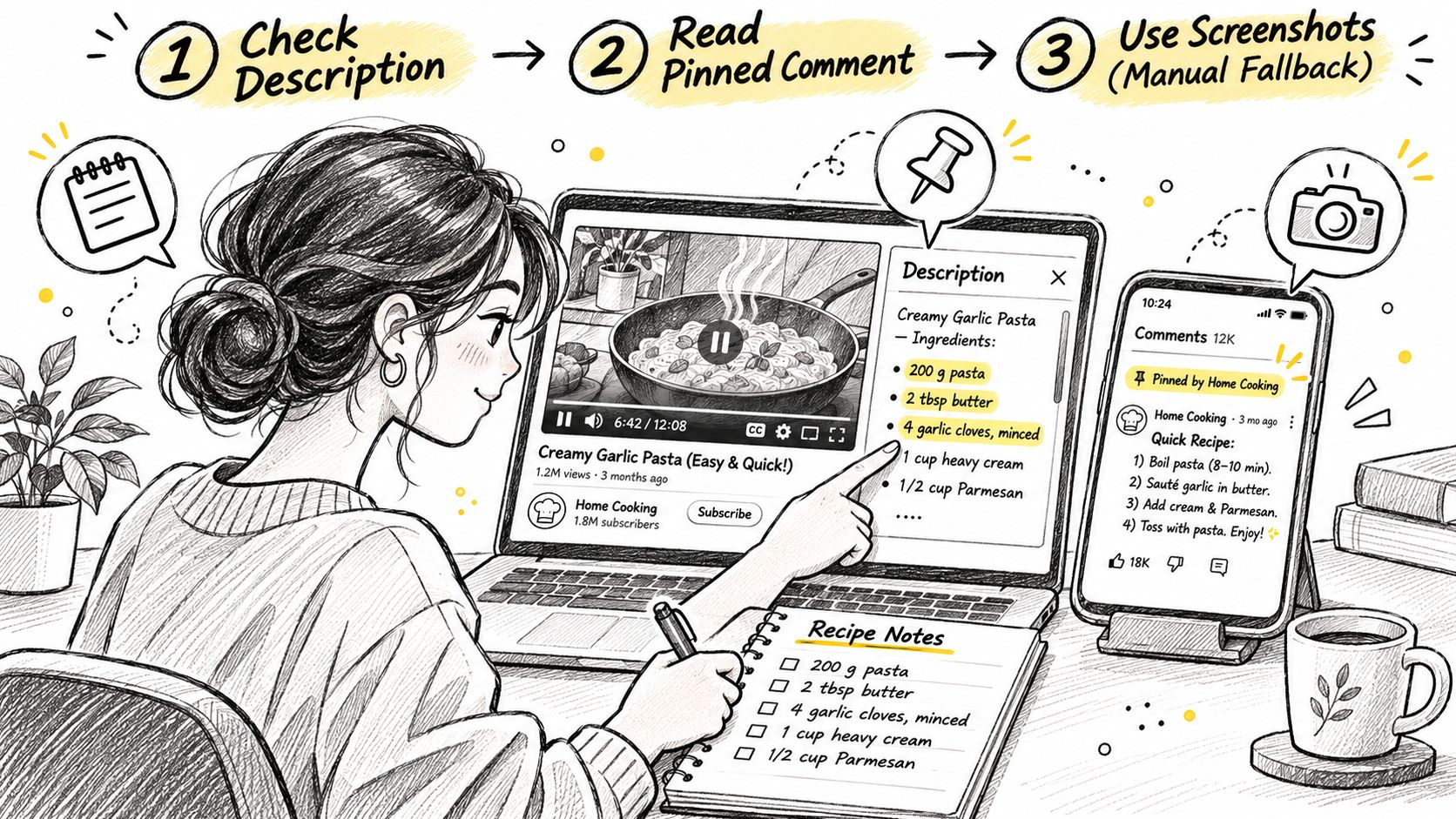
Check the description first. Tap "...more" under the video. Creators often put quantities, sub-recipes and links there, and copying that text into a note takes seconds.
Then read the pinned comment. It's where creators post the amount they missed on camera or the correction they made after publishing. Sorting by newest occasionally surfaces a fix, but the pinned one is the one to read first.
Follow the creator's blog link when there is one. A written recipe on the creator's own site is the most reliable text you'll get, and it usually includes the yields and temperatures the video skipped.
Open the transcript. YouTube provides a full transcript for any video that has captions. In the description, select "Show transcript," and clicking any individual line jumps to that moment in the video (YouTube Help). That panel only appears when captions exist, and plenty of cooking videos carry none; YouTube's own data marks each video as captioned or not, which is why a link alone never guarantees usable text (YouTube Data API videos resource).
Even where captions exist, downloading a caption track requires permission to edit the video, so a tool can't assume every public recipe video hands over clean transcript data (YouTube captions download documentation).
What to Do with a Half-Written Recipe
Copy the transcript lines that name quantities into your note, with the timestamp beside each line. "2:14, two teaspoons of salt" is worth more than a paragraph you'll have to re-watch.
When none of that works, take screenshots of the on-screen text and label each file with its time. Shorts often show measurements only as overlays, so screenshots frequently save more than transcripts do. A creator says a splash of milk over the bowl while the screen reads 2 cups of flour. The audio gives you the splash, the frame gives you the flour, and checking both gives you the recipe.
When an amount is missing, write unknown. A blank you remember to fill beats a number you guessed and then cooked with.
Check Every Recipe Field Before You Cook
Treat every saved YouTube card as a draft until the key fields match the video. A card can look clean, searchable and ready while still carrying the one number that ruins dinner.
| Field | Where to check it | Why it goes wrong |
|---|---|---|
| Oven temperature | Spoken setting and any on-screen dial | Fan, Celsius and Fahrenheit are easy to compress into one number |
| Cooking time | Timer, on-screen frame and end texture cue | Resting, chilling and marinating sit outside the active cook time |
| Quantities and fractions | On-screen overlay plus the description line | 1/2, 1/4 and spoon abbreviations collapse in auto text |
| Servings | Final yield and pan size shown | Cards may carry a default count that was never said |
| Allergen ingredients | Full ingredient list and finishing shots | Garnishes, sauces and packaged items can hide nuts or dairy |
| Substitutions | Spoken remarks, pinned notes and description edits | A swap may be mentioned once while the frame shows the original |
Speech recognition and auto-captions can confuse fractions, brand names and abbreviated units, so check every number, temperature and ingredient name against the on-screen frame rather than the transcript alone. A card built from captions alone can call for 1/4 cup when the cook said 1/2.
The Two-Minute Field Check
Run the table from top to bottom and compare each row with the card. Mark anything uncertain instead of smoothing it over, keep the timestamp beside that line in the recipe notes, then fix the card before you shop. If you are still learning yields, pan sizes and timing assumptions, this guide to how to read a recipe covers the details creators often skip.
Recipe One can pull ingredients and steps from a link, but the result still depends on what the video says or shows. If the creator never states a quantity, write unknown in that field and find a second source before buying the specialty item.
Practical rule: keep a checked text copy in the card: ingredient, amount, temperature, time and yield. The recipe should still cook if the upload changes, loses captions or goes private.
Organize Saved Recipes for Weeknights and Shared Meals
A saved card only pays off if you can find it again. Filing is part of the save, because a checked recipe sitting in the wrong place is still a lost recipe.
Build cookbooks around how you cook. Weeknights, baking, mom's classics. A recipe landing on the right shelf means you find it at 6pm without thinking, and the version you reach for is the one you already checked against the video.
Search by name, ingredient or tag. That's how a lone zucchini and half a bag of rice turn into dinner instead of another takeaway order.
Plan the week from your own library. The meal planner builds a week of dinners from recipes you already saved, so the plan reflects what you wanted to eat when you saved it.
Generate the grocery list from those planned meals. The list matches the cooking.
Share for shared meals. You can hand a single recipe or a whole cookbook to family. Cookbooks shared this way are read-only from an AI assistant, so make your edits in the app before anyone cooks from them.
If you work inside an AI assistant, Recipe One's MCP server integration lets you reach your recipes, meal plan and grocery list from Claude, ChatGPT and other assistants. The Recipe One plugin for ChatGPT and Claude is live: search "Recipe One" in ChatGPT Plugins or Claude Customize > Connectors, with setup at the Recipe One docs. A Chrome extension is available now in the Chrome Web Store. The web app at app.recipeone.app is live.
Save each recipe into a cookbook while the video is still open. Do it later and you'll be scrolling through titles trying to remember which one had the good sauce.
The full system for keeping a collection searchable is covered in this guide to organize online recipes.
Keep Credit and a Usable Copy When Videos Disappear
A video can be deleted, made private, region-restricted or buried under three hundred other saves. When that happens, the card is all you have, and it has to stand on its own.
Save the creator's name, channel and source link beside the card. Credit should travel with the recipe, not live in your memory.
Keep your own ingredient-and-step version, not a link alone. A link that resolves to "This video isn't available anymore" is not a recipe.
Record substitutions and equipment in the notes. The swap the creator mentioned for the dairy, the pan size they used, the fact that the dough needs a stand mixer.
Check the saved recipe before shopping, not after you get home with the wrong cheese.
On rights, the plain version: keep the card for your own cooking. Don't republish a creator's full written recipe, photos or narration, and when you pass a dish to family, name where it came from.
Readable text also reaches cooks that video doesn't. Someone in a noisy kitchen, a deaf or hard-of-hearing cook, or a non-native speaker working in a second language can't easily replay audio mid-task, and a text card solves all three at once.
Say a pancake video gets taken down a year from now. Your card still lists 2 cups flour, the creator's channel name and the source link, so you can cook it that Sunday and credit them if you post a photo.
When in doubt, credit the creator, link the source and read their terms. It costs one line and it keeps the ecosystem honest.
For a broader look at keeping cards usable, see the recipe saver app guide, and for building a collection that behaves like a real book, this piece on a digital recipe book covers the structure.
Frequently Asked Questions About Saving YouTube Recipes
Can I save a recipe from a YouTube Short? Yes. Copy the Short's link and paste or share it into Recipe One, then check the card against the video. Shorts often flash measurements only as on-screen overlays, so the card is a draft until those amounts match what you saw.
What if the video has no captions and no written recipe? Work through the fallbacks in order: the description, the pinned comment, the creator's blog link, the transcript if the Show transcript panel appears, and finally screenshots of on-screen text. Write any missing amount as unknown rather than guessing it. A blank field is safer than a wrong one when you shop or cook.
Does the card replace checking the video? No. Results depend on what the video says or shows, so check the card before cooking or shopping. Treat the card as a draft that gets better as you correct it. Keep that corrected text so the recipe still works if the video later disappears.
What happens if the video is deleted later? The saved card keeps the ingredients and steps and links back to the source video, so you can still cook the recipe. Add the creator's name to the card yourself so the credit stays with it.
Recipe One turns a YouTube link into a recipe card with ingredients and steps, then carries it into a cookbook, the week's meal plan and the grocery list, and it's free to start. Share the next video you want to cook and see what the card looks like before you plan around it. Start at Recipe One.