
You open your phone to find dinner and get buried under screenshots, saved videos, browser bookmarks, and messages from relatives. One recipe is missing its ingredient list, another links to a deleted post, and the dish you want tonight is hidden beneath dozens of things you saved months ago. The collection looks full, but it doesn't help you decide what to cook.
I rebuilt my own recipe library after years of collecting food inspiration this way. The useful shift wasn't finding a better folder. It was treating the digital recipe book as a kitchen operating system, one that turns scattered ideas into searchable recipes, meal plans, shopping lists, and cooking decisions you can use with one hand while the other is covered in flour.
Planning Your Recipe Book Before You Import Anything
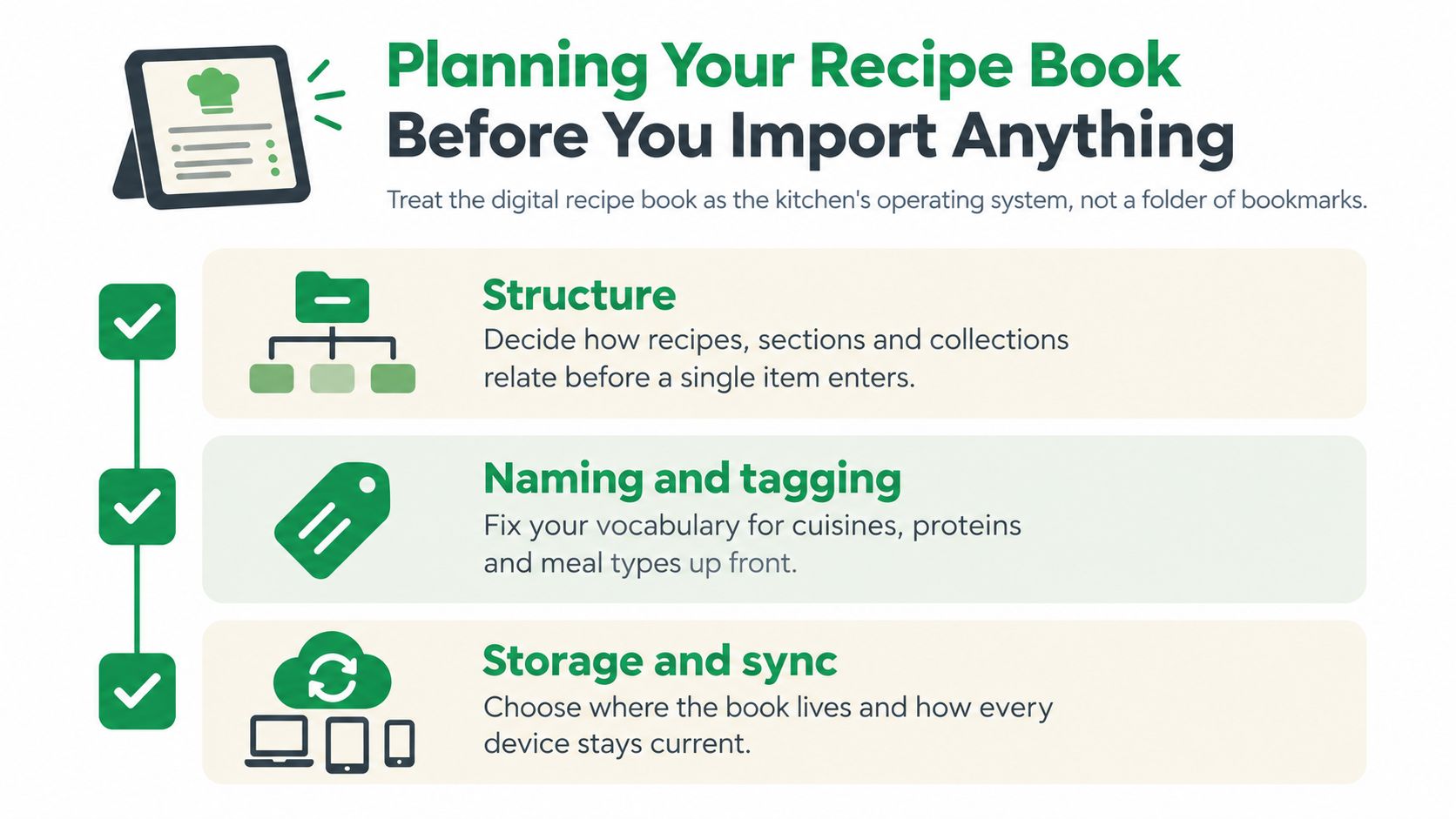
Before you import a single screenshot, decide what your recipe book needs to do on a normal weeknight. A folder stores files. A kitchen system helps you answer practical questions quickly: What can I cook in 20 minutes? Which recipes use the chicken already in the fridge? What can I freeze? Which dish did everyone actually enjoy?
Spend half an hour writing down your rules. That small planning session prevents your new library from becoming a better-looking version of the screenshot graveyard you're trying to replace. The same principle applies to any organized content system, and these documented content strategy tips are useful when deciding how information should be structured before you start adding it.
Choose categories that reflect real cooking
Don't begin with shelves such as Italian, Asian, or vegetarian unless those labels genuinely help you choose dinner. I get more use from categories based on the decision in front of me:
- Time and effort: 15-Minute Weeknights, Slow Weekend, Batch Cooking
- Equipment: Sheet Pan, One Pot, Air Fryer, No-Bake
- Household needs: Kids Lunchbox, Freezer Friendly, Work Lunch
- Occasions: Sunday Roast, Bake Sale, Birthday Dinner
You can still tag cuisine and main ingredients, but your primary collections should mirror how you shop and cook. For more ideas, compare your setup with these categories for digital cookbooks and keep only the labels you'll use.
Decide what every recipe must contain
Create a fixed set of fields before importing. At minimum, include yield, active time, total time, equipment, dietary tags, freezer status, source, and last-cooked date. Add pan size and substitution notes if you regularly adapt recipes.
These fields aren't decoration. They make filtering possible when you're tired and make a recipe easier to trust. A last-cooked date also tells you whether a dish belongs in regular rotation or is merely taking up space.
Pick one source of truth
Your library can live in a native recipe app, a cloud folder with consistent templates, or a spreadsheet linked to stored photos and PDFs. The choice matters less than the rule that every recipe has one home.
Don't keep the ingredients in a notes app, the photo in your camera roll, and the cooking instructions in a social platform. A recipe book digital system only works when your phone, tablet, and computer point to the same current record.
Importing Recipes From Social Posts, Photos, Text, and Video
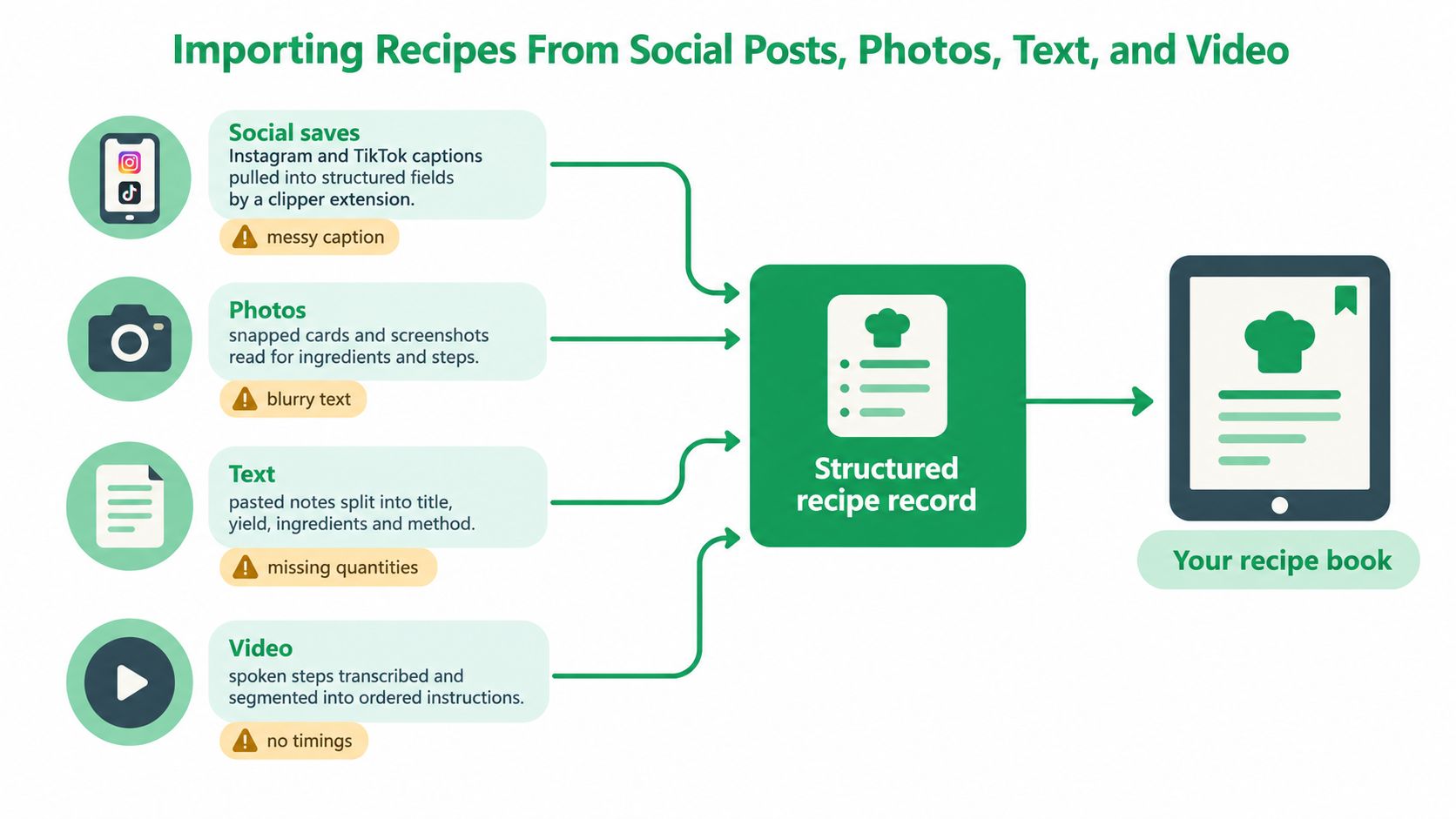
Each recipe source has a different failure mode, so importing everything through one careless copy-and-paste process creates avoidable errors. Social captions leave out details, photos confuse OCR, family notes assume knowledge, and videos hide measurements inside spoken instructions.
Start by giving every import a source name and date. For example, use a title such as “Lemon Chicken, Instagram, March 2026” or add the original creator and link in the source field. That attribution helps you find the original when a step is unclear, and it keeps your personal collection connected to the people who developed the recipe.
Social posts need an immediate edit
For Instagram, TikTok, and Facebook saves, use a recipe clipper or importing tool that separates the caption into a title, ingredients, method, and notes. Then open the new record straight away. Don't assume the caption is complete.
Check for the oven temperature, pan size, salt quantity, yield, and timing first. Short captions often rely on the video or on details shown in the comments. If the post is a carousel, inspect every slide before marking the recipe ready. A saved post isn't a usable recipe until its instructions stand on their own. If Facebook is part of your collection, this guide to saving recipes from Facebook can help you establish a repeatable capture habit.
Photos require visual proofreading
For a handwritten card or screenshot, run OCR through your recipe app or a dedicated scanner, then compare every extracted line with the image. Printed pages can reach roughly 95% to 98% OCR accuracy, while handwritten recipes typically reach about 82% to 87%, according to OCR guidance for digitizing recipes.
Pay special attention to fractions, abbreviations, temperatures, ingredient names, and line breaks. Handwriting can be much harder to interpret, particularly when notes are cursive or messy, so the preview-and-correction step isn't optional. A missing “½” or a confused tablespoon can change the result more than a typo in the title. The recipe OCR accuracy checklist gives a useful review list for these common errors.
Text and video need reconstruction
Typed family recipes should go directly into your standard template rather than remaining as a pasted document. Separate the title, yield, ingredients, method, and family notes so the recipe can be searched and scaled later.
Video recipes need slower work. Pause at each step and write down the timing, temperature, visual doneness cue, and tool used. Replace “cook until it looks right” with a description you can recognize, such as browned edges, a thickened sauce, or a set center. The goal isn't to transcribe every word. It's to create instructions that still work when the video is unavailable.
Standardizing Ingredients and Measurements
A recipe becomes easier to cook when every import speaks the same language. Standardization is the editing habit that turns a pile of captured material into a dependable library.
Choose your measurement rules once. You might use volume for liquids, grams for dry ingredients when the source supports weighing, and Fahrenheit with Celsius in parentheses for international recipes. Then apply the same choices to every new entry. Consistency makes shopping, scaling, and searching less tiring because you don't have to reinterpret the recipe at the counter.
Ingredient names need the same treatment. Pick one searchable term for “green onion,” “scallion,” and “spring onion,” then use it consistently. Include the preparation state in the ingredient line, too. “Garlic” isn't as useful as “3 cloves garlic, minced,” and “butter” doesn't tell you whether it should be cold, melted, or at room temperature.
Make ambiguity visible
Don't preserve phrases such as “a handful,” “some oil,” or “one onion” if you want the recipe to be repeatable. Replace them with a practical estimate and add a note when the amount is flexible. If you're unsure, mark the field for testing rather than pretending the source was precise.
Use a saved ingredient template or text snippet for recurring formats. This keeps edits quick and makes your records look consistent without requiring a full rewrite each time.
| Original Phrase | Standardized Form | Why It Matters |
|---|---|---|
| 1 onion | 1 medium yellow onion, diced | Size, variety, and prep affect both shopping and cooking |
| A handful of cilantro | 15 g cilantro, roughly chopped | A usable amount is easier to shop for and repeat |
| A pinch of salt | ¼ tsp kosher salt | A defined starting point helps with scaling and testing |
| Garlic | 3 cloves garlic, minced | The preparation state changes how quickly it cooks |
| Butter, softened | 115 g unsalted butter, room temperature | Temperature affects mixing, browning, and texture |
For more complex conversions, use this practical guide to converting recipe measurements. The point isn't to erase the character of a family recipe. Keep the original wording in a note, but make the main record clear enough to cook without interpretation.
Designing Templates That Actually Work at the Stove
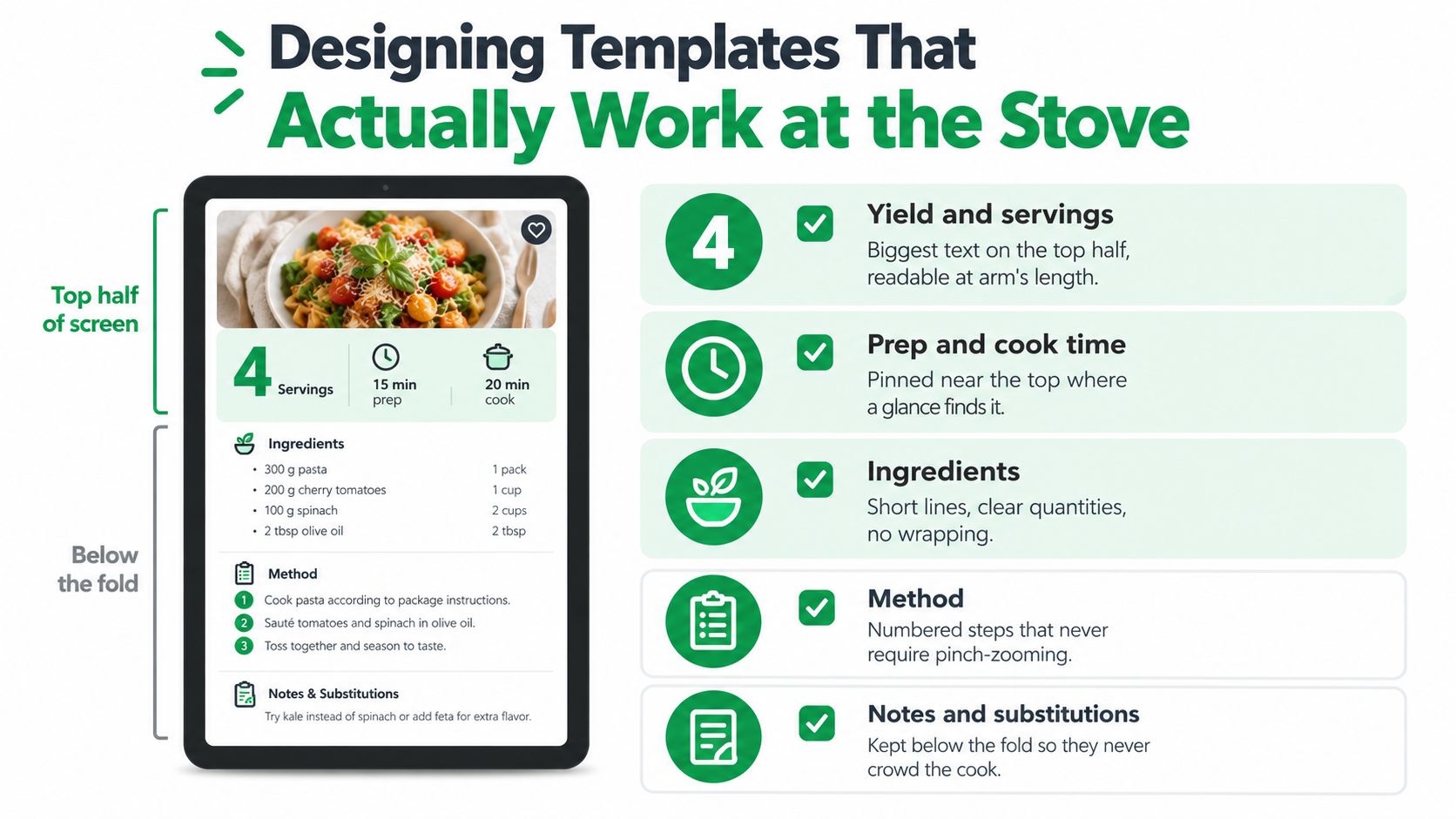
A recipe card should be readable in low light, at arm's length, with a greasy phone screen and one wet hand. If the design prioritizes a large hero image over yield, timing, and method, it may look attractive in a library but fail during dinner.
Put the information you need before cooking at the top. Yield, prep time, cook time, total time, and equipment should appear before the ingredient list. A cook deciding whether to start a recipe needs those facts before reading the story or scrolling through progress photos.
Give the cook a clear path
Keep ingredient lines short and specific. If a line wraps several times, split it or remove unnecessary prose. A tappable checklist is useful when ingredients move from the counter into the bowl, but the quantities must stay visible after the item is checked.
Write the method as numbered steps. Put timing inside the step, such as “Simmer for 8 minutes” rather than “Simmer until done.” Add doneness cues when timing alone can't guarantee the result.
A single finished dish photo at the top usually earns its space. Inline progress photos help for technical actions, but too many interrupt scrolling and force the cook to hunt for the next instruction.
Keep supporting details below the working area
Equipment notes, pan dimensions, internal temperature targets, substitution flags, and leftover storage instructions are valuable. They shouldn't crowd the first screen. Put them below the core ingredients and method, where the cook can reach them when needed.
Test every template with a simple rule: if you can't cook from start to finish in low light with one wet hand, trim the layout. This recipe template for Pages offers another reference point for thinking about structure, but your final design should reflect your own kitchen and devices.
Connecting Your Recipe Book to Meal Plans and Shopping
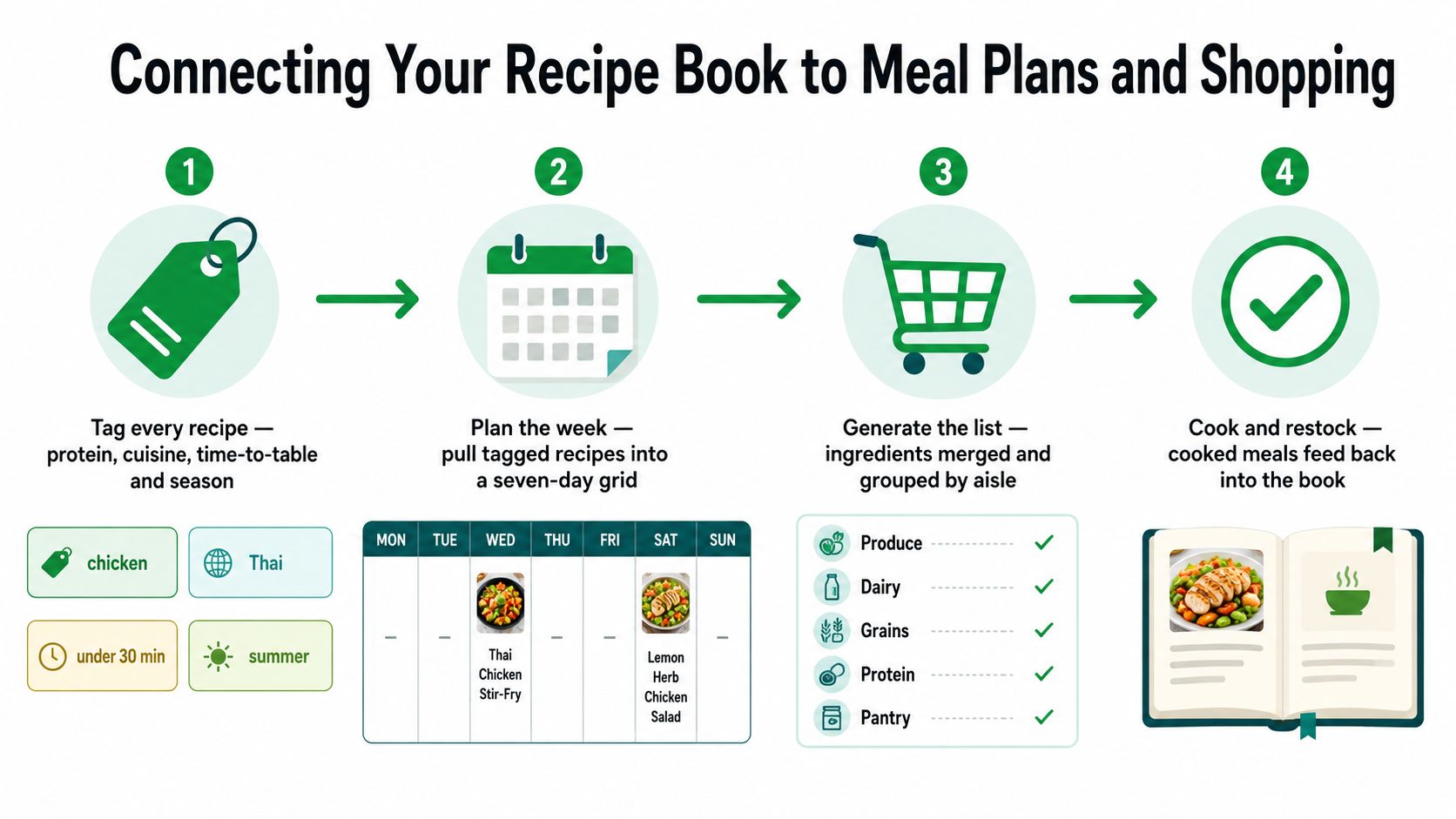
A recipe book becomes useful when it makes the next decision easier. The connection should run in one direction: your library stores the recipe, your meal plan selects it, and your grocery list pulls from the plan without creating a second copy.
Tag each recipe by protein, cuisine, time-to-table, season, and effort. A chicken recipe might carry the tags chicken, Thai, under 30 minutes, weeknight, and stovetop. Those tags let you build a plan from what you can realistically cook rather than rereading every card.
Build the plan from the library
Use a dedicated meal-planning view in Paprika, Plan to Eat, Notion, a spreadsheet, or another system that can reference the original recipe. Don't duplicate the full recipe into a weekly document. When the source record changes, the plan should still point to the current version.
Start with the evenings that have the strongest constraints. Assign a fast meal to the night you get home late, a longer recipe to a day with more time, and leftovers where they can reduce future work. Leave room for changes because a plan that cannot absorb a tired evening becomes another source of guilt.
A tool such as Recipe One can save recipes from links, photos, videos, or text, organize them into personal cookbooks, and connect recipes with meal planning and grocery-list workflows. Use it as one possible home for the source library, not as a reason to maintain several parallel collections.
Turn the plan into a realistic shopping list
Generate one consolidated list and group it by aisle. Combine repeated ingredients, then separate pantry staples from items you need to buy. Before leaving, check the fridge and mark what you already have. The generated list is a starting point, not an inventory of your kitchen.
Keep substitution rules close by. If you always swap spinach for kale or a particular chili for another, record that preference at the recipe or household level. Add a leftover-rescue column as well. Sunday roast can become Tuesday tacos, and extra cooked rice can become a quick fried-rice dinner.
Sync the final list to your phone and test it before you reach the store. A list that only exists on a desktop is technically generated but practically useless.
Backups, Sync, and Habits for a Library That Stays Usable
A recipe library needs maintenance because links disappear, imports arrive incomplete, and devices eventually fail. Treat upkeep as a loop rather than a one-time export.
Run three backup paths in parallel. Your primary app should sync the active library through your account. A scheduled manual export to PDF or JSON gives you an archival copy, and an offline copy on a local drive protects you if a service becomes unavailable. Formatted PDFs are especially useful when you want a readable, shareable version of the collection.
Keep devices in agreement
Turn on account-level sync for the complete library, not only selected folders. Check how the app handles a recipe edited on two devices, and choose a clear conflict rule. Silent edit histories can create confusing forks, so remove duplicate versions when you notice them rather than allowing both to become permanent.
Use a simple maintenance rhythm:
- Weekly review: Delete duplicates and finish incomplete imports.
- New-recipe pass: Add tags, source details, and a last-tested note as soon as you save something.
- Monthly link check: Open important source links and replace dead pages with a PDF or your own complete record.
- Cooked-status update: Mark what worked, what needed adjustment, and whether the household wants it again.
One small scheduling habit can help if you publish or share recipes socially. A social media scheduling platform may keep outbound posts organized, but it shouldn't replace the source record in your own library.
Prepare for recovery
Write a one-page recovery checklist and store it with your backup. Include the app or folder location, export format, account email, folder naming rules, measurement standards, and the order for restoring recipes, photos, and tags.
Common signs of library rot include orphaned tags, photos without recipes, recipes without usable photos, and collections nobody opens because search has failed. A recovery checklist turns a device change into a clear sequence instead of a frantic hunt through old screenshots.
Putting It All Together on a Normal Tuesday Night
On Tuesday, I check the weekly plan before opening social media. The selected recipe already shows its total time, equipment, ingredients, and steps. I open cook view, pull the chicken and vegetables from the fridge, and cross off the items from the grocery list I prepared earlier.
Halfway through the afternoon, the plan can change without collapsing. If work runs late, I move the longer dish to the weekend and choose a tagged weeknight recipe instead. The original recipe stays in the library, while the meal plan records what happened.
The system only needs a small starting set. Tonight, choose three dinners you already make, standardize one recipe, place it in a clean template, create the next grocery list, and export a backup. Then cook one meal and record what you'd change.
The value isn't the size of the collection. It lives in the loop: plan, shop, cook, log, repeat. A living recipe book digital system should reduce decisions on an ordinary Tuesday, not give you another project to manage.
Recipe One helps you save recipes from social posts, videos, photos, and text, then keep them searchable in organized digital cookbooks with structured ingredients and steps. Use the meal planner and grocery-list tools to turn that collection into a practical weeknight workflow, and visit Recipe One to start building a recipe library you can actually cook from.


