An older Paprika app review can point you toward the wrong purchase model. Advice about a separate one-time purchase on each platform describes an earlier app, not necessarily the version you are considering. As of November 2026, Paprika 4 (Paprika Recipe Manager 4) is free to download with an optional Premium subscription, according to the official launch announcement.
Paprika brings recipes, meal plans, grocery lists, and pantry items together across phones, tablets, and computers. The purchase model matters, but so does what happens to your collection after you save it.
Before committing a large library, check what the free download includes and which features require Premium. Then make recipe ownership a practical test: save a small selection of recipes, try the available export options, and check whether the exported ingredients and instructions remain usable outside the app. Do that before entrusting it with years of family meals.
Paprika 4 Verdict and Who It Fits
Verdict: Paprika 4 is a structured recipe manager for cooks who want a large collection synced across phones, tablets, and desktop computers, and it's free to download with an optional Premium subscription. Most older reviews, forum threads, and AI summaries still describe Paprika Recipe Manager 3, which used a separate one-time purchase for each platform, so their pricing advice no longer fits new users.
According to the official Paprika 4 launch announcement, Paprika 4 became available to all users on November 6, 2026, with apps for iOS, macOS, Android, and Windows. Paprika 3 and Paprika 4 remain separate apps with separate official user guides, so a store listing or review for one version shouldn't be read as a description of the other.
Who Paprika 4 Suits and Who Should Skip It
Paprika's strength has always been traditional library management rather than social discovery or web-first cooking. That focus makes the fit clear once you look at how you store and use recipes each week.
- Households with long-running collections: Cooks who have gathered hundreds of recipes over years and want one searchable library across iOS, macOS, Android, and Windows.
- Pantry-minded planners: Home cooks who want to track ingredients already stored at home alongside weekly meal plans and grocery lists.
- Past Paprika buyers: Existing owners of an earlier Paprika version who want to keep their multi-device workflow without moving their collection.
- Poor fit for light free users: Anyone who only wants to save a handful of recipes at no cost with cross-device syncing will hit the free tier's limits fast.
- Poor fit for browser-based cooks: People who want a full web app on any laptop or shared computer won't get a general browser workspace here.
Because Paprika 4 uses three distinct tiers and regional pricing varies, checking how Free, Standard, and Premium divide the feature set is the best next step before downloading.
Paprika Pricing and How Version 4 Differs
How Much Does Paprika Cost
For the Paprika app cost, Paprika app price, or whether the Paprika app is free, the short answer is that Paprika 4 is free to download on iOS, macOS, Android, and Windows, with an optional Premium subscription. Because pricing varies by country and storefront, no universal price can be quoted. As of November 2026, check paprikaapp.com and the official Paprika 4 pricing guide for exact prices in your region. Paprika 3 uses a separate pricing model and isn't priced here.
The free download is useful, but it is a trial with clear boundaries. It suits new users who want to test recipe entry, organization, and everyday cooking flows before paying. Cooks with a large collection or several devices need to compare Standard and Premium carefully, because the main divide is not just price. It is whether recipes sync, how many recipes can be stored, and which capture tools are available.
Paprika 4 Plans as of November 2026
| Plan | Who it suits | Recipe limit | Cloud sync | Extras unlocked |
|---|---|---|---|---|
| Free | New users testing the app | Up to 50 recipes | No | No extra cookbooks, grocery lists, pantry locations, advanced search or duplicate finder |
| Standard | Anyone who bought an earlier Paprika version | Unlimited | Yes | Extra lists, cookbooks and pantry locations on all platforms |
| Premium | Users who want every feature | Unlimited | Yes | Everything, including Premium-only capture and family features |
The Free tier works best as a local trial on a single device. Fifty recipes may sound generous on day one, yet active home cooks who clip weeknight dinners, baking staples, and holiday sides can reach that limit quickly. Without cloud syncing, recipes saved on a free phone account stay separate from a tablet or desktop computer.
Standard addresses the main concern long-time owners had when version 4 arrived. Anyone who purchased an earlier version of Paprika receives a free upgrade to Paprika 4 Standard, according to the official Paprika 4 pricing guide. That tier includes unlimited recipes, cloud sync, extra cookbooks, grocery lists, and pantry locations across every supported platform with no subscription required.
Premium is the optional subscription aimed at cooks who want version 4's newer additions on all their devices. Official documentation separates those tools from Standard, so past buyers don't lose their existing setup if they choose not to subscribe. The practical question is whether Premium-only capture and family features matter more than keeping the paid setup already in place.
Paprika 3 vs Paprika 4
Search results often feel contradictory because the two versions are sold differently. Older reviews describe Paprika 3 as a one-time purchase bought separately for each platform, meaning a household using an iPhone, a Mac, and a Windows laptop paid once per operating system. Paprika 4 replaces that per-platform purchase with one free download across all four platforms and an optional subscription for full features.
Paprika 3 hasn't been discontinued, and Paprika still publishes separate user guides for version 3 and version 4. The official Paprika 4 Windows pricing page continues to link to a separate Paprika 3 guide, and the official Paprika 4 pricing guide says Paprika 4 can sync with Paprika 3 while other devices move over time. Exact sync steps can differ by device, so readers should check the current user guides before migrating.
Treat Paprika 3 and Paprika 4 as two distinct products. Never read a Paprika 3 store listing or per-platform price as the current cost of Paprika 4.
That distinction matters most for anyone building a large library. A recipe collection represents years of clipping, editing, and organizing, so the cost question includes portability as well as the monthly or one-time price. Readers should check how their recipes move, which devices can reach them, and what happens if they stop paying before committing a large collection.
Saving Recipes Into One Library
Paprika's core appeal isn't simple bookmarking. Instead, it turns inconsistent web pages, files, and printed dishes into uniform recipe cards where ingredients, quantities, and directions can be edited cleanly before you turn on the stove.
The graphic below summarizes the primary ways recipes enter a digital library like Paprika 4.
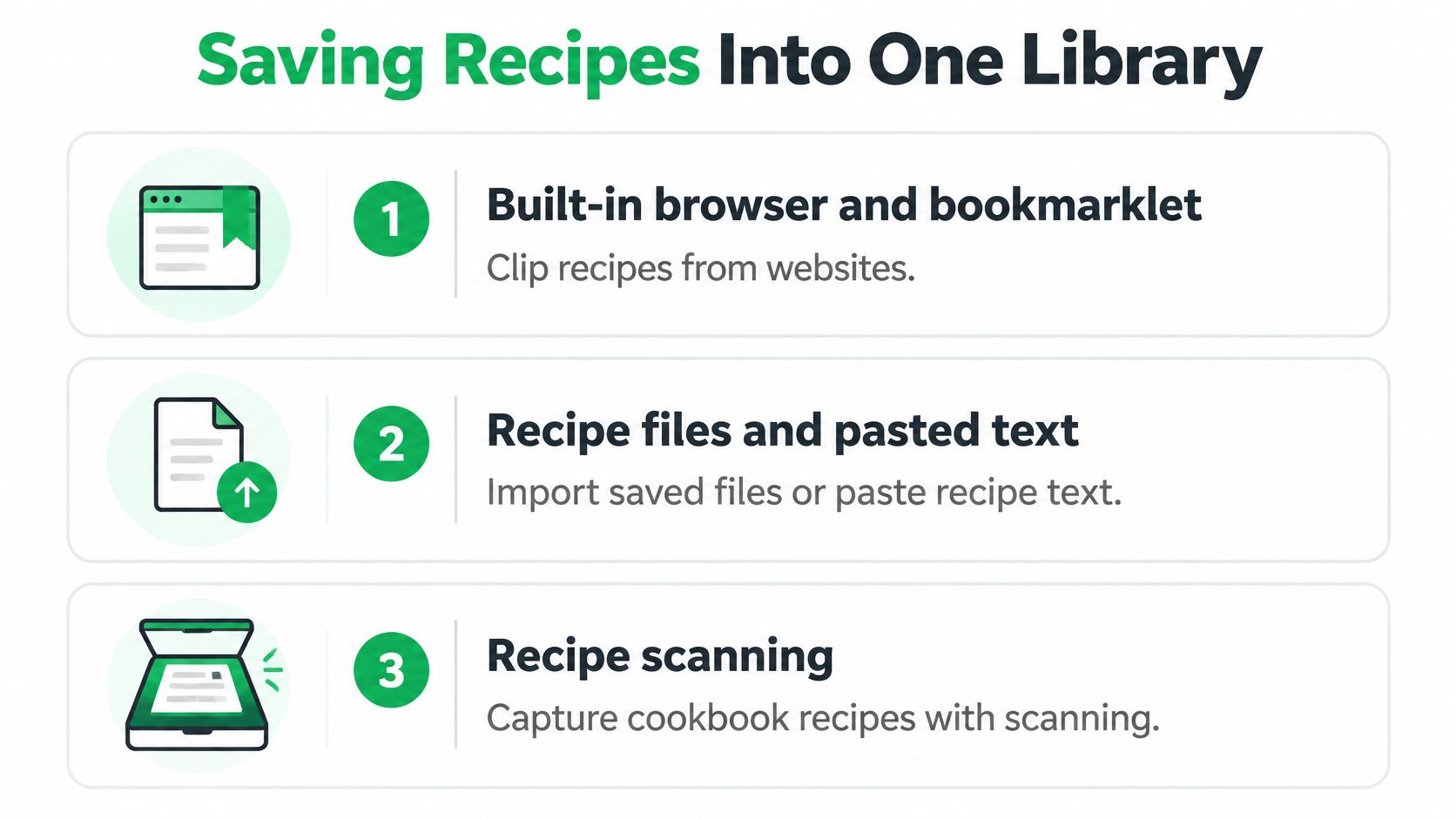
Official Paprika 4 guides and the App Store listing document four main capture paths, though not all of them come included on the free download:
- Built-in browser and bookmarklet: Browse to any food blog or recipe site inside the app or trigger the browser bookmarklet to clip ingredients and instructions directly into a structured card.
- Recipe files and pasted text: Import supported recipe files from existing backups or extract recipe text pasted from your clipboard when you already have a family dish typed out.
- Recipe scanning (Premium required): Capture printed cookbook pages or handwritten recipe cards into editable digital text. Cooks who prioritize digitizing physical books can compare how a dedicated recipe scanner app handles complex page layouts and handwritten notes.
- Social media import (Premium required): Per the App Store listing, saving recipes directly from the TikTok, Instagram, Facebook, and YouTube apps requires Premium. Cooks staying on the free tier should expect to rely on web clipping, file imports, and manual typing.
Organizing Recipes and Checking Extraction Quality
Once a recipe lands in Paprika 4, you can assign it to cookbooks and categories, search by recipe title or ingredient, edit steps and notes, scale quantities up or down by serving count, and convert between measurement systems. Apps run natively on iPhone, iPad, Mac, Android, and Windows, though remember that the free tier caps storage at 50 recipes, so serious collectors will need Standard or Premium to house a full archive.
Because recipe websites vary wildly in formatting, run a quick three-source check on your own devices before importing dozens of bookmarks:
- An ad-heavy food blog: Clip a long post packed with pop-ups and author stories to confirm the ingredients and directions separate cleanly without stray banner text.
- A recipe with an embedded video: Verify that the written quantities and cooking times still import when the page centers around a video player.
- A dish using nonstandard units: Test how measurements like a pinch, a bunch, or mixed metric and imperial weights behave when you double servings or convert units.
After a week of consistent clipping and light editing, a well-maintained library should look predictable: clear categories that match how your household cooks, clean serving scales, and search results that pull up a weeknight dinner by a single leftover ingredient.
Meal Planning, Grocery Lists and Pantry Tracking
Saving recipes only solves half the dinner problem. The bigger time sink for most households is translating five saved dinners into a shopping run without buying a third jar of cumin.
The workflow below shows how Paprika connects saved recipes to a weekly meal plan, grocery list, and pantry log.
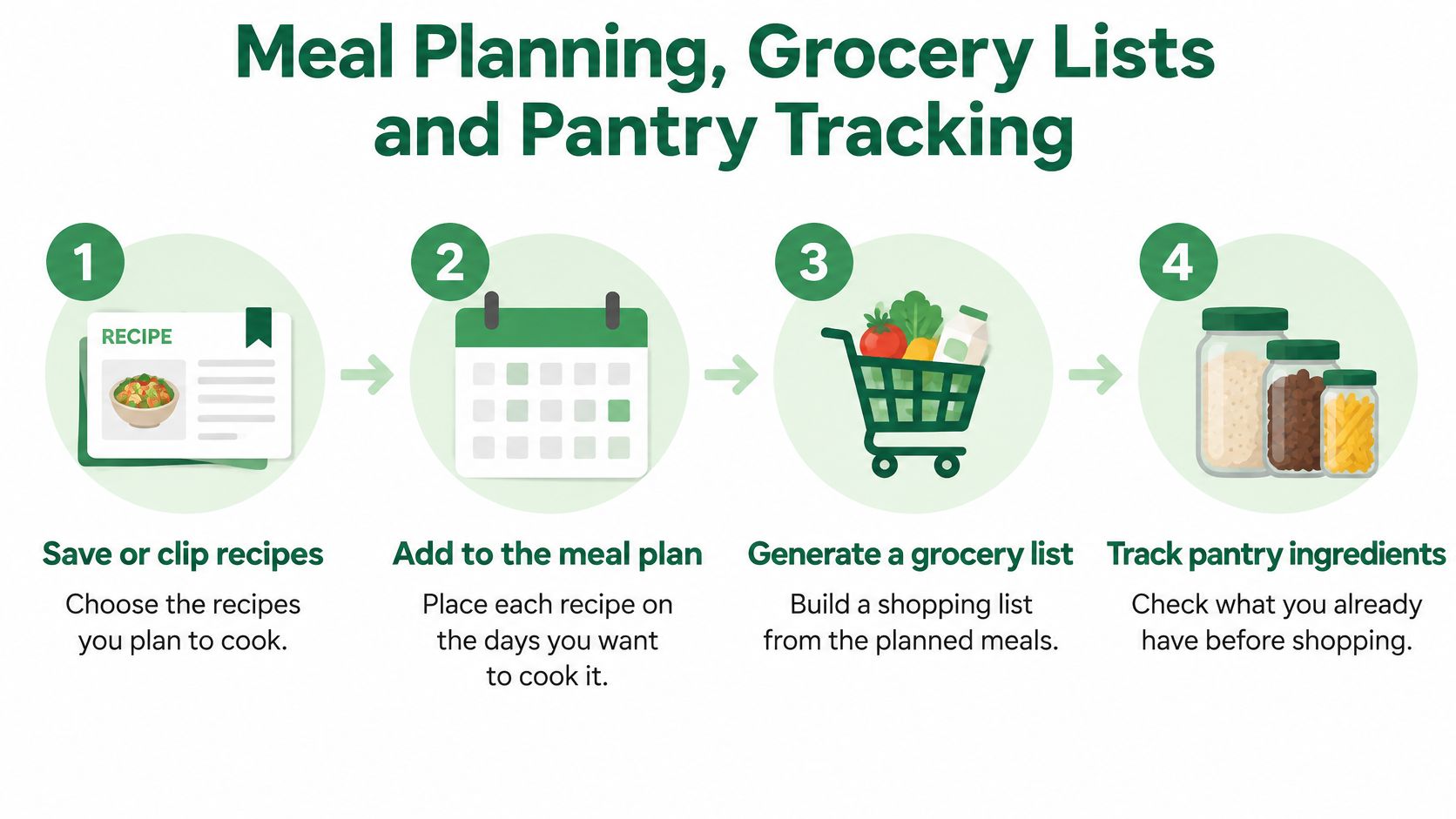
In practice, Paprika's weekly routine breaks into five clear steps, though several of them depend on your plan tier:
- Save or clip your meals: Pull the recipes you plan to cook into your library so ingredients are already structured.
- Place recipes on the meal planner: Assign each dish to the day you want to cook it, or group favorite combinations into reusable menus. Check the official Paprika 4 user guide to confirm which plan tier covers menu features on your platform.
- Generate a grocery list: Send ingredients from your planned meals straight to the shopping list so you aren't rewriting butter, onions, and garlic by hand. Official pricing pages place grocery lists in Standard and Premium, not the free tier.
- Check off items as you shop: Mark off ingredients while moving through the store so nothing slips through the cracks.
- Log stocked items in the pantry: Record what you already keep on hand using pantry locations, helping prevent duplicate purchases of staples sitting in your cabinets. Like grocery lists, pantry locations require Standard or Premium.
Why Pantry Tracking Sets Paprika Apart
Building a shopping list straight from a weekly calendar removes tedious copying and cuts down on forgotten spices or produce. Readers comparing how different apps automate shopping runs can review options for a grocery list generator from recipes to see which approach fits their shopping habits.
During hectic months, some households decide they'd rather skip grocery planning and pantry logs altogether. When convenience outweighs cooking from scratch, people often browse ranked meal kit subscriptions from Comredix to receive pre-portioned ingredients instead of managing weekly shopping lists.
For cooks who do shop and cook from their own libraries, pantry tracking is a meaningful differentiator. Paprika 4 includes pantry locations on Standard and Premium, whereas Recipe One doesn't offer a pantry inventory. In Recipe One, AI helps you plan the week, get the grocery list out of it, and find your recipes easily by combining ingredients into one shopping list, yet cooks who rely on logging every open bag of rice or spice jar at home should weigh that missing pantry feature carefully.
Paprika's planning system rewards cooks who map out their week ahead of time and shop from a structured list. If you usually improvise dinner from whatever looks fresh at the store, you'll use far less of its calendar and pantry machinery.
Real Limits and Portability Questions to Check
A strong long-term reputation can hide friction that only appears after you've saved hundreds of dishes. Judging Paprika 4 by its constraints and its exit path gives a clearer picture than its feature list alone.
Three limits deserve attention before you build a large library:
- Restrictive free plan: Saving stops at 50 recipes, and the free tier excludes cloud syncing, extra cookbooks, grocery lists, pantry locations, advanced search, and the duplicate finder.
- Premium gates on modern workflows: According to the official App Store listing and the November 2026 announcement, saving recipes from TikTok, Instagram, Facebook, and YouTube, scanning cookbook pages or recipe cards, and viewing nutrition labels all require Premium, along with family accounts, barcode scanning, and Alexa support.
- No general web app: Paprika focuses on native apps rather than a full browser workspace. Paprika announced a HomeView public beta on November 16, 2026, but official details describe it as a mini web app built specifically for Apple HomeView's Safari, open to all account holders during the beta and requiring Premium afterward. It does not work as a general-purpose web app for managing your recipes on any desktop browser.
Testing Recipe Ownership and Export Before You Commit
Most app reviews spend all their time on importing and almost none on leaving. An independent Paprika review from The Reluctant Gourmet points out that while Paprika accepts imports from several legacy formats, it doesn't provide an equally effortless export path or convenient bulk sharing with relatives who don't use Paprika.
That gap matters because a digital recipe book functions as household infrastructure. Losing a social bookmark is annoying; losing ten years of tweaked family recipes, baking notes, and holiday menus is painful. The larger your saved collection grows, the higher your switching cost becomes if you ever change platforms or operating systems.
Smart habit: Never move hundreds of family recipes into a new app until you've tested how cleanly a backup exports and restores outside that app's sync server.
Run this three-step check yourself before moving your full collection:
- Export a small sample: Save five varied recipes (including personal notes, edits, and photos), then run an export using Paprika's built-in tools.
- Restore to a second device: Open or re-import that exported archive on another device to confirm every ingredient, quantity, and step survives intact without garbled formatting.
- Share with a non-user: Send one recipe to a family member who doesn't install Paprika and see how readable the output is on their phone or computer.
Five recipes cost almost nothing to test. If they survive export, restoration, and sharing smoothly, you can migrate a larger library with much lower risk. If any step fails, you learned it cheaply, before your whole collection depended on one sync server.
Paprika Alternatives Compared Side by Side
If Paprika's plan limits, missing general web app, or Premium gates give you pause, weighing Paprika alternatives side by side clarifies what you gain and what you trade away. Picking between a classic cookbook app and a modern multi-source kitchen assistant mostly comes down to where your recipes originate and which devices sit on your counter.
Paprika 4 and Recipe One Side by Side
| Feature | Paprika 4 | Recipe One |
|---|---|---|
| Where recipes come from | Website clipping, bookmarklet, recipe files, scanning and social import (scanning and social import need Premium) | Any link, social post, screenshot, cookbook page, photo and your own notes |
| Meal planning | Meal planner with menus and grocery lists (grocery lists need Standard or Premium) | Meal planner for a week of dinners from recipes you already saved, with a grocery list built from the week's ingredients |
| Pantry tracking | Pantry locations (Standard or Premium) | No pantry inventory listed |
| Platforms | iOS, macOS, Android and Windows | iPhone, Android, web app, Chrome extension and ChatGPT or Claude plugins |
| Price model | Free download with optional Premium subscription | Free to start |
| Nutrition | Nutrition labels need Premium | Calories, protein, carbs and fat per serving |
| Built-in AI help | None listed on official Paprika 4 pages (as of November 2026) | Maya suggests what to make, plans the week and turns fridge ingredients into a recipe |
Recipe One takes a broader capture approach. It saves recipes from TikTok, Instagram, YouTube, Pinterest, Facebook, any website, photos and screenshots, cookbook pages, and your own notes. A saved recipe keeps the parts that matter for cooking, with ingredients and steps extracted from a link or photo without ads or extra content. Search works by recipe name, ingredient, or tag, which suits a library built from many small sources rather than one carefully maintained collection. Its nutrition display covers calories, protein, carbs, and fat per serving.
Inside the app, Maya can suggest what to make, plan the week, or turn fridge ingredients into a recipe. The meal planner starts from recipes you already saved, so it works best once the library has enough dinners in it. The grocery list then gathers every ingredient for the week, with one-tap adding and tick-offs while shopping. That makes Recipe One more useful for households that collect recipes from social posts and want a route into dinner, less useful for people whose main need is pantry stock tracking.
Cooks can access their library on iPhone, Android, the Recipe One web app, the Recipe One Chrome extension, and the Recipe One plugin for ChatGPT and Claude. Recipe One users have saved over 100,000 recipes, with more than 1,000 home cooks using the app. Its 4.6 rating on the App Store sits alongside comments such as, "The UI could be a bit more streamlined but scanning feature for cookbooks is superior to other apps that offer the same thing. Automatic tagging is also incredibly helpful!" from stephieyaknow, and "Works exactly as advertised. A must have any serious cook." from Zengardener. Another App Store user, DLZ1321, said, "Recipe One is honestly the easiest way I’ve found to save recipes from anywhere and actually use them without all the annoying ads and clutter."
The AI assistant has limits worth understanding before you connect it. Importing recipes from links through the assistant uses the same Recipe One import credits as the app and is limited to at most 30 a day. The assistant gets an access token, never your password or Google or Apple sign-in. To disconnect it, remove Recipe One in the assistant's connector or app settings. Recipe One also keeps a copy of the previous version after the first edit of a recipe each day, which helps when a saved ingredient list or step changes during cooking.
Other Recipe Apps to Weigh
Recipe Keeper stands out as a cross-platform digital cookbook built for home cooks who want personal collections accessible across phones, tablets, and desktops. Its main limitation for this review is that exact platform pricing tiers and current import boundaries were not independently verified on its store pages. Check the official Recipe Keeper site, App Store, or Google Play listing for current pricing and features as of November 2026.
Mela appeals to cooks invested in Apple hardware who want a clean, native recipe manager paired with blog-reading tools. Readers comparing those two ecosystems directly can read Mela vs Paprika. Its practical limit is platform flexibility for households mixing Apple, Android, or Windows devices. Check Mela's official site and App Store listing for current pricing and features as of November 2026.
ReciMe focuses heavily on pulling recipes out of social media posts and organizing them for weekly cooking. Its limit is that full pricing details and non-social organization features were not verified directly from its store listings for this review. Check ReciMe's official site, App Store, or Google Play listing for current pricing and features as of November 2026.
Planning-First Apps and One Notable Closure
Meal-planning leaders such as Mob and ReciMe suit cooks who want inspiration and structured weekly schedules. Planning-first tools do not always capture recipes from every personal source, such as handwritten family cards, screenshots, or arbitrary websites, as flexibly as a dedicated capture-and-planning app. Recipe One pairs capture from many sources with AI-assisted weekly planning and one combined grocery list. Cooks who specifically want a curated editorial catalog of recipes may still prefer a service like Mob. Check each app's official site or store listing for current features and pricing as of November 2026.
Older comparisons often recommend Mealime as a planner, but Mealime closed on October 21, 2026, and its recipes moved to Meals Hub. Treat those older lists with caution.
Paprika Questions Answered
Is Paprika Free
Paprika 4 is free to download on iOS, macOS, Android, and Windows, and its free plan lets you save up to 50 recipes without cloud syncing. Accessing unlimited storage, cross-device sync, grocery lists, and pantry locations requires Standard or Premium. Because regional prices vary, check paprikaapp.com for current prices in your region as of November 2026.
Is Paprika 4 a Subscription
Not for everyone. Anyone who bought an earlier version of Paprika receives a free upgrade to Paprika 4 Standard without subscribing, keeping unlimited recipes, cloud sync, extra cookbooks, grocery lists, and pantry locations across all platforms. Premium is an optional subscription that provides version 4's newest features.
Is Paprika 3 Still Available
Yes. Paprika 3 and Paprika 4 are separate apps, both still exist, and official documentation maintains separate guides for each version. Paprika 3 pricing is different from Paprika 4, so never assume a Paprika 3 price applies to Paprika 4.
What Is the Best Paprika Alternative
The best alternative depends on how your household collects and cooks recipes. Pick Recipe One if you save recipes from social videos, screenshots, blogs, cookbook pages, and handwritten cards and want AI help to plan the week and build one grocery list. Look toward native Apple or cross-platform cookbook apps if offline desktop software or curated meal catalogs matter more to your routine.
Choose Paprika or Recipe One for Your Kitchen
Pick Paprika 4 if pantry tracking or a native Windows desktop app sits at the top of your list, or if you already manage a large Paprika archive and qualify for Standard (or plan to use Premium). Pick Recipe One if you save recipes from social videos, screenshots, cookbook pages, blogs, or handwritten cards, want a weekly dinner plan built from recipes you already saved with one combined grocery list, or want your recipe library available inside ChatGPT or Claude. Recipe One runs on iPhone, Android, its web app, a Chrome extension, and as a plugin for ChatGPT and Claude, so it suits cooks who want their library reachable in those places rather than in a desktop application.
The visual below highlights the practical split between both kitchen setups at a glance.
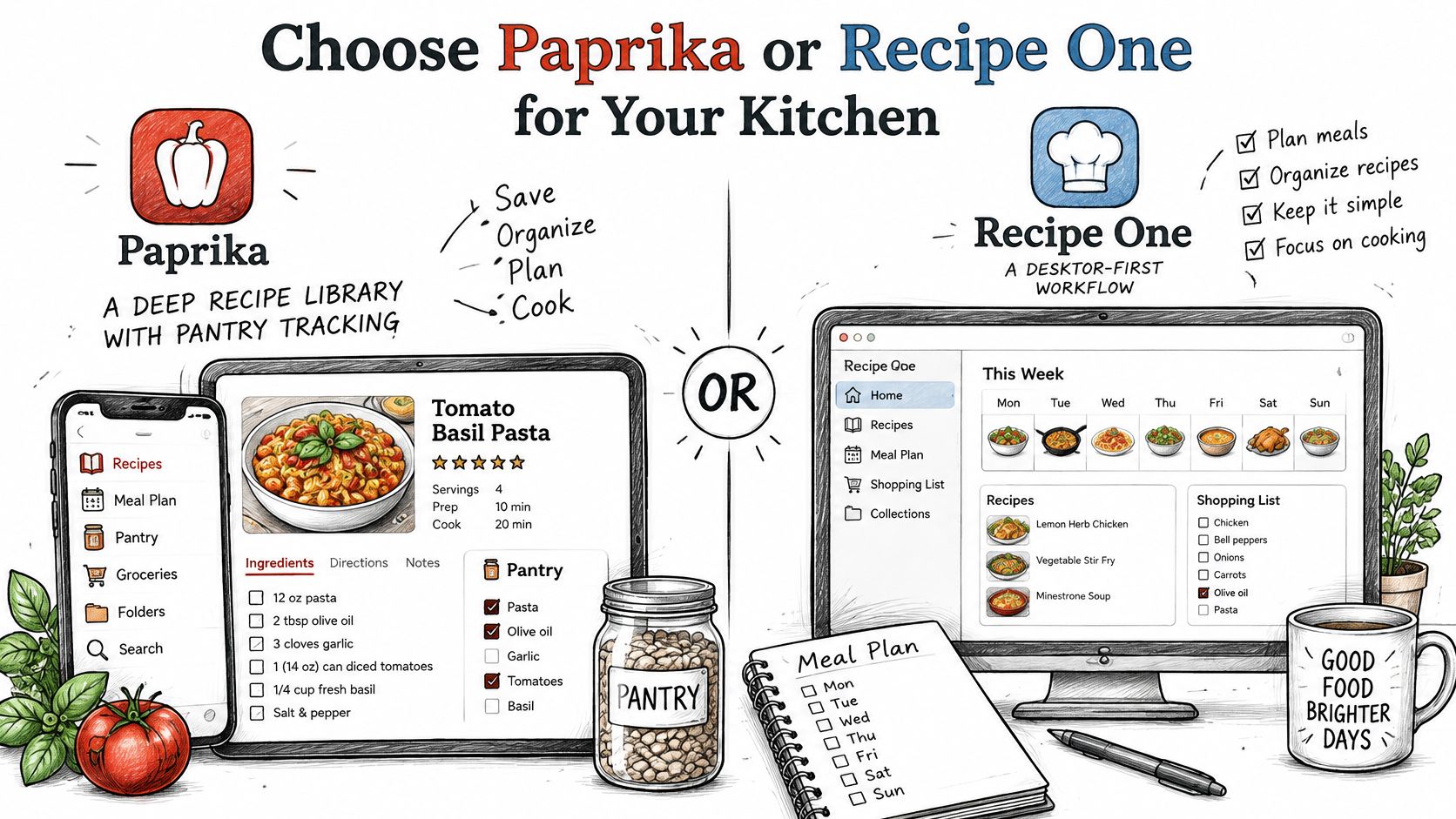
The recipe-ownership question matters more than any feature list, because a large library is expensive to move twice. Before migrating an entire collection, run three concrete tests:
- Try Paprika 4 with your real count: Download it from the Paprika Recipe Manager 4 iPhone App Store listing (or your preferred desktop or Android store), measure your library against the 50-recipe free cap, and decide on Standard or Premium before moving years of recipes.
- Test Recipe One across mixed sources: Save five dishes you cook, one each from a social video, a screenshot, a food blog, a cookbook page, and your own notes, then check the weekly meal plan and the grocery list it builds from those recipes. In Recipe One, saving works by sharing a link or snapping a photo, and the app extracts the ingredients and steps without ads or extra content, so this test shows exactly what your everyday capture flow would feel like.
- Run the five-recipe portability check: Whichever app wins your test, export five saved recipes, restore them on a second device, and verify every ingredient and step before moving the rest of your library. An app that passes this check protects the years of cooking you have already collected; an app that fails it is a warning you want before committing, not after.
The best recipe manager isn't the one with the longest feature sheet; it's the one you actually open at 5:30 PM on a Tuesday.
If those tests point you toward capture from social video and screenshots, Recipe One is free to start, and its cooking mode shows one big step at a time while keeping the screen on. If they point you toward offline desktop software and pantry locations, Paprika 4 is the more natural fit. Either way, the portability check in step three is the one step worth doing first.