
Tuesday night, you're staring at three jars of pasta sauce, a half-empty bag of rice pushed behind the cereal, and a can of beans you're sure you bought last week. You buy another can anyway, then discover the original during Saturday's shelf cleanout. Meanwhile, something else expires because you never saw it.
That isn't laziness. It's a tracking problem. Groceries arrive together, then split across shelves and disappear at different speeds. Your memory can manage dinner tonight, but it can't reliably maintain a changing record of every opened jar, backup staple, freezer portion, and nearly empty packet.
A pantry inventory app can act as an external brain, but only if it fits the way you already shop and cook. The download isn't the solution. The solution is a small workflow that makes adding, using, and replacing food easier than ignoring it.
The Pantry Chaos You Are Actually Trying to Fix
The first failure is usually a duplicate purchase. You're in the supermarket, remember needing tomatoes, and can't remember whether the cupboard holds one tin or four. Without a trustworthy inventory, you buy “just in case.” That creates clutter, hides older products, and makes the next shopping decision even harder.
The second failure is expiry. A jar gets pushed behind newer groceries, a bag of flour loses its place, or an opened packet remains invisible until it smells wrong. The app needs to surface what deserves attention, not merely store a long list that you never check.
The third failure arrives at 8 p.m. You have food in the house, but you can't connect it to a realistic meal. A stock list without recipe context tells you what exists. It doesn't tell you what to cook before ordering takeaway.
The useful test: If the app doesn't reduce the number of cupboard doors you open before dinner, it's just another list.
The breakdown often happens after the initial enthusiasm fades. Items bought together get used at different rates, quantities become guesses, and one missed update makes the whole system feel unreliable. That's why physical layout still matters. Before you load an app, practical functional pantry design advice can help make locations visible and consistent.
Start with the physical zones you use, then let the app mirror them. A useful guide to organizing a kitchen pantry can help you decide where staples, opened packets, and backup stock should live. The app becomes far more useful when “rice” means one predictable shelf rather than a hunt through the kitchen.
Setting Up Your Pantry Inventory App the Right Way
Don't begin by cataloguing every edible thing in the house. That sounds thorough, but it creates the exact maintenance burden that causes abandonment.
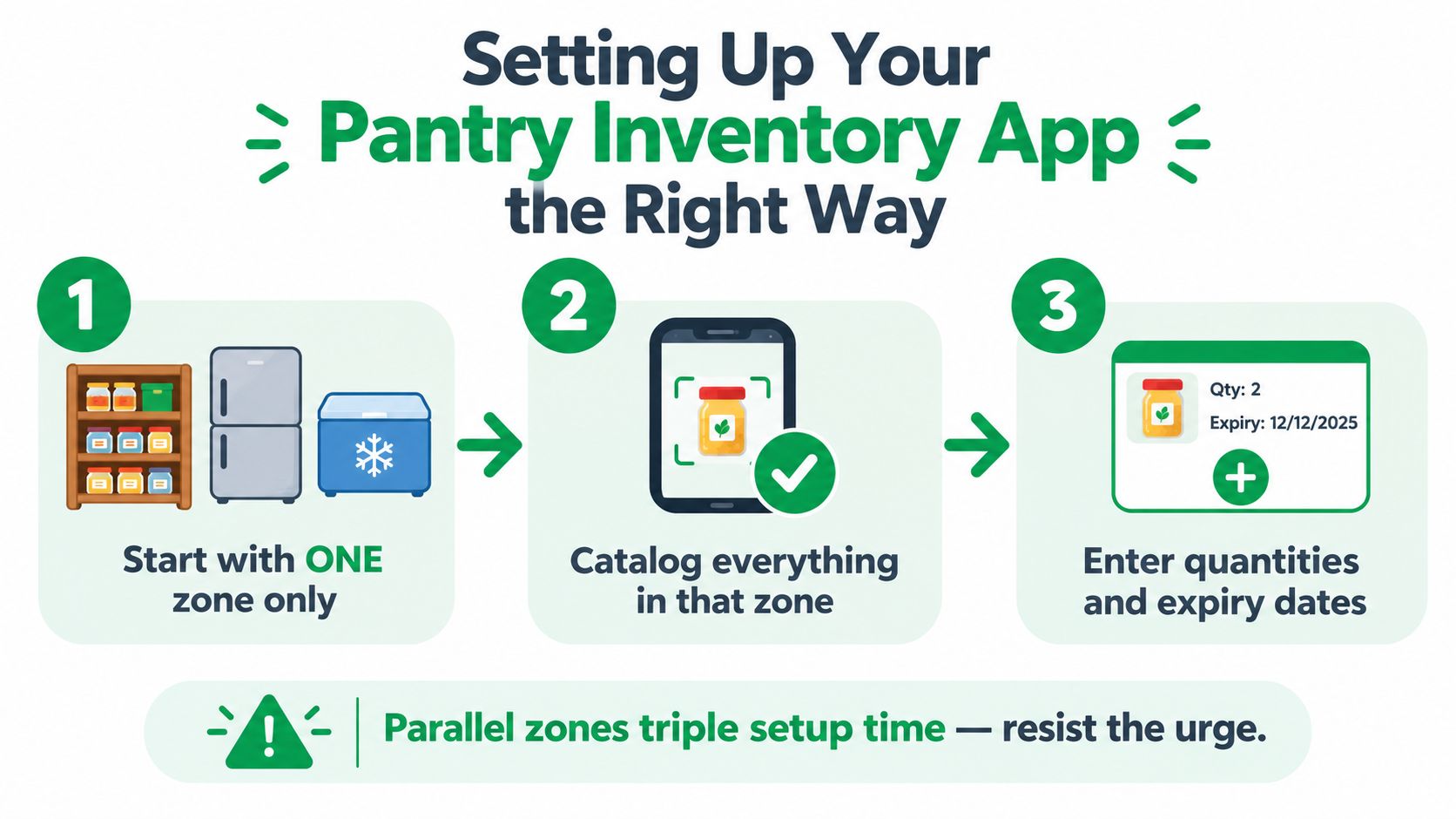
Start with one zone
Choose the dry pantry, fridge, or freezer. Pick the zone where duplicate buying and forgotten food cause the most trouble. Starting with one area gives you a complete, usable system instead of three half-finished lists.
Spend one focused session on that zone. Work shelf by shelf, and photograph groups of products when the app supports it. You're trying to create a dependable baseline, not a museum catalogue.
Record quantities the way you cook
Use units that make sense at the stove. Track flour in cups if that's how your recipes work, and track beans as cans rather than converting every label into weight. An inventory that reflects your cooking language is easier to update and more useful while meal planning.
Give each item a location. “Pantry shelf” is better than an unstructured kitchen-wide list, particularly when someone else in the household needs to find something quickly. The same principle applies to operational stock systems, where clear processes matter more than decorative complexity. Ovenbell's order management guide offers useful context on keeping stock and fulfilment information connected.
Set the trigger before you need it
Low-stock thresholds should trigger repurchasing, not confirm that you've already run out. If you always want two cans of chickpeas available, set the alert at two. If you use a staple rarely, set a lower threshold and rely on a recipe check before buying more.
Decide how new items enter the system before you close the app. Will you scan at the counter, add groceries while unpacking, or use a receipt workflow? The best method is the one you'll use when you're tired and the shopping bags are still on the floor.
Recipe One's recipe keeper app can also help connect saved recipes with the ingredients you want to keep visible. Finish the initial setup completely enough that the first update feels simple. If you close the app halfway through, you've created future admin rather than removing it.
Categories and Tags That Make the System Work
Categories answer where an item lives. Tags answer how or when you use it. Keep those jobs separate.
Use fixed categories for physical storage: pantry, fridge, freezer, spice rack, or baking cupboard. Those locations rarely change, and they make retrieval quick. Use flexible tags for decisions: breakfast, weeknight, kid-friendly, bulk-buy, baking, meal-prep, and expiring soon.
A small starter set is better than a clever taxonomy. Begin with six to eight tags that reflect real choices in your household. If you never filter by a tag, it isn't helping you cook.
| Categories | Tags |
|---|---|
| Pantry | Weeknight |
| Fridge | Breakfast |
| Freezer | Kid-friendly |
| Spice rack | Baking |
| Baking cupboard | Bulk-buy |
| Utility shelf | Expiring soon |
Apply two rules from the beginning. Don't create a tag for fewer than three items, and retire a tag that hasn't helped you make a decision for a month. These limits keep the app readable when your inventory grows.
Build around tonight's question
The useful filter isn't “show me everything I own.” It's “what can I make tonight without another shop?” A tag layer lets you narrow the list to weeknight ingredients, freezer items, or food that needs using soon. That turns the app from a storage record into a cooking prompt.
For recipe organization, categorizing recipes by ingredient and use follows the same logic. Store location belongs in one layer. Cooking purpose belongs in another.
Over-tagging is the quiet way to ruin the system. If every item has five labels, none of them guides a decision. Use tags to remove choices, not to describe every possible detail.
Connecting Recipes, Meal Plans, and Grocery Lists
A pantry inventory becomes useful when it joins the meal-planning loop. Recipes, planned meals, and shopping lists shouldn't live as separate features that you manually reconcile. They should form one routine: choose meals, compare ingredients with stock, buy what's missing, then reduce quantities as you cook.
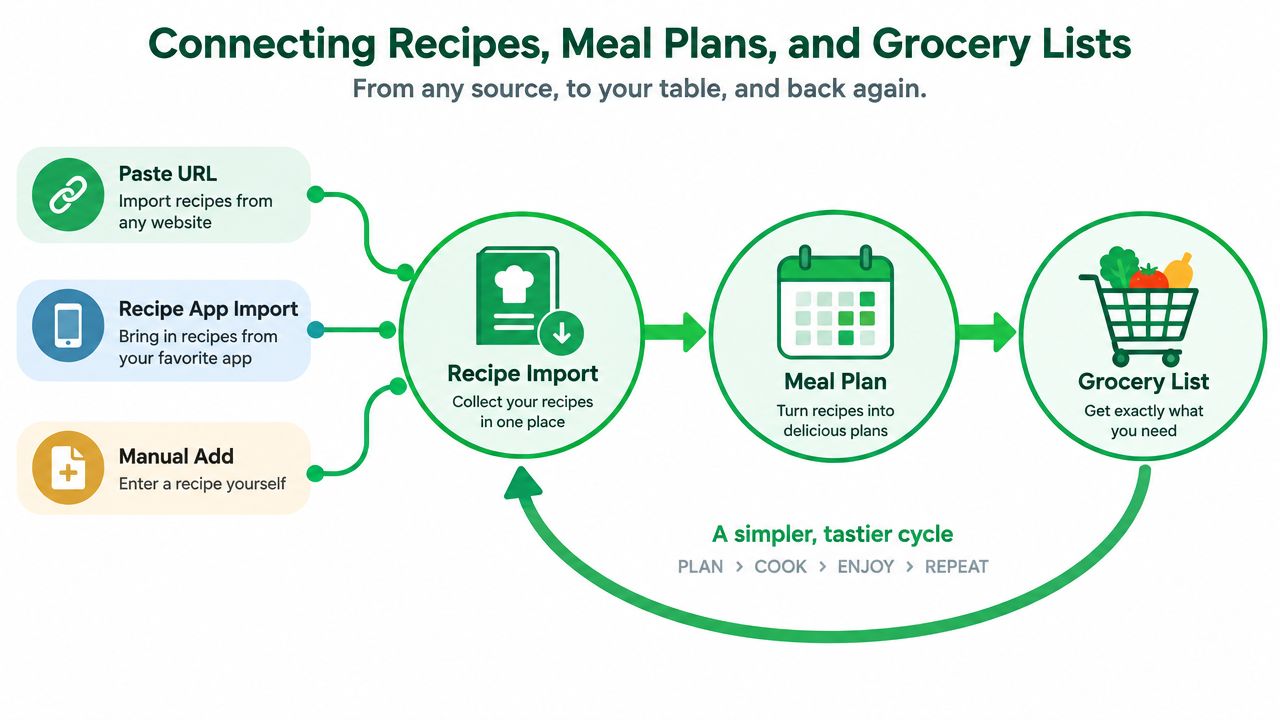
Start by importing recipes in the format you use. Paste a URL, bring in a recipe from a connected app, or add one manually when the source is messy. Check the ingredients after import. Recipe parsers can confuse “one onion” with “three yellow onions,” merge similar products incorrectly, or miss an ingredient hidden in a paragraph.
Use the week as the operating cycle
On Sunday, choose meals for the coming days and compare the ingredients against current stock. If you have rice, lentils, and canned tomatoes, the grocery list should request only the missing items for the planned dishes. A list that begins blank and ignores your inventory forces you to perform the comparison in your head.
On Monday, mark the meal as cooked and adjust what was used. Don't wait until the end of the week. If a recipe used half a jar of sauce, record the remaining quantity while the jar is still on the counter.
Midweek, build the top-up shop from the same list. On Friday, check what remains and decide whether it should influence next week's meals. That final glance prevents the “mystery leftovers” problem, where food exists but never enters your plans.
Recipe One's grocery list generator from recipes follows this connected model by turning saved recipes into shopping items and organizing them for the shop. The important principle is broader than any one app: every meal should create a stock update, and every shopping list should reflect what you already have.
Here's a short visual walkthrough of the recipe-to-list process:
The loop only works if you correct mismatches early. Standardize “olive oil,” “extra-virgin olive oil,” and your household's preferred product instead of letting the app treat them as unrelated entries. Leave uncertain quantities approximate rather than blocking the update. An imperfect current inventory beats a precise inventory you stopped maintaining.
Adding Items Without Losing Your Mind
Choose capture methods by product type, not by loyalty to one feature. Barcode scanning is the sensible default for packaged goods, especially tins, jars, boxes, and repeat purchases. It can fail with bulk-bin food, fresh produce, store-brand products, and items whose barcode isn't in the app's database.
Barcode lookup also deserves supervision. A peer-reviewed assessment of popular nutrition apps found an average of 4% incorrectly identified products overall, while app performance ranged from 96% correct scans in the strongest app to 25% and 5% in weaker examples, with incomplete responses reaching 17%. Those findings come from a Netherlands barcode-scanning quality assessment. Pantry workflows should include search, correction, and database checks rather than trusting every scan.
| Method | Best For | Common Failure Points |
|---|---|---|
| Barcode scanning | Packaged supermarket goods | Missing products, wrong variants, bulk items |
| OCR or camera capture | Labels, handwritten dates, visual entry | Curved packaging, faded ink, misread text |
| Receipt scanning | Logging a full shop quickly | Duplicate products, unclear quantities, missed substitutions |
| Manual entry | Spices, leftovers, bulk grains, loose produce | Slow setup and inconsistent naming |
OCR is useful when the camera can see a clean, flat label. It gets less dependable with curved jars, worn printing, and handwritten dates. One reported comparison found OCR success falling from 96.3% on clean, front-facing labels to 68.1% on difficult surfaces, while cloud processing introduced about 3 to 8 seconds of upload delay. The same report gave around 91% initial date detection, 85% of alerts within 48 hours of true expiry, and 11% false positives. These figures come from an industry comparison of AI pantry scanners, and they make the practical point clearly: image quality matters.
Use this rule: scan first, type when necessary, and correct quickly. Don't delay adding an item because you can't make the record perfect. A rough entry that keeps the shelf visible is more valuable than an abandoned promise to return later.
The Weekly Maintenance Habit
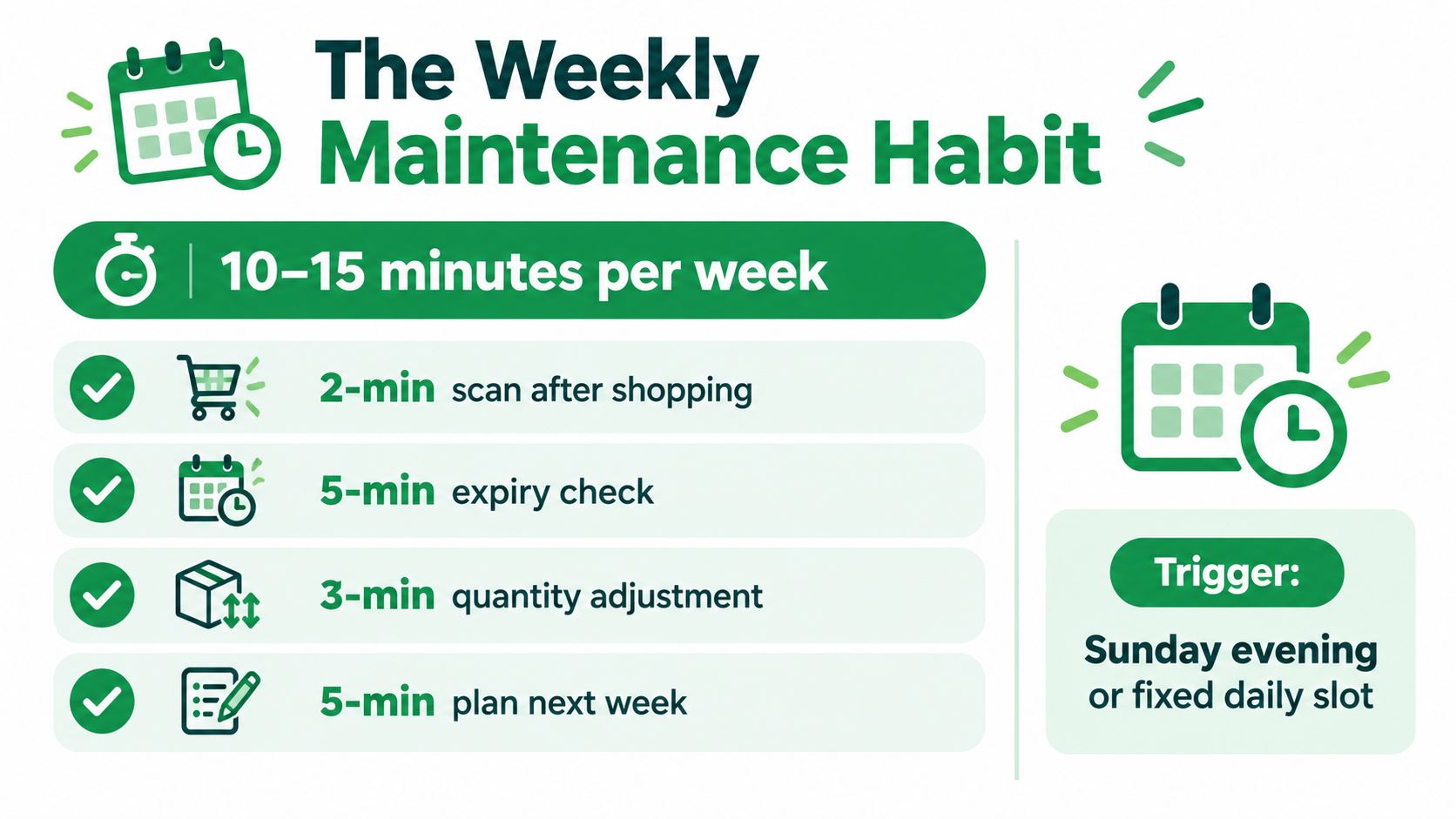
Your inventory needs a rhythm, not a heroic reset. Set aside roughly 10 to 15 minutes each week for maintenance, then attach smaller updates to moments that already happen.
After a grocery run, spend about two minutes scanning or adding products while the bags are still on the counter. You're already touching everything, so this avoids creating a separate admin task. During cooking, swipe down or reduce quantities as ingredients leave the shelf.
Make Sunday review specific
A weekly review works when you know what to inspect. Use the same order each time:
- Check dates: Look for items that need using soon, and move them into visible cooking plans.
- Fix quantities: Adjust products that were opened, finished, or used without a recorded update.
- Remove duplicates: Merge entries created by different spellings, scans, or package variants.
- Prune tags: Retire labels that no longer help you filter meals or shopping decisions.
- Audit the list: Remove purchases you already made and add missing ingredients for the coming plan.
The review doesn't have to happen on Sunday if that evening is chaotic. A fixed daily slot or a trigger tied to your routine works just as well. The important part is responding to a real signal, such as a low-stock alert, a recipe showing zero stock, or a pantry reorganization.
Use weekly meal-planning guidance to make the review serve dinner rather than administration. If the next meals are already chosen, expiry checks and quantity corrections have an immediate purpose.
Maintenance rule: Update an item when you're already holding it, then use the weekly review for exceptions.
The habit stays manageable because each action has a place. Shopping adds stock. Cooking removes stock. The weekly check repairs the small gaps before they become a full inventory rebuild.
Why Most Pantry Apps Fail and How to Make Yours Stick
Most pantry apps don't fail because they lack features. They fail because the user stops trusting the data. Three problems cause that collapse: adding food takes too many taps, quantities become stale, and the interface offers more options than the household needs.
Research into food-assistance technology shows that this isn't only a household annoyance. A nationwide survey found strong interest in practical digital functions, including 50.2% of pantry directors wanting staff or volunteer scheduling, 42.4% wanting a safe remote version of client choice, 35.7% wanting client registration, 35.0% wanting client and volunteer communication, and 22.3% wanting links to nearby emergency services. Inventory management was also among the desired features, according to the survey and related review00153-1/fulltext). The lesson is simple: digital tools gain value when they solve operational friction, not when they collect impressive features.
A later review documented 39 distinct digital tools for food assistance, with inventory management appearing in 12 tools, or 30.8% of those reviewed. It also found that most tools covered only a small fraction of the desired functions, reinforcing how fragmented the category has been. The scoping review of food-assistance technology supports a useful distinction for home cooks: broad capability matters less than a workflow people can sustain.
Design for the five-second check
If updating an item takes longer than finding it physically, the app has lost. A feature-heavy tool such as SuperCook may appeal to cooks who want extensive recipe discovery, while a simpler tracker such as Pantry by Helder may suit someone who mainly needs a quick stock check. Those products represent different priorities. Choose based on the action you'll repeat, not the feature list you admire during setup.
Recent pantry-app comparisons identify manual entry and upkeep as central failure points, with receipt scanning, camera capture, and household sync appearing as lower-friction alternatives in current product discussions. The pantry tracking app comparison frames the better question: can you keep the inventory accurate through restocking, cooking, and shared household use?
Ship the smallest version first. Track one zone, add only the fields you'll use, and run it for two weeks. Then make exactly one improvement based on a real annoyance. Add barcode scanning if typing is the problem. Add meal links if stock never influences dinner. Add household sharing if updates are being missed by other cooks.
The right pantry inventory app isn't the one that wins a first-day demo. It's the one you'll open when you're standing in the supermarket, holding a jar of sauce, trying to decide whether you already have one at home.
Recipe One turns saved recipes into an organized cooking system, with ingredient-based search and grocery lists built from the meals you plan to make. If you want your pantry decisions connected to real recipes instead of another isolated stock list, visit Recipe One and start building the workflow around the food you cook.


