SuperCook is publicly presented as free for its basic recipe library and ingredient matching, but you should check the official website or the App Store or Google Play listing for current pricing and any paid features. If an app finds ten recipes for your chicken and rice, have you found dinner, or have you only found ten links to check?
That gap is where most reviews stop too early. Finding a match matters, but cooking from it matters more. You still need clear quantities, steps in order, and a page that opens when you're standing at the stove. This review judges the SuperCook App by both parts, the search and the cooking moment that follows.
Quick Verdict on the SuperCook App
The SuperCook App is a recipe-by-ingredients app and website where you pick what you have and it returns web recipes that use those items. Its basic recipe access is publicly presented as free, though current pricing needs a check on the official site or store listing before you rely on it.
It's a good fit if your pantry is partly stocked and you want quick ideas without starting from a dish name. Say you've got eggs, spinach, cheese, and tortillas. Instead of guessing a recipe title, you enter those four items and browse what they can become.
It's less suited to exact nutrition tracking, strict portion scaling, or anyone who needs every result to arrive with complete, checked instructions. The recipes come from outside websites, so the quality of the steps sits with each source page, not with the search itself.
Three Things You Can Try Now
- List what you have. Write down the ingredients in your fridge and on your shelf, including staples you'd normally forget to count.
- Run two searches. Try one with no missing items, then one that allows one missing item, and compare how much wider the second list gets.
- Open one result fully. Check that it shows real quantities and ordered steps before you commit to cooking it.
Those three steps take a few minutes and tell you more than any feature list. The sections below explain how the matching works, what free access covers, where results can let you down, and how a saved-library alternative compares.
How Ingredient-Based Recipe Matching Works
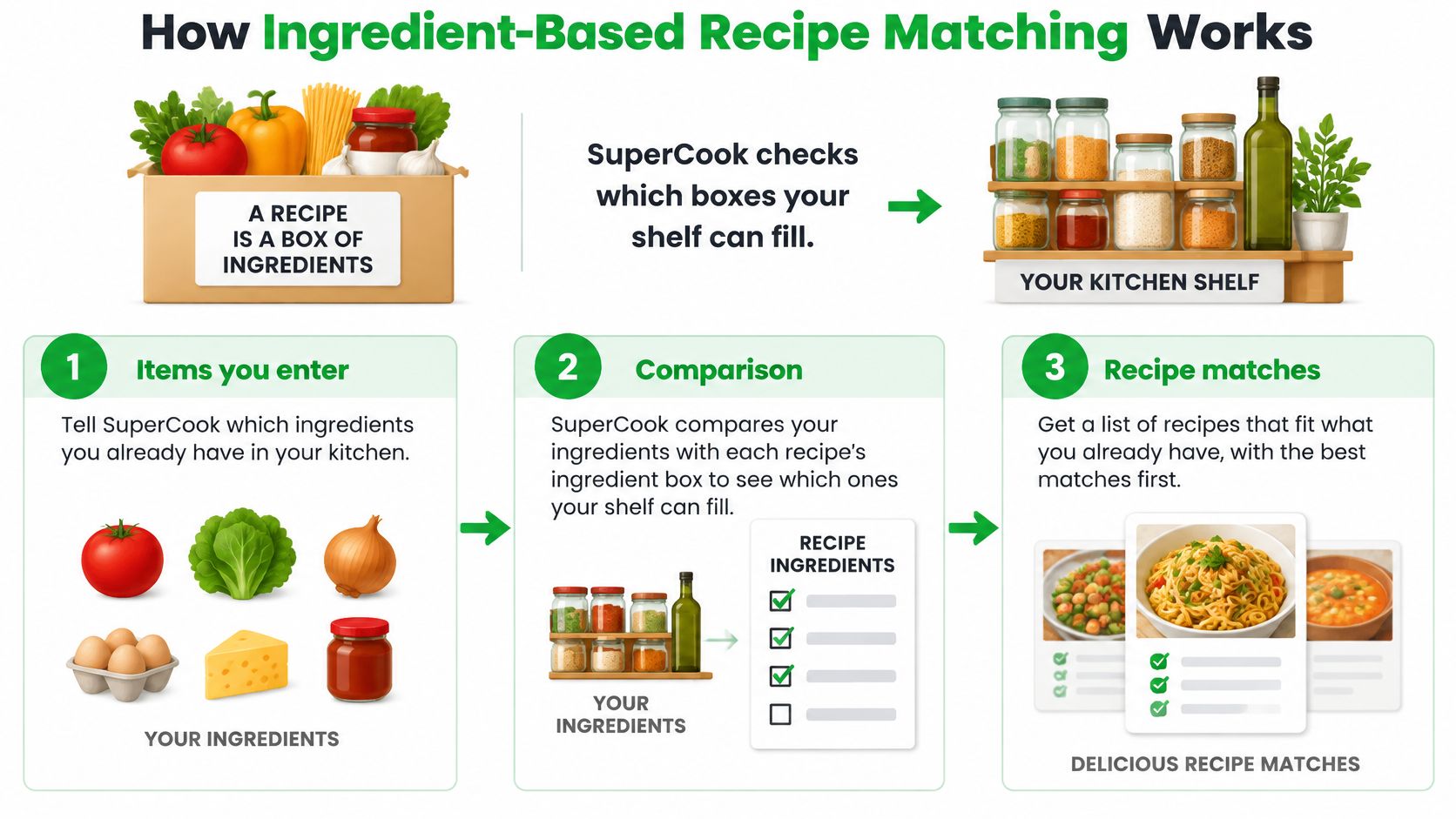
A useful match starts with a simple comparison: what you have against what a recipe calls for. SuperCook helps you explore recipes based on ingredients you enter, but finding a promising result is only the first part of the cooking decision.
The Three Parts of a Match
First, enter the ingredients you have. The search then compares your list with recipe ingredient lists and returns options to review.
Next, open a result and check the original recipe. The cooking moment matters: ingredient names lining up does not confirm that you have the right quantities, can follow the steps, or can finish with the time and equipment available. The match gets you to a candidate; the recipe page helps you decide whether it will work in your kitchen.
Why Specificity Changes Your Results
A more accurate pantry list gives the search a better starting point. If you leave out ingredients you do have, you may miss useful options. If your list includes something you have run out of, a recipe may look suitable until you begin cooking. Keeping an up-to-date pantry inventory can make ingredient-based searches more useful.
Some searches may allow results that need an ingredient you do not have. That can broaden your choices, but it also changes the question from “What can I cook now?” to “What could I make with one more item?” Check each recipe to see what is missing before deciding whether the extra trip is worthwhile.
A match means the ingredient names line up. It does not confirm the meal suits your diet, allergies, or available time.
Substitutions can affect allergen exposure, texture, cooking time, and nutrition. If you have dietary restrictions, review the recipe and its quantities carefully. For example, replacing cream with milk in a sauce changes its thickness and richness, even though both are dairy.
Use the same practical sequence each time: enter what you have, review the suggestions, open a recipe, then confirm its ingredients and steps before cooking. The search can narrow the choices, but the final check is what tells you whether a meal is workable.
Features and a Step-by-Step Search Workflow
SuperCook's filters shape the search, but the cooking moment is the true test: can you follow a complete recipe with what you have, or does the result still require guesswork?
| Filter or input | What it does | Best when |
|---|---|---|
| Maximum ingredient count | Limits results to recipes with a chosen number of ingredients | You want a simpler meal with a short ingredient list |
| One missing item | Shows recipes that need just one ingredient you do not have | A quick shop is an option |
| Appliance or cooking method keyword | Narrows results by a tool or method, such as an oven or slow cooker | You want to cook with a particular appliance |
| Voice input | Lets you enter several ingredients in one spoken entry | Your hands are busy while you check the pantry |
A Workflow That Avoids Guesswork
- List what you have. Include staples such as oil, salt, and eggs. Leaving them off can hide recipes that are within reach.
- Search with no missing items first. These results show which meals appear cookable without a trip to the store.
- Allow one missing item. Check which recipes become available and whether the missing ingredient is worth buying.
- Add an appliance or method keyword. If you want to use the oven or a slow cooker, this narrows the results to options that fit your setup.
- Open the strongest candidates. Read the quantities and steps on the recipe page. A title and photo cannot tell you whether you have enough or how the dish comes together.
- Keep track of the gap. Add the missing ingredient to a grocery list built from your chosen recipes, then rerun the search after you have it.
For example, say your list includes chicken thighs, potatoes, onions, garlic, and honey. A search requiring no missing ingredients might find a simple roast. Allowing one missing item could bring up a glaze that calls for soy sauce. You could also explore recipes featuring raw honey for ideas, but check each recipe's full quantities and directions before cooking.
What a good result looks like: a recipe with clear amounts and steps that fit your ingredients, plus a source page you can return to while cooking. A close match is only useful if the instructions work at the stove.
Free vs Paid Access at a High Level
The basic experience is publicly presented as free.
The Google Play listing presents the ingredient-matching service and its recipe collection without identifying a subscription price in the listing text. That's useful information, but it isn't a universal pricing policy. Public listings don't establish one price or one set of terms for every version or market.
So the honest answer to "is SuperCook free" is yes at a high level, with a check attached. Regional availability, advertising, and any paid features can differ, and listings change over time. This is the same caution you'd apply to any app, including list tools covered in comparisons such as an AnyList app overview.
A Two-Minute Check Before You Download
- Open the listing for your region. Prices and features can vary by country, so use your own store, not a screenshot from someone else's.
- Look for in-app purchase or subscription text. Stores place this near the app information, and it's the clearest signal of paid tiers.
- Read any price shown there before downloading. That figure, on the official listing, is the only one worth trusting.
Check the official site or App Store for current pricing, and you'll have the right answer for your device and region.
Strengths, Limits and Practical Workarounds
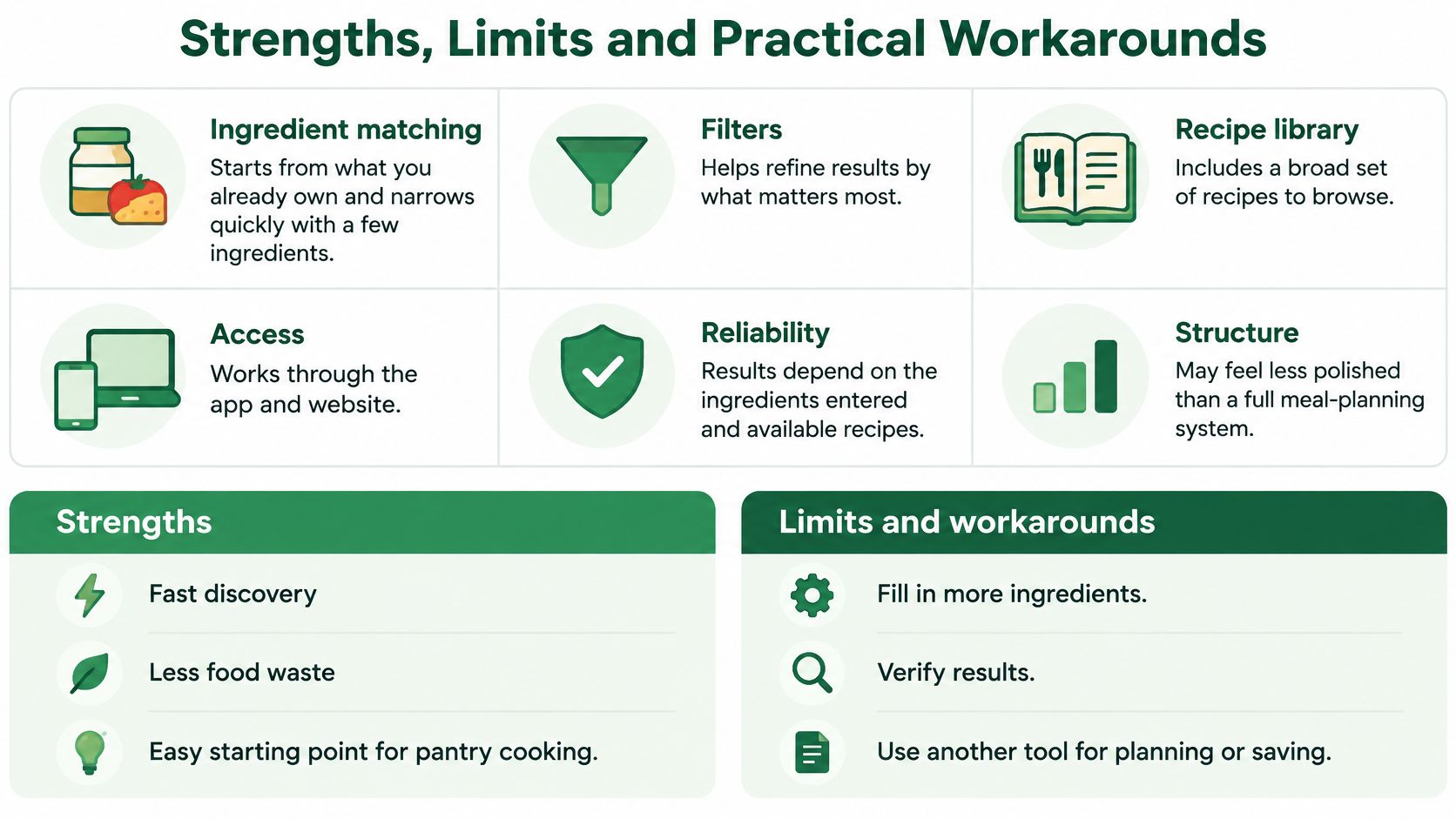
A recipe search only helps if you can use the result once you start cooking. SuperCook can help turn ingredients on hand into ideas, but the cooking experience also depends on whether the linked recipe opens and gives clear instructions.
| Area | Strength | Limitation |
|---|---|---|
| Ingredient matching | Starts with ingredients you already have | Results depend on the external recipe sources |
| Filters | Ingredient-count and one-missing-item filters narrow results | Filters do not confirm quantities or suitable substitutions |
| Recipe library | Brings recipe ideas together for browsing | A selected recipe may open on an outside page that loads slowly |
| Access | Basic recipe access is presented as free in store listings | Paid features, if offered, can vary by regional listing |
| Reliability | Can provide quick weeknight ideas | Some reviews report crashes, slow loading, or sign-in problems |
| Structure | Helps find ideas based on available ingredients | Listings describe no built-in meal planner or cookbook system |
Where Discovery Succeeds but Cooking Fails
A matching result is only the start. Reviews mention recipes that do not open properly or lead to incomplete instructions. Other reviews report slow loading, crashes, and login trouble.
That distinction matters at the stove. SuperCook works as a recipe routing tool: it connects your ingredients to a recipe source, while the outside page supplies the measurements and ordered steps. If that page is unclear or unavailable, a good ingredient match may still leave you without a usable dinner plan.
The video below shows how the app presents its ingredient-first approach.
A Recovery Routine for Weak Results
- Open a result before shopping. Check that the full instructions and quantities are available before buying ingredients. A title and ingredient match alone do not tell you whether the recipe is practical to cook.
- Try another route if the page fails. Search for the recipe name on the source site, or choose another result with similar ingredients. Avoid spending time on a link that will not load.
- Check substitutions carefully. Write down the quantities you plan to use and review dietary restrictions against the original recipe. A replacement ingredient can change allergens or nutrition.
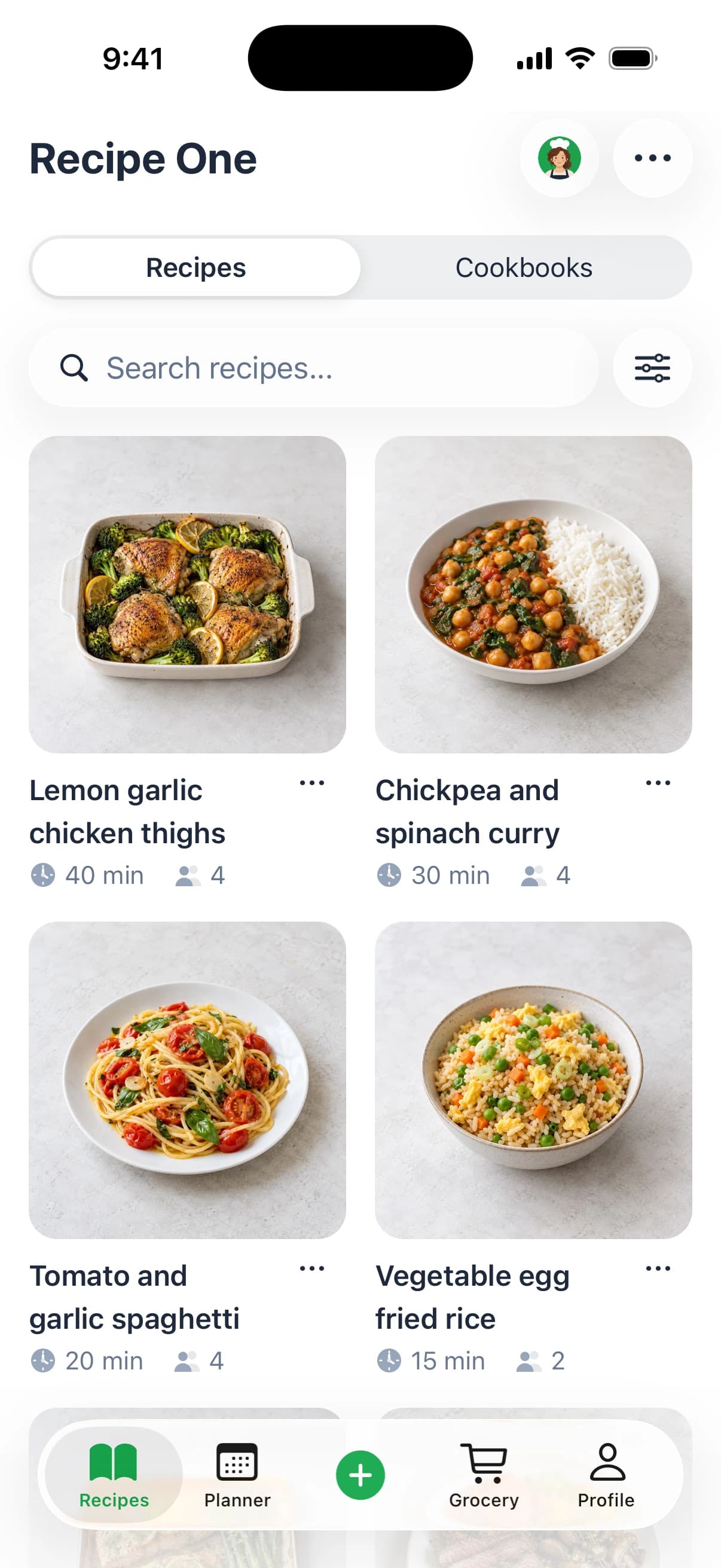
- Keep a usable copy. Recipe One lets users share a link or snap a photo, then extracts the ingredients and steps without ads or extra content. That can keep a recipe's key instructions together while you cook.
- Use a focused ingredient tool when needed. The free Cook with Ingredients tool is designed to find recipe ideas from ingredients you have.
Pantry-first cooking can also help reduce waste by using food already on hand before shopping again. For practical ways to manage grocery spending, see these ideas for saving money on groceries.
Privacy is another part of the experience to consider before creating an account. Public listings and policy information describe data collection differently, including policy details that refer to registration or uploaded information. Review the SuperCook privacy policy for the version you use, especially if you plan to share personal information.
Which to Choose
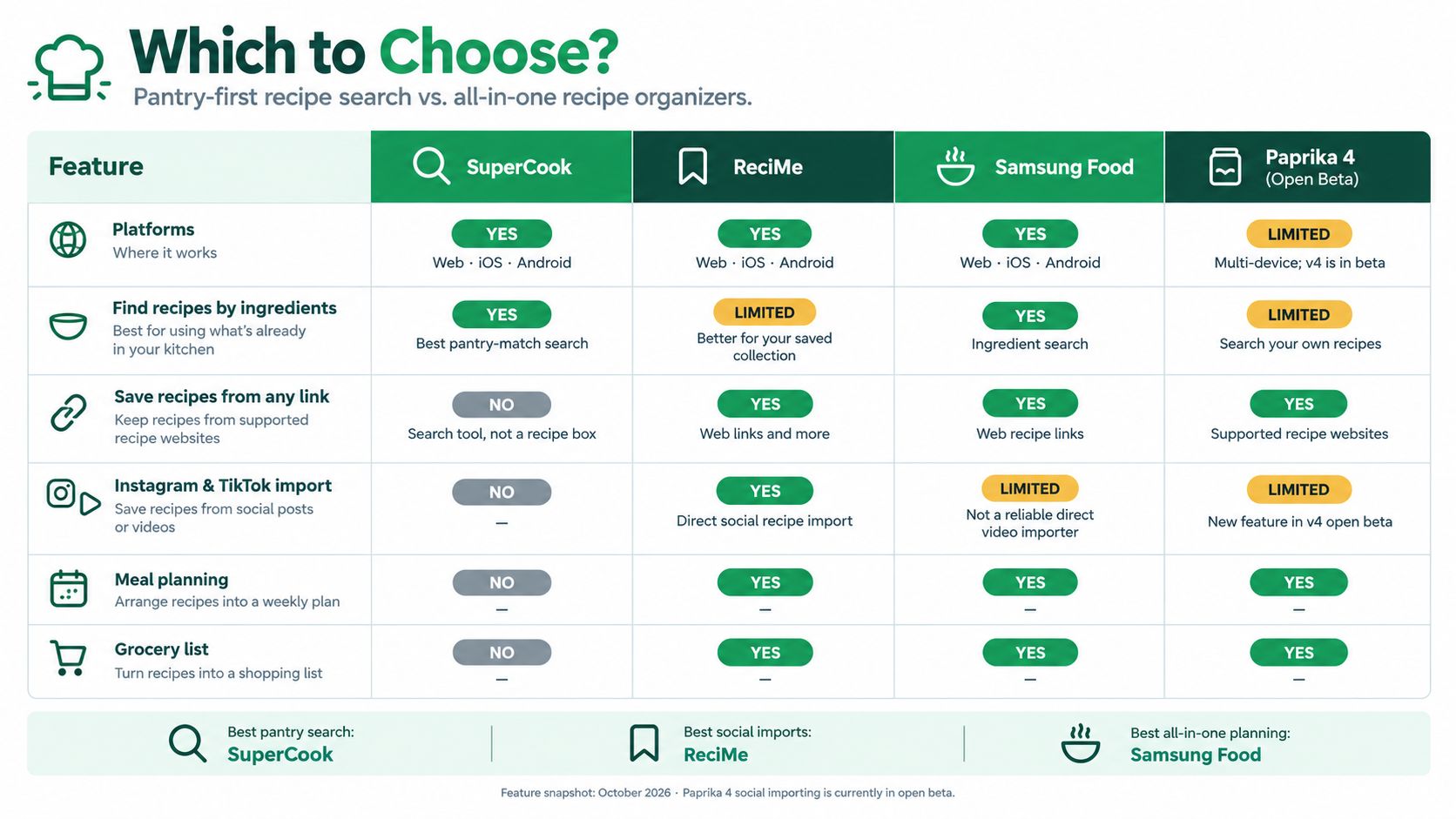
Which cooking moment matters more to you: finding a recipe from the ingredients on hand, or getting a saved recipe onto the table with a plan and shopping list? The comparison below focuses on those different jobs.
| Feature | SuperCook | Recipe One |
|---|---|---|
| Platforms | iOS and Android listings, plus a website | iPhone and Android |
| Find recipes by ingredients | Core feature | Yes, through Cook with Ingredients |
| Save recipes from any link | — | Saves recipes from links, photos, videos, websites, and cookbooks |
| Instagram or TikTok import | — | Saves recipes from videos, websites, cookbooks, photos, or links |
| Meal planner | — | Plans a week of dinners from saved recipes |
| Grocery list | — | Builds a grocery list |
The Core Difference in Plain Terms
SuperCook is a discovery engine. It searches web recipes based on what you have and sends you to matching results. That helps when you open the fridge without a meal in mind. The search is only the first part of cooking, though: you still need to open the source recipe and check that its ingredients and steps work for you.
Recipe One is a saved recipe library. It saves recipes from videos, websites, cookbooks, or photos, then helps you plan meals and build grocery lists from what you have saved. Its meal planner covers a week of dinners from recipes you already saved, so you can start with meals you want to cook and see what to buy.
The difference is the cooking moment each app addresses. SuperCook helps answer, “What can I make with these ingredients?” A saved library helps answer, “Where is the recipe I chose, and what ingredients do I need?” The first can help with spontaneous meals; the second suits routines built around recipes you want to keep and use again.
Choose by the question you ask most often, not by the longest feature list.
If meal planning is your deciding factor, compare the approaches in this guide to the best meal planner apps. If you mainly search from pantry ingredients, this guide to finding recipes by ingredients on hand can help you make a more useful ingredient list.
Verdict by Situation
- Choose SuperCook for quick pantry-based ideas, especially when you want options and are comfortable checking each recipe's source page before cooking.
- Choose a saved library if you want recipes from different formats kept together, then used for meal planning and grocery shopping.
- Use both patterns if you like discovering recipes by ingredients but prefer to cook from saved recipes with steps you have checked.
Recipe One is free to start and available on iPhone and Android. Check its current pricing and availability in the App Store or Google Play before choosing. If a saved library fits how you cook, you can start by saving a recipe you want to make.
Frequently Asked Questions About the SuperCook App
Are There Apps Like SuperCook
Yes, and they fall into two groups. Ingredient-first search tools find web recipes from what you own, while saved-recipe libraries organise recipes you collect yourself. Pick based on whether you mostly need discovery or organisation.
Does the SuperCook App Generate New Recipes
No, not in the inventing sense. This SuperCook recipe app searches and matches recipes from indexed recipe websites rather than creating new ones. Each result depends on its source page for quantities, steps, and accuracy.
Can I Use SuperCook on a Computer
There's a website alongside the mobile apps. Check current platform support on the official site before relying on it for cross-device cooking. A quick test on both devices saves frustration later.
Why Does a Recipe Not Open or Lack Steps
The source page may be unavailable, slow, or incomplete, since recipes live on outside websites. Open results before shopping, search the recipe name on the source site if a page fails, or move to the next ranked result. Saving a working version protects you next time.
If your recipes live in saved posts, screenshots, and cookbook photos, Recipe One brings them into one clean library with ingredients and steps you can cook from, then turns your week into a meal plan and a grocery list. It's a natural next step when pantry searching has found you a recipe worth keeping. Visit the site, start free, and save the next recipe you want to make again.