Honeydew at honeydewcook.com is a recipe saver and meal planner, not the HoneyDue budgeting app, with a free plan and a paid Plus tier. Why do so many saved recipes never make it to a weeknight dinner? Often it's because saving, planning and shopping live in different places. A recipe app is worth judging on whether it closes that gap, and on what stays free when your library grows.
Is the Honeydew Recipe App Worth It for You
Is the Honeydew Recipe App worth it, or is it another recipe box that fills up and never gets used? The answer turns on two things: whether you want saving, planning and shopping in one place, and how much of that workflow you need before the free plan runs out.
The name causes most of the confusion. HoneyDue is a budgeting app. The Honeydew Recipe App is a recipe-saving and meal-planning product, separate from general list apps that share the Honeydew name. Honeydew's own description of what the app is places it in that recipe and meal-planning category, with iOS and Android apps and a Chrome extension for saving from a browser in one click. That distinction matters before any feature comparison: a reader looking for budget tracking is in the wrong app store listing.
Honeydew makes its strongest case for three kinds of cooks. People who collect recipes from websites, social video and cookbooks and lose them in bookmarks get a single library. Weekly planners can drag recipes onto days and build grocery lists from a plan or a single recipe. Households that cook together can keep one organized collection instead of screenshots scattered across phones.
The limits appear for readers who want unlimited free saving or a budgeting tool. Unlimited saves sit in Plus, so a large library will eventually push against the free plan. That is a pricing question, not a product flaw, and it is the one to settle before subscribing. Check current subscription pricing on the official site or in the App Store or Google Play.
A fair test is simple: try the free plan on three recipes you already want to cook, check how cleanly they import, and see whether the planned meals and grocery list match how you shop. If they do, Honeydew has earned a longer trial. If the saved recipes stay saved and never become dinner, the feature list will not fix that.
What the Honeydew Recipe App Does Step by Step
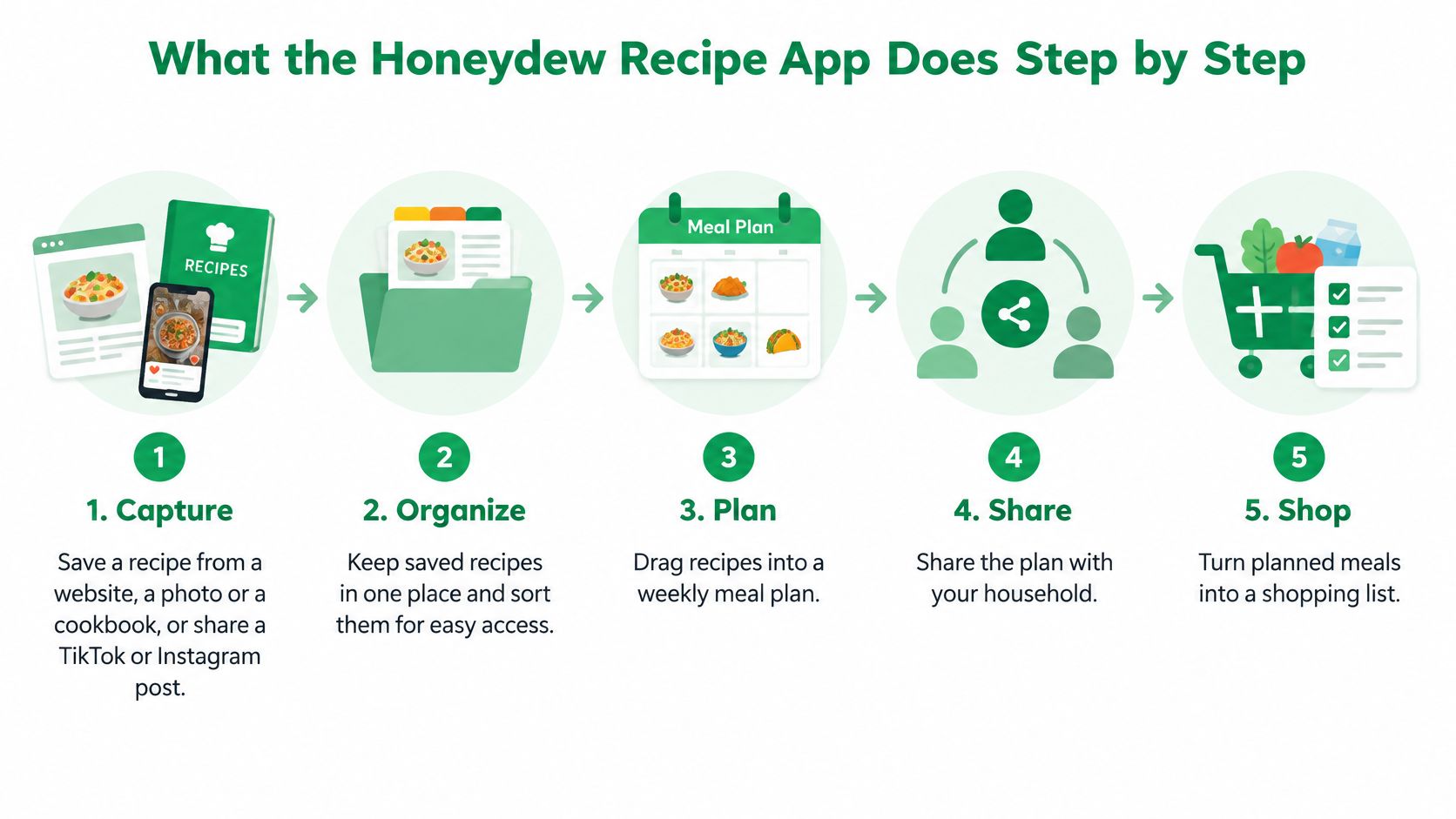
A saved recipe only helps your week when its ingredients reach a shopping list. Honeydew's value, if it fits you, is that chain from capture to shop. Here's how the documented workflow runs.
The five stages
-
Capture: Save a recipe from a website, a photo or a cookbook, or share a TikTok or Instagram post to Honeydew, or paste the post's link into the importer. Honeydew's guide to saving from TikTok and Instagram describes that share or paste-link flow, after which the recipe becomes editable ingredients and instructions. Most cooking inspiration now starts as a video, not a tidy recipe card.
-
Review: Check quantities, units and steps before your first cook. Import quality depends on the source, so a caption that skips amounts or a photo that's hard to read can produce gaps. This quick review is where mistakes get caught, while they're still cheap to fix.
-
Organize: Sort recipes into custom cookbooks so the library stays searchable. A small library survives in one pile. A growing one doesn't, and you'll stop trusting search if weeknight chicken sits buried under holiday desserts.
-
Plan: Drag recipes onto days of the week and set serving sizes for each meal. Serving sizes aren't a detail here, they're what makes the next step accurate. A plan for two needs different quantities than the same plan for six.
-
Shop: Generate a grocery list from the whole plan or from a single recipe, scaled to the servings you set. That closes the loop between deciding and buying, which is where most saved recipes otherwise die.
Platforms and browser capture
Honeydew runs on iOS and Android, so mixed-phone households aren't blocked at the door. Its Chrome extension saves a recipe from the browser in one click, which suits people who browse food blogs on a computer and cook from a phone.
Practical rule: Always open an imported recipe once before you plan with it. Two minutes of checking beats discovering a missing ingredient mid-cook.
A sensible first test
Save two recipes from sources you already use, ideally one website recipe and one social video. Put both into a plan, generate the list, and look at what came through cleanly and what needed edits. That single test tells you more than any feature list, because your sources, not anyone else's, decide how well importing works for you.
If both recipes arrive usable and the list matches what you'd buy, the core workflow fits your habits. If you spend longer fixing imports than typing them, that friction will repeat every week.
Honeydew Free Plan and Plus, Feature by Feature
The free plan is usable, and that distinction matters. Plenty of apps offer a free tier that works more like a demo. Honeydew's free versus paid comparison says free users can save a limited number of recipes from websites, organize them into cookbooks, sync across iOS and Android, and use basic meal planning and grocery lists without paying or providing a credit card.
Honeydew doesn't publish its exact save limit, so check it inside the app before you build a large library.
| Feature | Free plan | Honeydew Plus |
|---|---|---|
| Recipe saves | Limited number, exact cap not published | Unlimited saves |
| Saving from websites, social media and photos | Websites (limited saves) | Websites, photos, screenshots, and social media |
| Cookbook organization | Included | Included |
| Account syncing on iOS and Android | Included | Included |
| Basic meal planning and grocery lists | Included | Included |
| Advanced meal-planning tools | Basic planning only | Included |
| Enhanced grocery-list features | Basic lists only | Included |
| Priority support | Not included | Included |
| Card needed to start | No | Payment through app store |
| Price | Free | Monthly and annual options; check the official site or app store |
The practical gap between tiers is volume and planning depth, not access to syncing. Honeydew Plus removes the save limit and adds advanced meal-planning tools, enhanced grocery-list features, priority support and future premium features. Monthly and annual subscriptions are offered, but pricing varies by region, currency and whether you buy through the App Store or Google Play. Check the official site or store listing for current pricing rather than trusting any number quoted elsewhere.
The decision rule is straightforward. Stay free while your library is small and you plan a few meals a week. Consider Plus when you hit the save cap or want the advanced planning tools, not before. If you're comparing how another long-running keeper handles its paid tier, our Recipe Keeper review covers a different pricing model.
Count your saved recipes and planned meals this month, then decide. Honeydew's privacy policy and the store listing's data-safety details set out how your data is handled, so review them before creating an account.
Moving Your Existing Recipes Into Honeydew
Migration is the step most likely to decide whether a switch to Honeydew sticks. Honeydew supports migration from several other recipe apps, though the supported list can change, so check the import options inside the app before committing to a full move. For a small library, the move is mostly a single sitting. For a collection built over years, the work is in checking what arrived.
- Count first: Total your saved recipes and compare that number with the free plan's save limit, which the app shows when you reach it. A large import can hit the cap quickly and make Plus worth weighing.
- Test a small batch: Move ten to twenty recipes before the full library and open each one. A small batch exposes formatting problems while they are easy to abandon.
- Check every imported recipe: Confirm ingredient quantities, units and steps, because format can change during transfer.
- Keep the originals: Leave your old app or its export untouched until the new library looks right. Deleting the source first removes your only fallback.
- Rebuild your cookbooks: Group migrated recipes into custom cookbooks so the library stays searchable from day one. A cookbook for weekend baking can hold organic matcha treats for home bakers alongside other experiments.
New saves are simpler than old ones. Recipes you find later on social platforms can go straight in through the share or paste-link route, and our guide on how to save recipes from Instagram explains why that habit beats screenshots. The point is to keep the same structure for every source, whether a recipe arrives from a website, a photo, or a saved post.
A successful migration is less about speed than order. Run the small batch, inspect the imported ingredients and steps, then decide whether the whole library is worth moving or only the recipes you cook most. That approach also makes the free plan's save cap easier to judge, since you learn early which recipes you open. Honeydew's cookbook structure helps only after the content is clean, so sort the library after testing a few recipes, not before.
Honeydew Pros and Cons, Weighed Honestly
What does Honeydew ask of you in return for its strengths? The honest answer is a set of limits, not one dealbreaker. Honeydew's strongest case is the combined capture, planning and household workflow. According to Honeydew's meal planning documentation, household members can view the week's plan, suggest recipes and contribute to it.
| Area | Strength | Limitation |
|---|---|---|
| Recipe capture | Imports from websites, TikTok and Instagram posts, and photos | Imported ingredients and steps need checking before cooking |
| Free plan | Usable without a card, with cookbooks and basic planning | The save count is capped and the exact limit is not published |
| Meal planning | Drag recipes onto days and set servings for each meal | Advanced planning tools are part of Plus |
| Grocery list | Built from a full plan or a single recipe, scaled to servings | Enhanced grocery features are part of Plus |
| Household sharing | Plans can be shared so members can view, suggest and contribute | The shared view is the weekly plan, so it suits households that plan together rather than pass recipes back and forth |
| Pricing | Monthly and annual Plus options | Pricing varies by region, currency and store, so check Honeydew's official site or your app store |
Two limits deserve plain language. First, the free plan's cap means heavy collectors will face a pay decision sooner or later, and the unpublished limit makes that timing hard to predict. Second, Honeydew's Chrome extension saves recipes from a desktop browser in one click, but the full web app is not yet a confirmed planning tool, so desktop-first cooks should check its current availability on honeydewcook.com before relying on it.
How to weigh the trade-off
The case is strongest if you collect from social video and plan meals with other people. It's weakest if unlimited free saving is essential. If your main need is keeping a library tidy, our online recipe organizer guide looks at that narrower job.
Score each row against the features you need most. Let your lowest-scoring row decide whether the free plan is enough, because that's the friction you'll meet weekly.
Honeydew and Recipe One Side by Side
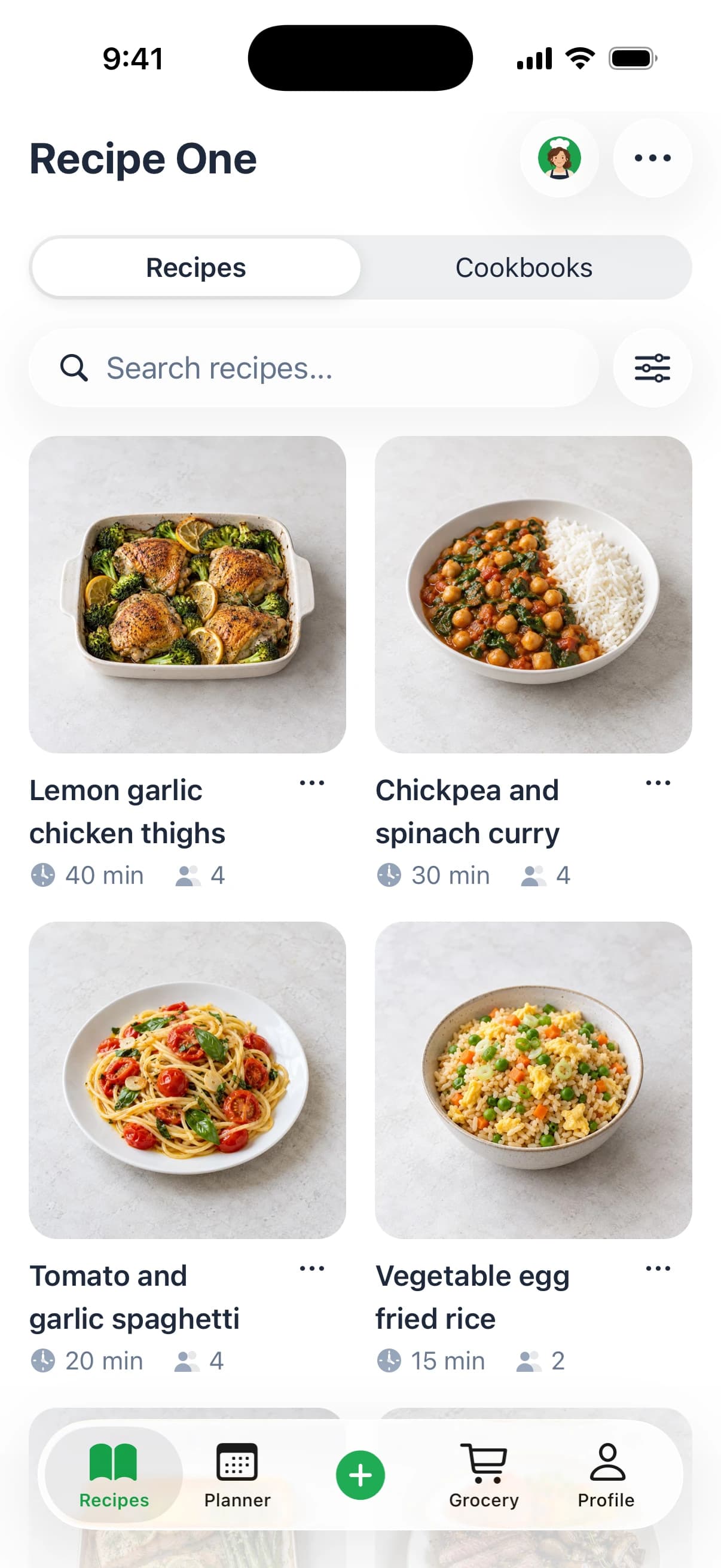
The comparison below covers the jobs both apps advertise: platform support, starting cost, meal planning, grocery lists and AI help. Recipe One is described as an AI-powered recipe keeper, and its current offering is listed at Recipe One.
| Feature | Honeydew | Recipe One |
|---|---|---|
| Platforms | iOS and Android | iPhone, Android, and web |
| Starting cost | Free plan with limits, plus paid Plus tier | Free to start, with a subscription available |
| Meal planner | Drag recipes onto days and set servings | Builds a week of dinners from saved recipes; Maya can suggest what to make |
| Grocery list | Built from a full plan or a single recipe, scaled to servings | Generates a grocery list from the week's plan |
| AI features | AI-assisted meal planning and recipe adaptation | Maya suggests meals, plans the week and turns fridge ingredients into a recipe |
Reading the rows
Platforms. Both cover iPhone and Android, so your phone choice does not decide this one.
Starting cost is where expectations split. Honeydew offers a free plan with a save cap and a paid Plus tier beyond it. Recipe One is free to start, so the key question for both is how much you can do before paying anything.
Meal planning reflects two styles. Honeydew's drag-recipes-onto-days approach suits a structured weekly plan you build yourself, meal by meal. Recipe One builds a week of dinners from recipes you already saved, and its AI cook, Maya, can suggest what to make when the plan is still open.
Grocery lists follow the same split. Honeydew builds its list from a full plan or a single recipe, scaled to servings, which is precise when your servings are right. Recipe One generates a grocery list from the week's plan, keeping the emphasis on moving from plan to shop with less manual assembly.
AI features differ in focus. Honeydew offers AI-assisted meal planning and recipe adaptation, such as converting a recipe to gluten-free. Recipe One's Maya suggests meals, plans the week and can turn fridge ingredients into a recipe, which targets the moments cooks most often stall: deciding what to make and using what is already on hand.
For a fair test, pick the row that matches your busiest week and try both apps on that job.
Choosing Honeydew, Recipe One or Another Meal Planner
Which app will you still open on a busy Tuesday? The answer depends less on the longest feature list than on the weak spot you can tolerate every week. Honeydew here means the recipe app, not the unrelated Honeydew and HoneyDue apps that share the name.
Choose by situation
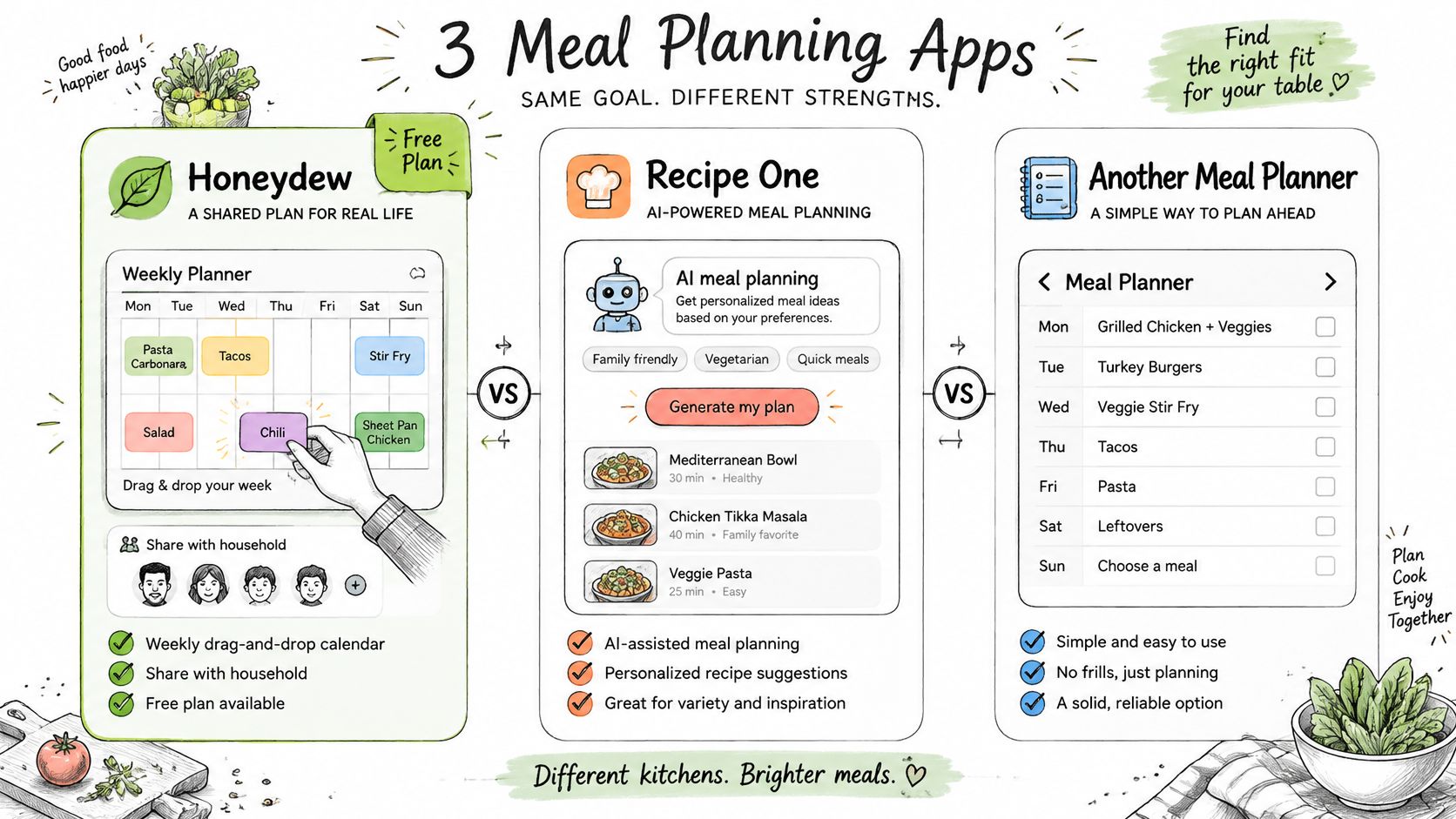
- Choose Honeydew if you want its drag-and-drop weekly planner, household plan sharing and a free plan to try first.
- Choose Recipe One if you want AI to help plan the week, get the grocery list out of that plan and find your recipes easily. It is free to start and available on iPhone and Android and the web.
The test is simple. Pick the job that causes the most friction in your week, whether that is deciding what to cook, building a list, or finding a recipe you saved months ago. Run both apps on that job with two real recipes. If one app makes the job shorter without adding a new step, it has earned a place in your routine.
Other names that come up in meal-planning searches include Mob and ReciMe. Compare their current listings for social-video import, a grocery list generated from the plan and AI planning against the two apps here. What Recipe One offers is that chain in one place, from week plan to grocery list to finding a saved recipe again. Our roundup of the best meal planner apps sets out the wider field.
For deeper category reading, see the best recipe saver app guide and the meal planning app with grocery list guide. Some cooks also plan around a specific life stage, and resources like recipes for expecting mothers from Feed Mom & Me show why a weekly plan matters more than a pile of saves.
Recipe One access routes available now
Recipe One also works beyond the phone app. Its MCP server integration lets users access their recipes, meal plan and grocery list from Claude, ChatGPT, Cursor and other AI assistants, with setup instructions in the docs. That route suits cooks who find recipes at a desk and cook from a phone.
Pick the app whose weakest row you can live with. You'll notice that row every week, long after the novelty of the strongest feature fades.
Recipe One is free to start and available on iPhone, Android, and the web. It saves recipes from videos, websites, cookbooks, and photos, then helps you plan meals and build grocery lists. Sign in with Google, Apple, or email and password to create a free account.
The Recipe One plugin for ChatGPT and Claude is available now: search "Recipe One" in ChatGPT Plugins or in Claude Customize > Connectors, or see the setup guide. You can also save recipes from your browser with the Recipe One Chrome extension or use the web app.
Frequently Asked Questions About the Honeydew Recipe App
Can I move my recipes from another app
Check whether your current app appears on Honeydew's migration list inside the app before you start. Test with a small batch first and compare quantities and steps before you move everything.
Does Honeydew handle my data privately
Honeydew's privacy policy on honeydewcook.com and the data-safety details in its App Store or Google Play listing are the places to confirm what the app collects and how it handles account data. Read both before you create an account or import recipes.
Where do I find current pricing
Check the official site at honeydewcook.com or the App Store or Google Play listing. Pricing varies by region, currency and store, so any price quoted in a third-party article can be out of date for you.
If Honeydew's free limits or planning style do not fit your week, Recipe One offers an AI-assisted alternative that helps you plan the week, get the grocery list out of it and find your recipes easily, and it is free to start on iPhone and Android, and the web. Run your two favourite recipes through it, compare the plan and list with what Honeydew produced, and keep whichever one you would open on a busy Tuesday. Start today at Recipe One.