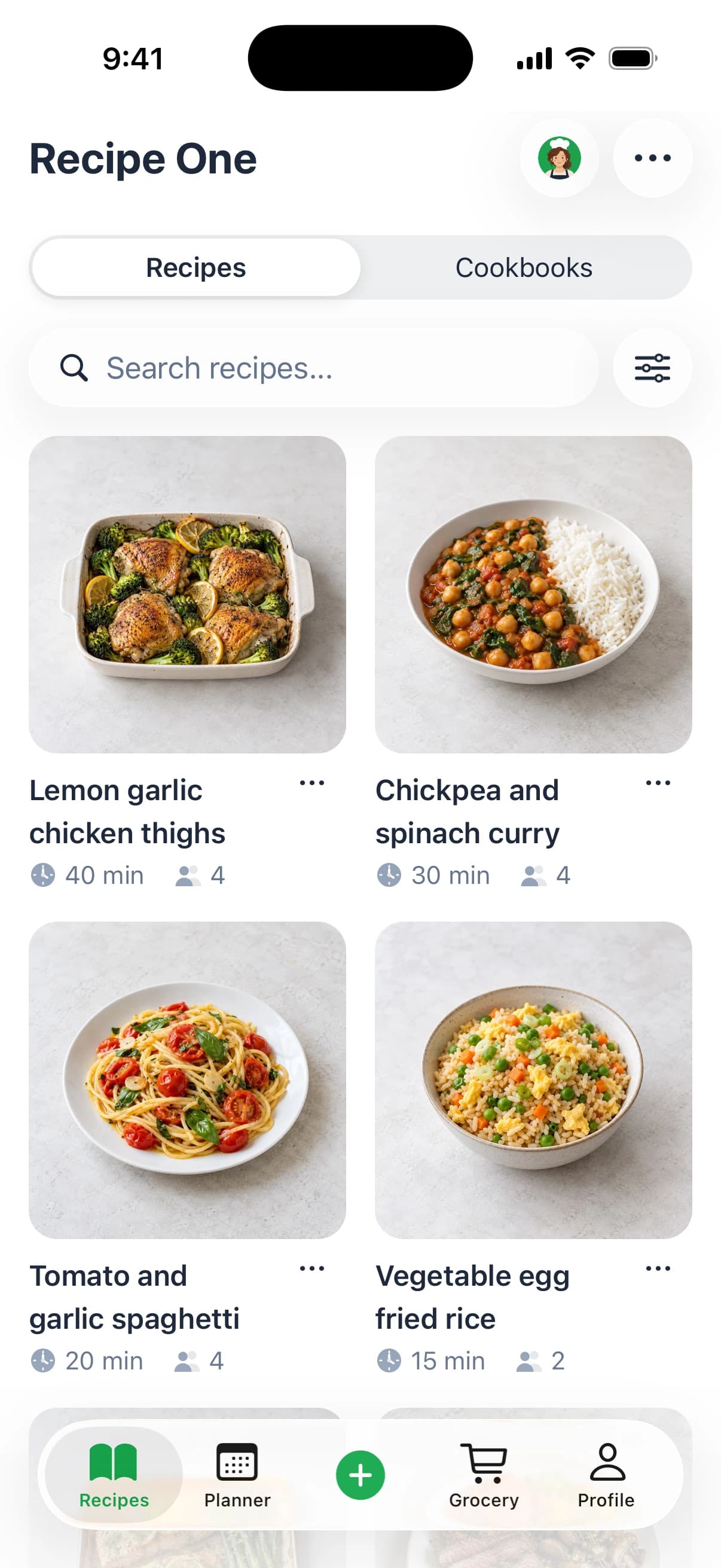
Sunday night usually starts the same way. You've saved a pasta video on your phone, bookmarked a sheet-pan dinner, texted yourself a soup idea, and still end up standing in the grocery aisle trying to remember whether you already have cumin, enough yogurt, or anything for lunch.
That's where a grocery shopping list generator stops being a cute app feature and starts acting like a real kitchen system. For a list-first app rather than a recipe list, see the Out of Milk review. The useful ones don't just copy ingredients from one recipe. They pull scattered meals into one list, clean up duplicates, adjust quantities, and help you shop without doing the same planning work twice. Try it free in the grocery list generator: paste a recipe ingredient list, group by aisle, and export a PDF.
Keep every recipe in one place
Save from any website, scan handwritten cards, and organize your kitchen.


Why a Grocery Shopping List Generator Saves More Than Time
A bad grocery list costs money, pantry space, and one extra stop on Thursday when dinner is already late.
Plenty of shoppers already plan before they buy. The gap is execution. Recipes are written for cooking, not for shopping, so the work falls back on you. You still have to combine overlapping ingredients, catch pantry assumptions, scale quantities to the right number of servings, and decide whether a recipe is still worth making at current prices.
Where recipes fail to become a shoppable list
The mess usually starts with small inconsistencies. One recipe calls for scallions, another says green onions, and a third lists half a bunch of cilantro without telling you what to do with the rest. Add a pantry check, a budget limit, and different eating preferences in the same household, and a handwritten list turns into a cleanup project. Pair it with this healthy grocery list on a budget.
A useful generator handles that handoff with less manual sorting. It should combine duplicate ingredients, flag what is probably already in the pantry, and convert recipe quantities into something you can buy at the store. That last part matters more than it gets credit for. Buying one lemon is different from buying a three pound bag of onions because two recipes happen to mention onions.
I judge these tools by one standard. Do they reduce decisions before I leave the house?
Comfort with digital grocery help is already there. Many home cooks save recipes on their phones, compare prices in store apps, and check off lists from the cart. A grocery tool fits naturally into that routine when it does more than hold random notes.
What actually saves effort
The time savings are obvious, but the better payoff is fewer planning mistakes.
- Less overbuying: Pantry-aware lists stop you from buying a second soy sauce, another jar of cumin, or too much produce for a two-person week.
- Better budget calls: If chicken thighs are expensive this week, a good generator makes it easier to swap meals or adjust quantities before you shop.
- Fewer half-use ingredients: Scaling meals to the right serving count helps avoid buying for six when you are feeding three.
- Cleaner diet planning: If you want to build your plant based shopping list, the tool should carry recurring staples forward instead of treating every week like a fresh start.
- Smoother shared shopping: One organized list beats a text thread full of “did we need yogurt too?”
What wastes time is a generator that dumps raw ingredients into a checklist and leaves the hard part to you. If you still need to rename items, delete pantry staples, regroup produce and dairy, and fix serving math by hand, the app is only changing where the work happens.
That is why I prefer tools that connect meal planning with list building, such as a meal planning app with grocery list support. The useful version is not just recipe import. It is a decision system that helps you shop the week you are having, with the budget, pantry, and number of eaters you have right now.
If you want a dedicated Android app rather than a generator, compare the best grocery shopping list app for Android.
How a Grocery Shopping List Generator Turns Recipes Into a Ready List
Sunday night is where weak list generators fall apart. You pull recipes from Instagram, a saved blog post, a note from last week, and a chicken stir-fry you know by memory. If the app can't turn that mess into one clean store list, you end up doing the sorting yourself at the kitchen counter.
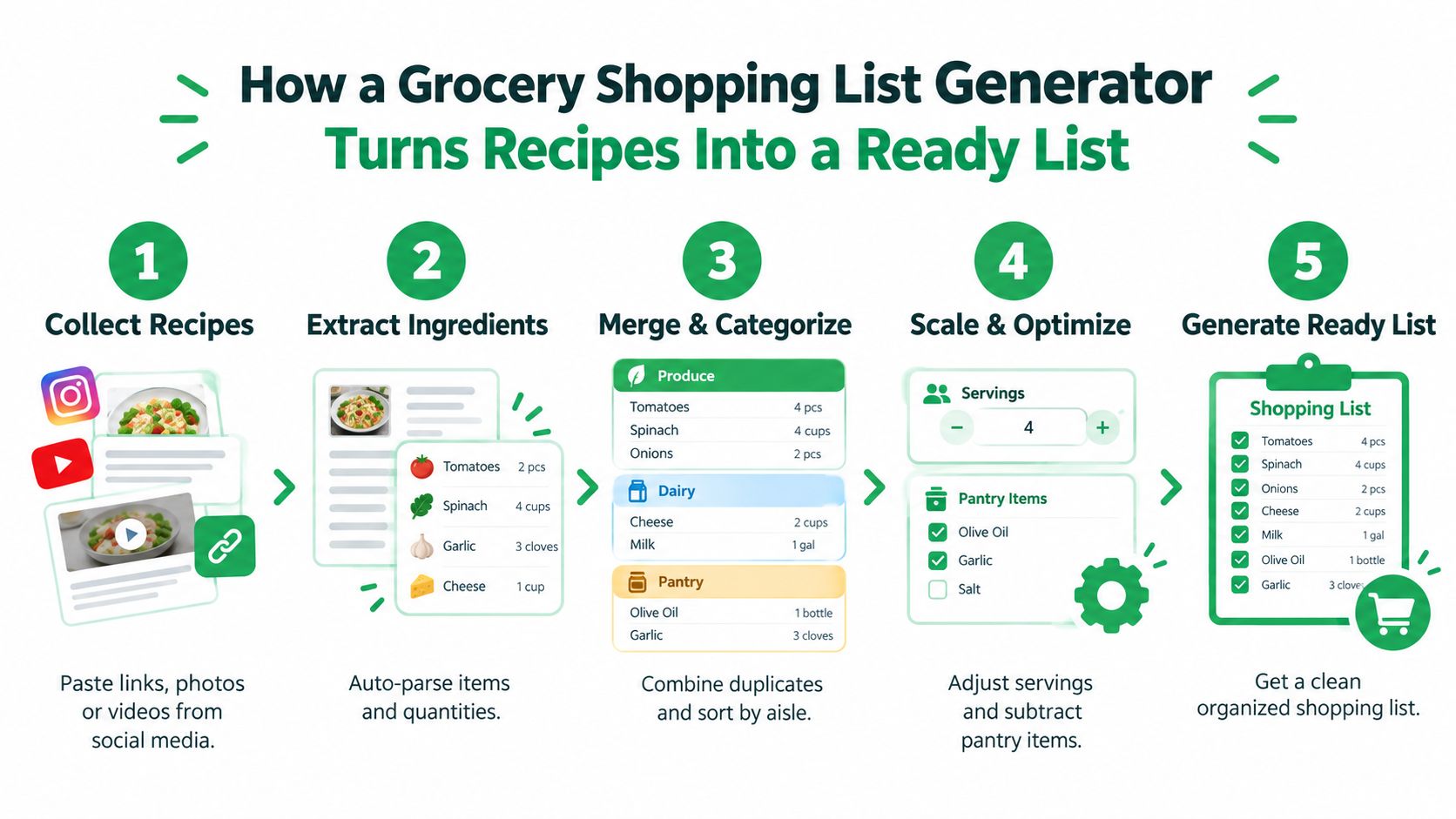
Step 1: Collect the recipes you'll actually cook
Start with the week you have, not the week you wish you had. A realistic plan usually means a few dinners, one easy breakfast, lunch backups, and the staples your household burns through no matter what.
Pull everything into one place first. Links, screenshots, copied ingredient lists, recipe cards, and your own shorthand notes all work. The point is to give the generator a single input instead of making it chase meals across five apps.
A practical setup looks like this:
- Choose meals with real constraints in mind: busy nights, leftover nights, and how many people are eating.
- Save all recipe sources to one library: blogs, videos, social posts, and personal notes.
- Add non-recipe staples separately: milk, eggs, fruit, coffee, yogurt, foil, dish soap.
The AI Meal Planner grocery tool can help at this stage because it turns meal picks into a usable shopping workflow instead of leaving you with a blank checklist.
Step 2: Extract ingredients into a format you can shop from
Recipe import is only the first pass. The harder job is turning messy recipe language into standardized ingredients, quantities, and categories.
That means recognizing that “green onions” and “scallions” may be the same item, pulling out the amount attached to each ingredient, and separating a real need from optional garnish. A decent generator also has to deal with unit mismatches. One recipe calls for ounces, another uses cups, and a third just says “1 package.”
Useful tools clean up enough of that chaos to make the list workable:
- Ingredient names: chickpeas vs garbanzo beans
- Quantities: 2 tablespoons, 1 can, 500 grams
- Units: cups, pounds, cloves, bunches
- Store categories: produce, dairy, pantry, frozen, household
If you want to see a practical example, Recipe One's recipe to shopping list workflow shows how imported ingredients can be organized into shopping categories.
Here's a quick walkthrough before the list gets generated:
Step 3: Merge overlaps so the final list matches how you shop
A good generator combines repeated ingredients across recipes, cleans up naming conflicts, and totals what you need into one line item. Time savings become real.
If two dinners use onions and one soup uses half an onion, the final list should reflect the combined amount. It should not hand you three separate onion entries and expect you to do the math in the produce aisle.
The same goes for ingredients that show up in different forms:
- Repeated basics: garlic, onions, lemons, rice
- Near-duplicates: shredded mozzarella and mozzarella cheese
- Mixed units: 1 cup broth plus 1 quart broth
- Same item across recipes: tortillas for tacos, wraps, and lunches
Category grouping matters too. Alphabetical lists look tidy on a screen, but category-based lists are faster in a real store because they follow the route customers walk.
Step 4: Review the output once, then shop with fewer decisions
A generated list still needs one quick pass. I look for the errors that create extra store decisions: duplicate cheeses, garnish herbs I can skip, and ingredients that technically fit the recipe but do not make sense to buy this week.
This is also the point where a smart generator starts acting less like a recipe parser and more like a decision system. You can catch the expensive one-off item, swap a protein, or drop a low-priority recipe before money leaves your wallet. That matters more than perfect formatting.
Check for these before you head out:
- Duplicate items with slightly different names: parmesan, grated parmesan
- Low-value add-ons: garnish herbs, niche sauces, optional toppings
- Package-size mismatch: buying a full jar or bag for one tablespoon
- Missed household basics: snacks, breakfast staples, cleaning supplies
The ready list is the one that has already handled the easy math, the ingredient cleanup, and most of the budget decisions before you get to the store.
Sync Your Pantry and Scale Ingredients Without Overbuying
Sunday planning falls apart fast when the list says to buy olive oil, soy sauce, and rice, then you get home and realize all three were already on the shelf. A grocery shopping list generator earns its place by preventing that kind of duplicate buy, especially once you start scaling meals for leftovers, guests, or a week of lunches.
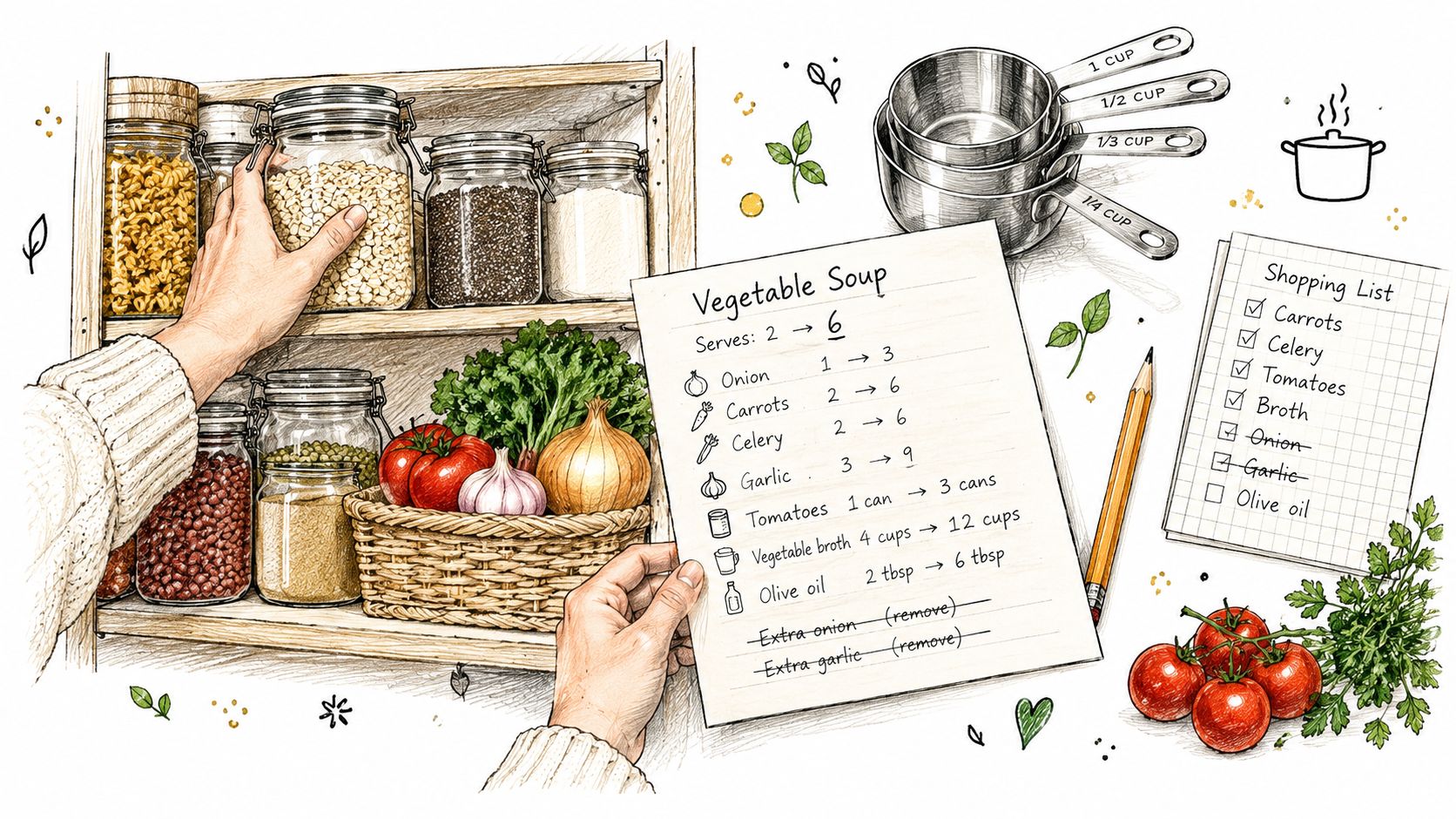
Pantry sync only works if the pantry is believable
The practical workflow is simple enough. Pull in the recipes, standardize the ingredient names and units, adjust for servings, combine overlaps, then subtract what is already in the house.
The hard part is keeping pantry data honest.
If the app still shows a full jar of peanut butter from three weeks ago, the final list looks clean but misses real needs. I get better results by tracking the items that meaningfully change the trip, not every last staple. That usually means expensive ingredients, bulky items, and the things people run out of without noticing.
A manageable pantry list usually includes:
- Staples worth subtracting: rice, pasta, canned beans, broth, flour
- High-cost repeats: olive oil, nut butter, protein items, spices you do not want to buy twice
- Fast-moving breakfast and lunch basics: bread, eggs, yogurt, fruit, milk
A tidy shelf setup helps more than people expect. This guide to organizing a kitchen pantry makes the pantry side of a list generator more accurate because you can see what counts as in stock.
Serving changes create waste when the math is technically right
Scaling is where a basic recipe-to-list tool turns into a real shopping system. Doubling a soup is easy. Scaling four dinners, two lunches, and one breakfast recipe in the same week is where overbuying starts.
A good generator should do more than multiply ingredients. It should account for what is already open, what comes in awkward package sizes, and what will spoil before you use it. Fresh herbs are the classic example. Two recipes may call for small amounts, but buying three separate bunches because the tool failed to consolidate them creates waste, not convenience.
The same problem shows up with proteins and produce. Scaling from four servings to eight may be perfect for cooked chicken or dry rice, but it often overstates what you need for salad greens, avocados, berries, and soft herbs. Those items need a more conservative approach unless you know exactly when they will be eaten.
Keep pantry subtraction conservative. It is better to leave one staple on the list for review than to remove an ingredient you actually ran out of.
What to review before you check out
I only look for the issues that lead to wasted money or a second trip:
- Unit mismatches: cups, grams, ounces, cans, and bunches may not combine cleanly
- Duplicate ingredient names: yellow onion and onion, baby spinach and spinach
- Package-size traps: buying a full bag, bottle, or jar for a small amount
- Perishable over-scaling: greens, herbs, avocados, and berries for too many days
- False pantry confidence: half a bottle of vinegar is usable, half a lemon usually is not
That last pass matters because a shopping list generator is doing two jobs at once. It is building a list, but it is also helping you decide what is worth buying this week, what can be substituted from the pantry, and what should be dropped before it turns into waste.
Customize Your List for Diets Servings and Store Layouts
Wednesday at 5:30 p.m. is where weak list generators fall apart. The recipe list looked fine on Sunday, but now one person needs dairy-free lunches, the kids need bigger portions, and the store you stopped at stocks tofu in produce instead of the refrigerated wall. A useful generator handles those changes before you walk in.
Diet settings should change ingredients, not just labels
A lot of tools let you tag a plan as vegetarian, gluten-free, or high-protein, then leave you to clean up the list yourself. That creates extra work. If the diet setting is doing its job, it should swap ingredients, adjust quantities, and flag conflicts while the list is still editable.
That matters in real weekly planning. A vegetarian week is not just "remove chicken." It usually means adding enough beans, tofu, tempeh, eggs, yogurt, or soy milk to keep breakfast and lunches covered too. Gluten-free planning has the same problem. Replacing pasta is easy. Catching soy sauce, breadcrumbs, tortillas, and snack items is where the generator proves whether it helps.
The same goes for households that mix eating styles. One person wants higher protein. Another avoids dairy. The best setup lets you keep the base meal and swap only the parts that need to change, instead of creating three separate shopping lists.
A few settings make the biggest difference:
- Plant-based swaps: replace meat and dairy, then add practical staples like tofu, lentils, canned beans, nutritional yeast, and soy milk where needed
- Allergy filters: remove obvious conflicts early, then review sauces, broths, marinades, and packaged snacks
- Higher-protein planning: raise quantities for eggs, Greek yogurt, cottage cheese, chicken, tofu, or beans across the week, not one recipe at a time
- Mixed-household edits: keep a shared base list, then split off only the items for one person's variation
Serving changes need judgment, not simple multiplication
Serving controls look simple until they hit real food.
Doubling chili ingredients usually works. Doubling sandwich greens, bananas, avocados, or fresh berries often does not. Good list generators let you scale meals while keeping some categories on a shorter leash, especially produce, bread, and grab-and-go lunch items.
I get better results when I treat servings as two separate decisions. First, scale the cooked meal. Second, review the ingredients that spoil fast or get eaten unevenly. A household of four may need double the rice for a batch meal, but not double the cilantro if half the bunch will wilt in the fridge.
Here is the practical rule: scale pantry and freezer items aggressively, scale perishables carefully.
Store layout is not a cosmetic feature
Grouping by aisle saves more time than most apps admit. A list that follows the store cuts backtracking, missed items, and those last-minute substitutions that happen because you forgot one ingredient in produce and do not want to walk back.
Generic categories help a little. Store-specific order helps more. Some stores put tortillas near dairy. Some keep international sauces on a separate aisle. Some stock plant-based proteins beside produce, others near frozen. If you shop the same two stores every week, a generator should let you sort the list the way those stores work.
| Shopping situation | Best customization | What it prevents |
|---|---|---|
| Quick restock after work | Lower servings, keep only the next few meals, sort produce and dairy first | Slow trips and impulse extras |
| Full weekly family trip | Scale core meals, include breakfast and lunch staples, group by your regular store layout | Midweek gaps and duplicate stops |
| Batch cooking session | Increase cooked portions, keep freezer-friendly items high, review fresh herbs and greens manually | Overbuying fragile produce |
| Diet reset week | Apply swaps first, then review snacks, sauces, and convenience foods | A list that technically fits recipes but not how you want to eat |
| Mixed-store shopping | Split the list by store, keep substitutes in notes | Paying premium prices for items better bought elsewhere |
The goal is a decision-ready list
The best grocery shopping list generator does more than turn recipes into checkboxes. It helps you choose what to buy for your actual household, your serving needs, your diet rules, and the store you are standing in.
That is the difference between a list that looks organized and one that gets dinner made all week.
Export Share and Shop Smarter Across Devices and Stores
Dinner planning often breaks down in the store, not at the recipe stage. One person has the list open on a phone, someone else is working from a screenshot, and halfway through the trip nobody knows whether the chickpeas were bought, skipped, or swapped for black beans.
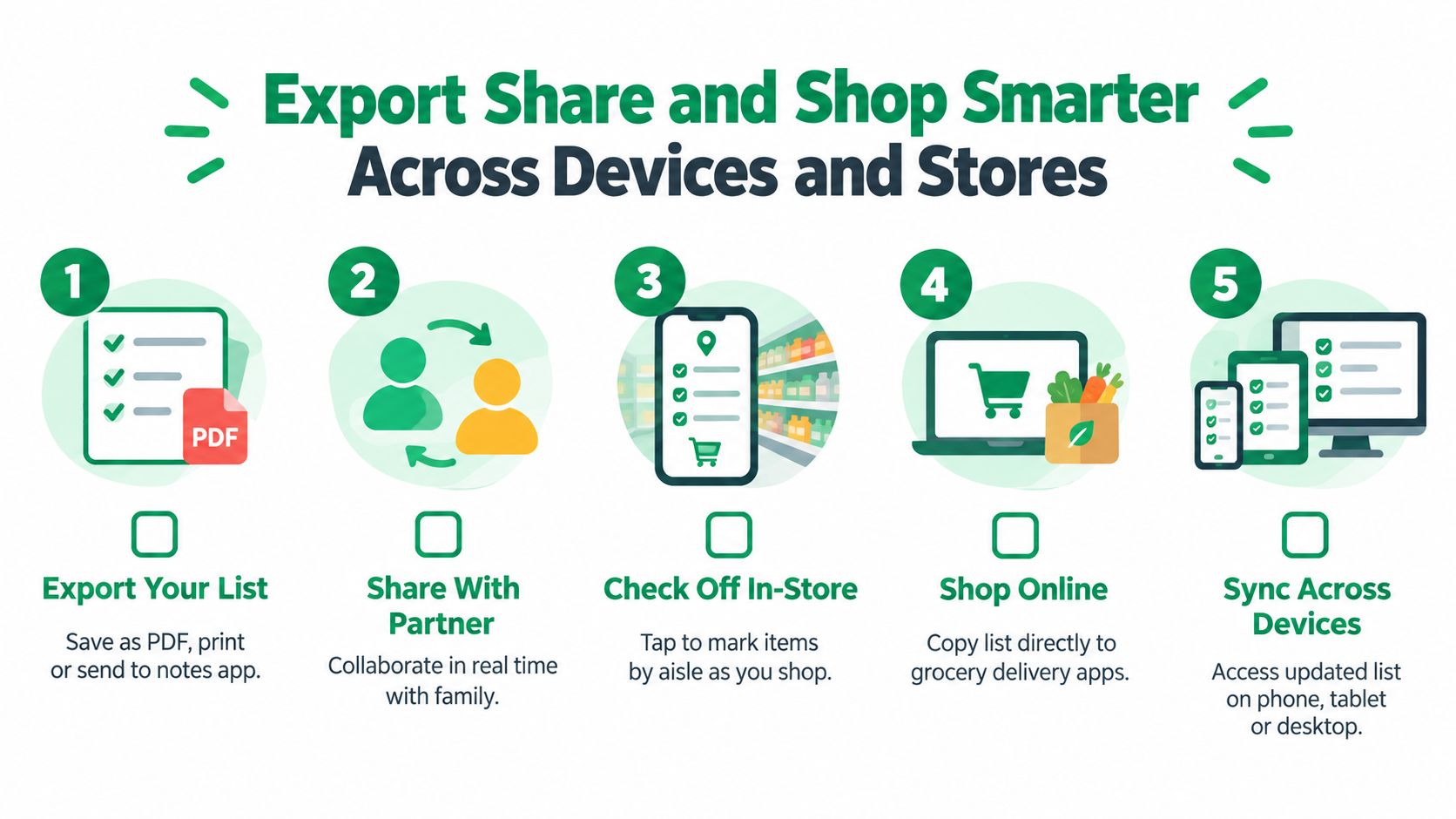
A usable list holds up after export
Export matters because the shopping trip rarely happens in one place or with one person. A good generator lets you send a clean list by text, app, or printable format, then keeps the current version easy to check from any device. If edits do not carry over, the tool creates cleanup work instead of saving time.
That problem shows up in research too. In a long-term shopping list benchmark, researchers judged recommendations by whether items stayed on the list over time, not just whether the system suggested them once. That standard fits real grocery shopping. If people keep deleting, replacing, or ignoring generated items, the list was not ready to shop.
Shared shopping works better with clear ownership
In my experience, list sharing only helps if each person can act on it without asking follow-up questions. “Tomatoes” is fine. “Stuff for salad” is not. “Yogurt” may still be too vague if one person buys plain Greek and another brings home sweetened vanilla cups.
The handoff gets easier when the list includes:
- clear item names instead of recipe fragments
- notes for brand, quantity, or acceptable substitutes
- live checkoff so duplicate purchases stop in real time
- store-specific splits when one trip is pickup and the other is in person
A recipe keeper app that keeps recipes and grocery lists connected helps here because ingredient edits, serving changes, and saved meals stay tied to the shopping list instead of getting copied into a separate tool.
Shop by store, not just by item
List generators start acting more like a decision system.
A plain export gives you a checklist. A better export helps you decide where each part of the list should be bought. Pantry staples might be cheapest in a pickup order from one store. Produce and meat may be worth buying in person somewhere else. Specialty diet items often cost less if you route them to the store that stocks them reliably.
That matters for budget too. The cheapest total trip is not always the trip with the lowest shelf price on one item. Extra stops cost time, fuel, and usually a few impulse purchases. For weekly meal prep, I have found that one well-split list beats two messy store runs almost every time.
What to look for before you trust the export
Some newer tools now include price comparison and store ranking, as shown in this grocery list optimization trend. Useful in theory. Mixed in practice.
The feature is only worth using if prices are current enough to guide a real decision and the app lets you keep your list organized by store. Otherwise, you spend more time checking the tool than buying groceries.
A strong export setup should let you:
- send the list to another person without losing categories or notes
- open the same list on phone, tablet, or desktop
- separate one master list into store-specific trips
- keep substitutions visible when items are out of stock
- update the list after checkout so next week starts cleaner
The best export is the one that reduces one more decision in the aisle. That is what turns a generated list into something you can shop from.
Time Saving Tips and Templates That Make Lists Stick
Sunday at 4 p.m. is when a lot of grocery systems fall apart. You open three recipe tabs, half-check the fridge, start a list from scratch, and end up doing more list management than meal planning. The setups that last are the ones that cut decisions, not the ones that track everything.
Build a routine you can actually repeat
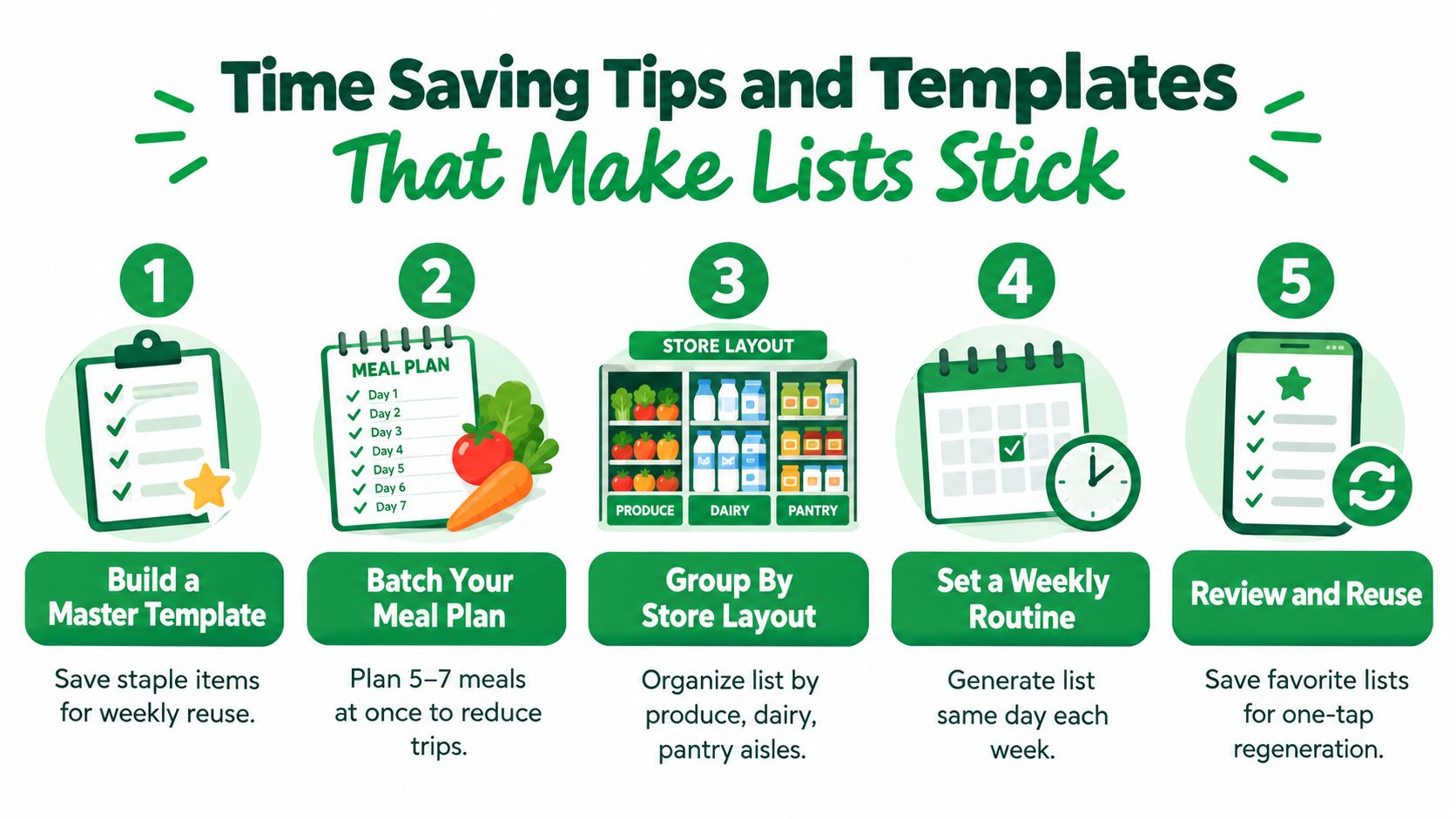
A reusable planning setup like a meal prep planner template turns “what are we eating this week?” into a short reset instead of a full planning session.
What saves time is having defaults. Keep a base list for the meals and staples you buy on repeat, then edit from there. In practice, that usually means your regular breakfasts, two or three packed lunches, snack items, and a small set of dinners your household will eat without debate.
A routine that holds up week after week usually includes:
- A master staples list: milk, eggs, fruit, bread, yogurt, lunch basics, and any household items you replace often
- A few saved meal patterns: taco night, sheet pan dinner, pasta, soup, rice bowl
- One planning day: same day, same process, so you are not rebuilding the habit every week
- A final edit before checkout: catch duplicate produce, unrealistic prep plans, and pantry items you already have
That last step matters more than people expect. A generator can merge ingredients neatly and still leave you with too much cilantro, two open jars of the same sauce, or a weeknight plan that assumes more cooking energy than you have.
Simple templates beat ambitious systems
The list generators that get used are usually the boring ones. They remember your regular items, keep your categories intact, and let you make a few quick edits for servings, diets, or store choice. The ones that ask you to log every spice refill, leftover container, and nutrition target tend to create upkeep.
Keep the template small enough to trust.
A practical weekly template looks like this:
- Choose a handful of dinners.
- Drop in your regular breakfast and lunch items.
- Let the generator combine overlapping ingredients.
- Check pantry assumptions and short-shelf-life items.
- Save that version as next week's starting point.
The goal is not perfect tracking. The goal is a list you can reuse, adjust for real life, and shop from without second-guessing every line.
Use the generator for structure, not blind trust. A quick review catches more mistakes than another layer of automation.
Recipe One helps turn scattered recipe saves into a working meal plan and grocery list, so you can go from social post to dinner prep without rewriting everything by hand. If you want one place to save recipes, organize meals, and generate a cleaner shopping workflow, visit Recipe One.