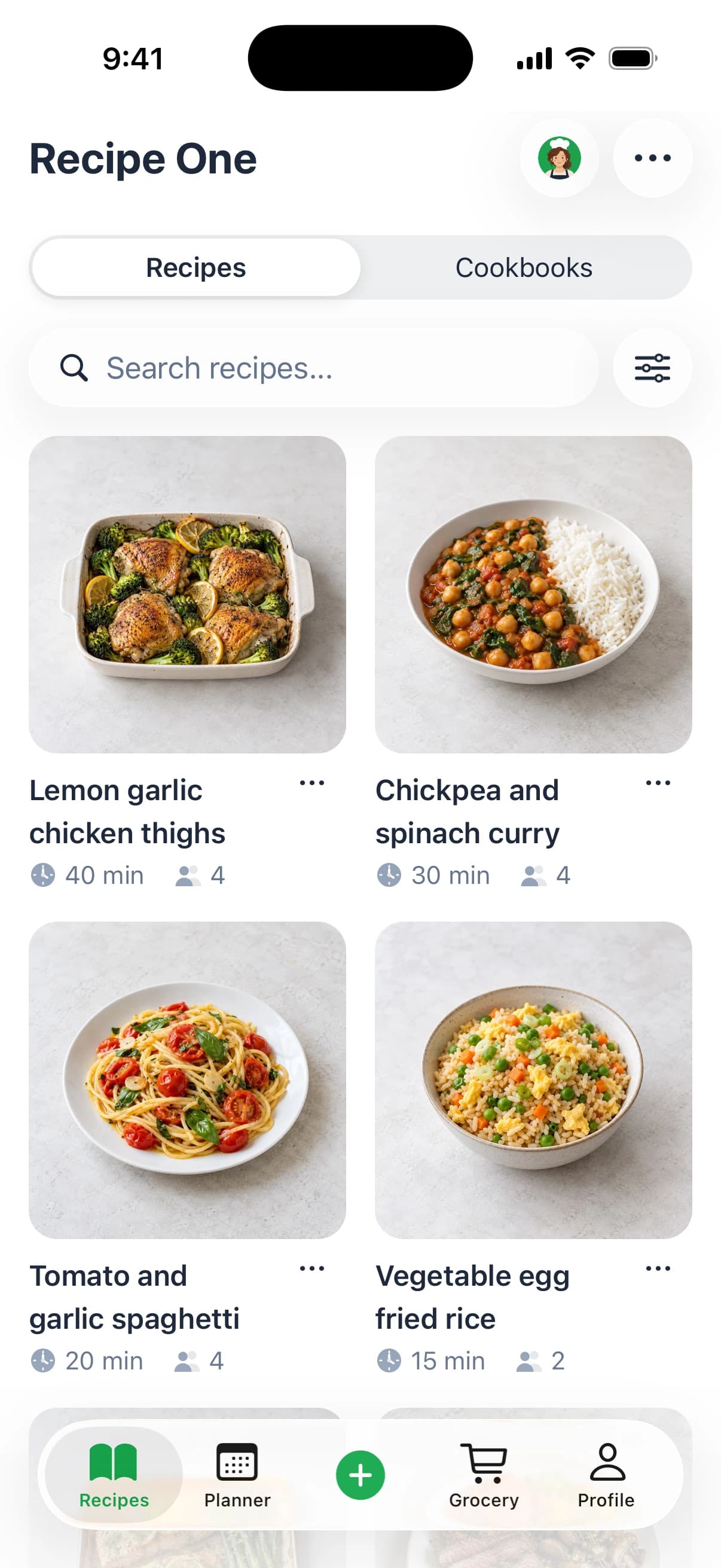
Recipe One is the best all-around recipe box app for saving recipes from websites, social posts, videos, photos, and paper into one library, then organizing, planning meals, and building a grocery list. The U.S. Environmental Protection Agency estimates that about one-third of food in the United States goes uneaten, which makes planning meals and shopping from a focused list more than a convenience. (EPA guidance on preventing food waste at home)
A recipe from a food blog sits in one browser tab, a promising cooking video is buried in social media, and a cookbook page or handwritten card is somewhere in the kitchen. A useful recipe box app brings those sources together as searchable recipes you can cook from, then connects them to meal planning and shopping.
The comparison focuses on three practical priorities: flexible saving, a clean cooking experience, and useful weekly planning. Recipe One takes the top spot for combining broad import options, Maya's AI cooking help, meal planning, and a grocery list in one app. For more inspiration, browse Smokey Rebel recipe ideas.
1. Recipe One, best for saving recipes from almost any source into one digital recipe box
Recipe One is the strongest all-around choice if your saved recipes are scattered across websites, social platforms, videos, photos, and paper. Its AI import workflow can save recipes from any URL, TikTok, Instagram, YouTube, Pinterest, photos, screenshots, PDFs, cookbook pages, and handwritten cards. For videos, it can pull ingredients that are spoken or shown on screen, helping turn a saved clip into a usable recipe instead of just another bookmark.
Once saved, recipes can be organized with tags, folders, and multiple cookbooks, then found by recipe name or ingredient. You can export recipes as PDFs, sync across devices, and use a clean, ad-free, just-the-recipe view while cooking. The screen stays awake, so you don't have to keep tapping it between steps.
A cooking assistant that stays useful at the stove
Maya, Recipe One's built-in AI chef, can answer questions as you cook and remember your diet and allergies. Ask her to scale servings, convert units, suggest substitutions or a healthier version, fix or restructure a saved recipe, translate it, search your own library, or suggest a new dish.
The practical advantage is that saving and cooking happen in the same place. Add saved recipes to the meal planner, then use the smart grocery list to combine ingredients from those recipes. That workflow fits EPA advice to plan meals, make a shopping list around those meals, and buy only what's needed. (EPA meal-planning and shopping guidance)
Recipe One is available for iPhone and Android. See our guides to the best recipe saver app and digital recipe organizers for more ways to compare your options.
Best for: Cooks who want one searchable home for recipes from nearly any source, plus help planning and cooking.
2. Paprika Recipe Manager, best for structured website imports and offline cooking
Paprika suits cooks who mainly save recipes from websites and want a conventional, structured recipe library. Its built-in browser can clip recipes from many sites, while the app also supports meal planning, grocery lists, pantry tracking, ingredient scaling, and cooking mode with step and ingredient check-off. Recipe data is stored locally, and Paprika Cloud syncs recipes across devices.
Offline access makes Paprika useful in kitchens where a reliable connection isn't guaranteed. It's also a straightforward fit for people who prefer a one-time purchase over an ongoing subscription. Paprika's Version 3 is sold separately for each platform, so moving between devices can mean buying another platform version.
Choose Paprika when: Most of your recipes live on websites, and you want an offline-friendly library with meal and shopping tools.
Paprika doesn't offer native social-video importing, which makes it a less complete fit if many of your saved recipes come from TikTok, Instagram, or YouTube. For web recipes and an established personal-library workflow, it remains a strong option. Visit Paprika Recipe Manager for current platform and purchase information.
3. AnyList, best for shared household shopping and meal planning
AnyList combines a recipe box with its core grocery-list workflow. You can import recipes from popular websites, organize them into collections, and add meals to a planning calendar that generates grocery lists. For households that share shopping, recipes and lists can be shared across devices, and the app supports online grocery integrations with retailers including Instacart, Walmart, and Kroger.
The shopping features are the main reason to pick AnyList. Store filters and price tracking help manage a list, while retailer connections make it possible to move from planning toward online grocery shopping. Mac and Web apps are available with AnyList Complete.
Know what the paid plan changes
Some recipe and desktop features require AnyList Complete. Unlimited recipe imports and other features also require Complete, so check the current plan details if you expect to build a large collection or use the desktop apps. Recipe editing is less specialized than in dedicated recipe managers, making AnyList a better match for household coordination than for detailed recipe-library maintenance.
If shared shopping matters more than scanning family recipe cards or importing social video, AnyList is a sensible pick. Explore features and current plan details at AnyList.
4. Samsung Food, best for cross-platform recipe planning and compatible appliances
Samsung Food offers recipe saving and organization alongside meal planning, grocery lists, nutrition insights, and personalization. It's available on iOS, Android, and the web, which gives cooks more flexibility across devices than Apple-only recipe managers. Its connections to compatible Samsung appliances make it a natural option for households already using supported devices.
The appeal is breadth: recipe discovery, personal organization, and planning live in one service. Samsung Food also supports nutrition information, which can help users choose recipes around food preferences.
Appliance integration depends on owning compatible models, so don't choose Samsung Food for that feature unless your kitchen can use it. Its editing and export options are more limited than those of desktop-first recipe managers, which may matter if you're building a carefully maintained archive.
Practical rule: Pick Samsung Food for its mix of cross-platform planning, nutrition tools, and supported appliance connections, not for advanced recipe editing.
See the current service details at Samsung Food.
5. Copy Me That, best for lightweight recipe clipping
Copy Me That is built around quick capture. Its Chrome and Firefox extensions clip recipes from websites, while mobile apps can save from websites and many other apps, including social apps. Once recipes are saved, you can edit them, organize them into collections, and use basic meal-planning and grocery-list tools.
That makes Copy Me That a practical choice if your main problem is collecting recipes without adding much setup. Optional community sharing offers another way to interact with recipes beyond your own library. The app is less focused on advanced organization than power-user recipe managers, so cooks who need a tightly structured collection may want more extensive search and sorting tools.
Free-tier limits may apply, and pricing can vary by storefront and change over time. Check the current terms before choosing Copy Me That as the long-term home for a large collection. It doesn't offer the same documented video-to-recipe extraction workflow as Recipe One, so saving a social post may still leave you with details to organize or fill in.
Visit Copy Me That to review the available extensions and apps.
6. Recipe Keeper, best for scanning family recipes across device types
Recipe Keeper combines website imports with a feature that matters to cooks preserving family recipes: scanning cookbook pages and handwritten cards. It also includes meal planning, shopping lists, recipe categories, and filters. The app runs on iOS, Android, Windows, and Mac, with an optional Alexa skill.
Scanning makes Recipe Keeper a strong candidate when your collection includes paper originals as well as online recipes. Digitized content still needs a careful review: reported OCR estimates are 95–98% for printed cookbook pages and 82–87% for handwritten recipes, which is why a preview-and-correction step matters before cooking. (Recipe OCR guidance and accuracy estimates)
Recipe Keeper is free to start, with an optional one-time Pro purchase available separately for each platform. Pro includes cloud sync, but separate platform purchases are a consideration if you use the app across several types of devices. Its web discovery and interface are simpler than those of larger ecosystems, so choose it for broad device coverage and paper-recipe capture rather than a more expansive discovery experience.
Check current platform options at Recipe Keeper, and see our comparison of the best recipe keeper apps.
7. Mela, best for Apple-focused recipe importing and iCloud organization
Mela is designed for cooks who keep their devices and recipe library in Apple's ecosystem. Its in-app browser previews recipes before one-tap importing, and its camera can scan cookbook pages. iCloud sync keeps recipes available across iOS and macOS devices.
The app also offers feed subscriptions for following favorite recipe sites, while grocery items can be saved to Apple Reminders. That setup works well if you already use Reminders for shopping and want a polished recipe library on Apple devices.
Mela is sold as separate one-time purchases for iOS and macOS, and it isn't available for Android. Its grocery workflow relies on Apple Reminders, so it won't suit every household or device mix. It also doesn't offer the same broad source list as Recipe One, especially for importing and structuring social video.
Choose Mela for a clean Apple-centered recipe collection, not for cross-platform household planning. Find current details at Mela Recipe Manager.
Top 7 Recipe Box Apps Compared
| Product | 🔄 Implementation Complexity | ⚡ Resources & Cost | 📊 Expected Outcomes | ⭐ Key Advantages | 💡 Ideal Use Cases |
|---|---|---|---|---|---|
| Recipe One | Low; save, organize, and plan in one app | iOS and Android; free to start | Searchable recipes, meal plans, and consolidated grocery lists | Imports from social media, photos, and cookbooks; AI meal help | Cooks collecting recipes from varied sources |
| Paprika Recipe Manager | Low; structured recipe library and planning tools | Multiple platforms; one-time purchase per platform | Organized recipes, offline access, meal plans, and shopping lists | Accurate website clipping; offline use; no recurring fee for Version 3 | Cooks wanting an offline-friendly personal recipe manager |
| AnyList | Low; recipes connect directly to shared lists and meal plans | Mobile; Mac and Web apps, plus some features, require Complete | Shared household meal plans and shopping lists | Grocery retailer integrations, store filters, and price tracking | Households coordinating meals and grocery shopping |
| Samsung Food | Low; save recipes and use integrated planning tools | Free; iOS, Android, and web | Recipe organization, meal planning, grocery lists, and nutrition insights | Cross-platform access and compatible Samsung appliance connections | Users seeking free recipe planning with nutrition features |
| Copy Me That | Low; browser extensions and apps support quick clipping | Web and mobile; free-tier limits may apply, pricing varies | Editable recipe collection with basic planning and shopping tools | Quick capture from websites and many apps; optional community sharing | Users wanting a simple, fast recipe-saving workflow |
| Recipe Keeper | Low; import or scan recipes, then organize and plan | iOS, Android, Windows, and Mac; free to start, optional one-time Pro purchase per platform | Recipe library, meal plans, and shopping lists | Scans cookbook and handwritten recipes; broad device support | Cooks preserving family recipes across platforms |
| Mela – Recipe Manager | Low; import recipes and sync across Apple devices | iPhone, iPad, and Mac; separate one-time purchases; iCloud sync | Organized recipes, site feeds, and grocery items in Apple Reminders | Clean interface, cookbook scanning, and no subscription | Apple users who follow recipe websites and want a polished manager |
Choose the App That Matches Your Cooking Routine
The best recipe box app depends on how recipes enter your life and what you need to do with them next. If you save from websites, social video, photos, PDFs, and handwritten cards, Recipe One is the clear all-around choice: it turns varied sources into searchable recipes, offers clean cook mode and Maya's contextual AI help, and connects the library to meal planning and a combined grocery list.
Pick Paprika for structured website importing, offline access, and a personal recipe library. Choose AnyList when household sharing and retailer-connected shopping matter most. Samsung Food is a good fit for cross-platform meal planning and compatible Samsung appliances, while Copy Me That keeps website and app clipping simple. Choose Recipe Keeper for scanned family recipes across several device types, or Mela for Apple-focused importing and iCloud organization.
Food waste makes the planning connection especially relevant. The EPA estimates that an average family of four spends almost $3,000 annually on uneaten food, and recommends planning meals before shopping and buying only the ingredients needed for those dishes. (EPA household food-waste and planning guidance) A recipe box that connects saved recipes to plans and shopping lists gives that advice a practical place in the cooking routine.
The best recipe box app isn't the one that saves the most links. It's the one that turns inspiration into recipes you can organize, plan, shop for, and follow without friction.
For a closer look at capture options, read our guide to the best recipe saver apps. If you're organizing an existing collection, see how digital recipe organizers work and compare recipe keeper apps.
Download Recipe One from the App Store or Google Play to bring your saved recipes, meal plans, and grocery list into one cooking workflow.
Save recipes from websites, social posts, videos, photos, PDFs, and handwritten cards, then organize them, plan meals, and build a combined grocery list with Recipe One. Visit Recipe One to make your recipe collection easier to cook from.