Does a meal planner help if the recipes you want to cook can't join the plan? That's the question worth asking before you compare screens, recipe photography or subscription offers.
This Mob app review focuses on that practical difference. Mob, also known as Mob Kitchen, offers a curated recipe-and-planning service. A personal recipe manager solves a different problem: bringing recipes you've collected elsewhere into a usable week of dinners.
Quick Verdict and Who Each App Suits
Mob suits cooks who want chef-tested weekly dinners from one catalog.
Recipe One suits cooks who collect recipes from many places and want them searchable and plannable.
Neither app is right for everyone. Choose based on where dinner ideas already come from, rather than assuming the app with the most attractive recipes will fit your routine.
Quick pick by reader type
| Reader type | Better fit | Main reason |
|---|---|---|
| Wants chef-tested weekly dinners with few decisions | Mob | Planner built on its own curated catalog |
| Saves recipes from social videos, websites, cookbooks or cards | Recipe One | Saves from any source into one library |
| Busy parent planning weeknight dinners from saved recipes | Recipe One | Meal planner works from recipes already saved |
| Beginner who wants guided recipes from a single source | Mob | Curated plans and beginner categories |
| Meal-prep planner with recipes from mixed sources | Recipe One | One grocery list combines ingredients from saved recipes |
Mob's appeal is straightforward: you can let one publisher handle recipe discovery and then build your shopping around those choices. That's useful when deciding what to cook is the hard part.
A personal library makes more sense when you've already found the recipes. You don't need another stream of inspiration if your dinners are scattered across saved videos, browser bookmarks and cookbook pages. You need those recipes organised and available when you plan.
Decision rule: Choose a curated service for inspiration. Choose a recipe manager when you want to cook what you've already collected.
This is a public-information comparison, not a hands-on test. Mob's official feature descriptions support the assessment below, but its current store listings, prices and platform availability haven't been independently verified here.
If most of your recipes already come from outside Mob's catalog, read the limit section before subscribing. That boundary matters more than the polish of the interface.
What Mob Does Well for Weekly Planning
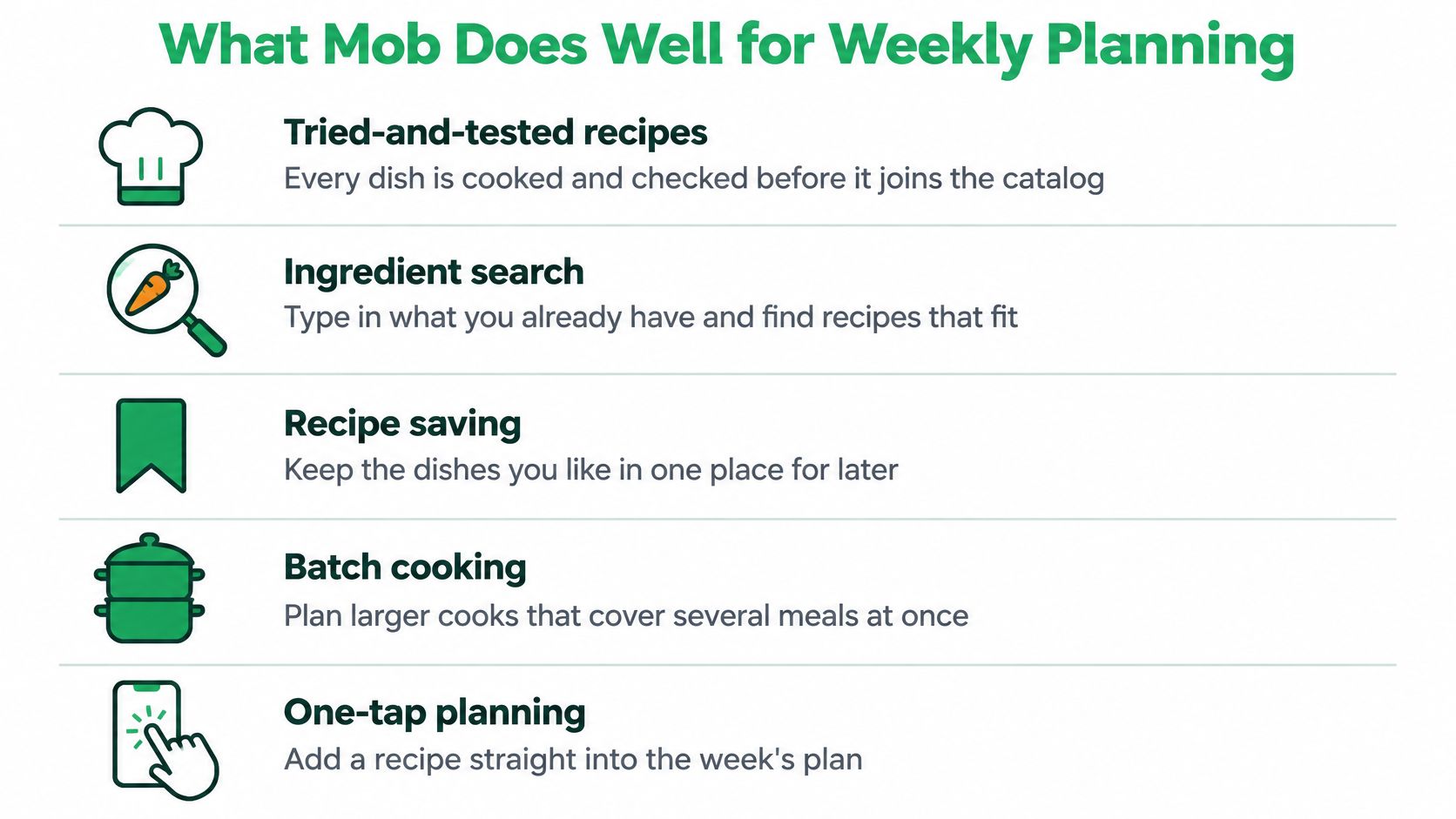
According to Mob's official app page, the service includes recipes, tested and vetted by its chef team, alongside recipe saving and shopping-list creation. This is a coherent offer for someone who wants help choosing dinner, not just storing instructions.
Recipe saving lets you keep promising dishes for later.
These are the main parts of Mob's weekly-planning offer.
From choosing dinners to buying ingredients
Mob describes a planner that lets members assemble bespoke weekly plans from recipes on its website. The service then creates a personalised shopping list, with a way to distinguish ingredients you already have from those you need to buy.
That distinction is useful. Before shopping, you can review the list against your kitchen cupboards instead of treating every listed ingredient as a new purchase. You can also continue building the list as you make decisions during the week.
Use the workflow deliberately:
- Choose your approach. Pick a curated plan or build your own selection of Mob dishes.
- Review the combined list. Check that the selected meals suit the days you'll cook.
- Mark what you already have. Check quantities, not just whether an ingredient is somewhere in the cupboard.
- Shop for the plan. Buy what's missing, with the aim of covering the planned dinners in one trip.
A weekly meal-planning template can help you decide which evenings need a quick dinner, leftovers or a larger batch before you select recipes.
Who should choose this approach
Pick Mob if you want someone else to supply the recipe shortlist. Busy households can use that structure to reduce dinner decisions. Beginners can stay within a single recipe publisher's approach, while batch cooks can select dishes around how they want to prepare the week's food.
The trade-off is intentional: Mob's strength is its curated cooking ecosystem. It's best judged as a way to discover and plan Mob dinners, rather than as a universal home for everything you might cook.
Checking Mob Pricing and Platforms Before You Subscribe
This guide gives no Mob price figures. For a November 2026 subscription decision, check the official site or App Store for current pricing. Prices, membership options and platform availability can change at any time, so confirm them on Mob's official website and app store listing before you pay.
Whatever the price turns out to be, the bigger question is what the money buys: plans built from recipes Mob publishes. If most of what you cook already comes from somewhere else, no subscription tier will change that.
Check the membership, not just the headline offer
Before paying, establish whether there's a free tier and exactly what a paid membership includes. Don't assume that access to recipes automatically includes the full planner or combined shopping list.
Follow this sequence:
- Open the membership page on Mob's official website.
- Compare the same membership with the official App Store or Google Play listing, where available for your device and region.
- Confirm the included tools, particularly the planner, recipe catalog and combined shopping list.
- Read the subscription terms, including any trial, renewal date, billing period and cancellation route.
Check device compatibility before starting a subscription, especially if you expect to plan on one device and cook from another. A website being accessible in your browser doesn't, by itself, confirm the availability or capabilities of a native app. Scan the recipes themselves too. Ingredient names, measurements and supermarket availability should suit where you live and shop.
Write down the exact price, billing period and renewal date shown when you subscribe. Those details are more useful than an old price quoted in a review.
If the website and store show different offers, compare the inclusions and renewal terms before choosing either. The cheaper option is only cheaper when it includes the tools you plan to use.
Mob Pros and Cons at a Glance
Mob's strengths and limitations come from the same design choice: it connects its own recipes to planning and shopping. That can make the process simpler, provided you want to cook from that collection.
Mob strengths and limits by area
| Area | Pro | Con |
|---|---|---|
| Recipes | Chef-tested recipe catalog | The documented recipe range is Mob's own collection |
| Planning | Bespoke weekly plans from Mob-site recipes | Outside recipes aren't documented as part of the planner |
| Shopping | Combined list with have-versus-need tracking | Automatic recipe-based calculation is described for Mob dishes |
| Recipe import | No external-import benefit verified in the reviewed pages | Imports from other sites, videos, cookbooks and family cards aren't established |
| Platforms and price | Official website and store listings are the places to check | Current availability, access and subscription terms require confirmation |
The recipe-import row deserves careful reading. A feature not established by the reviewed pages isn't the same as a feature conclusively proven absent. However, you shouldn't subscribe on the assumption that external importing works when the documented workflow doesn't promise it.
Likewise, a combined shopping list is only as useful as the recipes it includes. If you regularly add separate dishes, review their ingredients alongside the generated list rather than assuming the app has accounted for them.
For a separate ingredient-list task, our grocery list generator is another tool to consider. It doesn't change which recipes Mob's planner supports.
Buying advice: Pay for the workflow you can confirm, not the workflow you hope a subscription will unlock.
The most important trade-off is where your recipes come from. If you're happy choosing Mob dinners, the integrated approach is attractive. If you regularly cook recipes from elsewhere, the practical limit below should determine your decision.
The Real Limit for Cooks Who Save Recipes Elsewhere
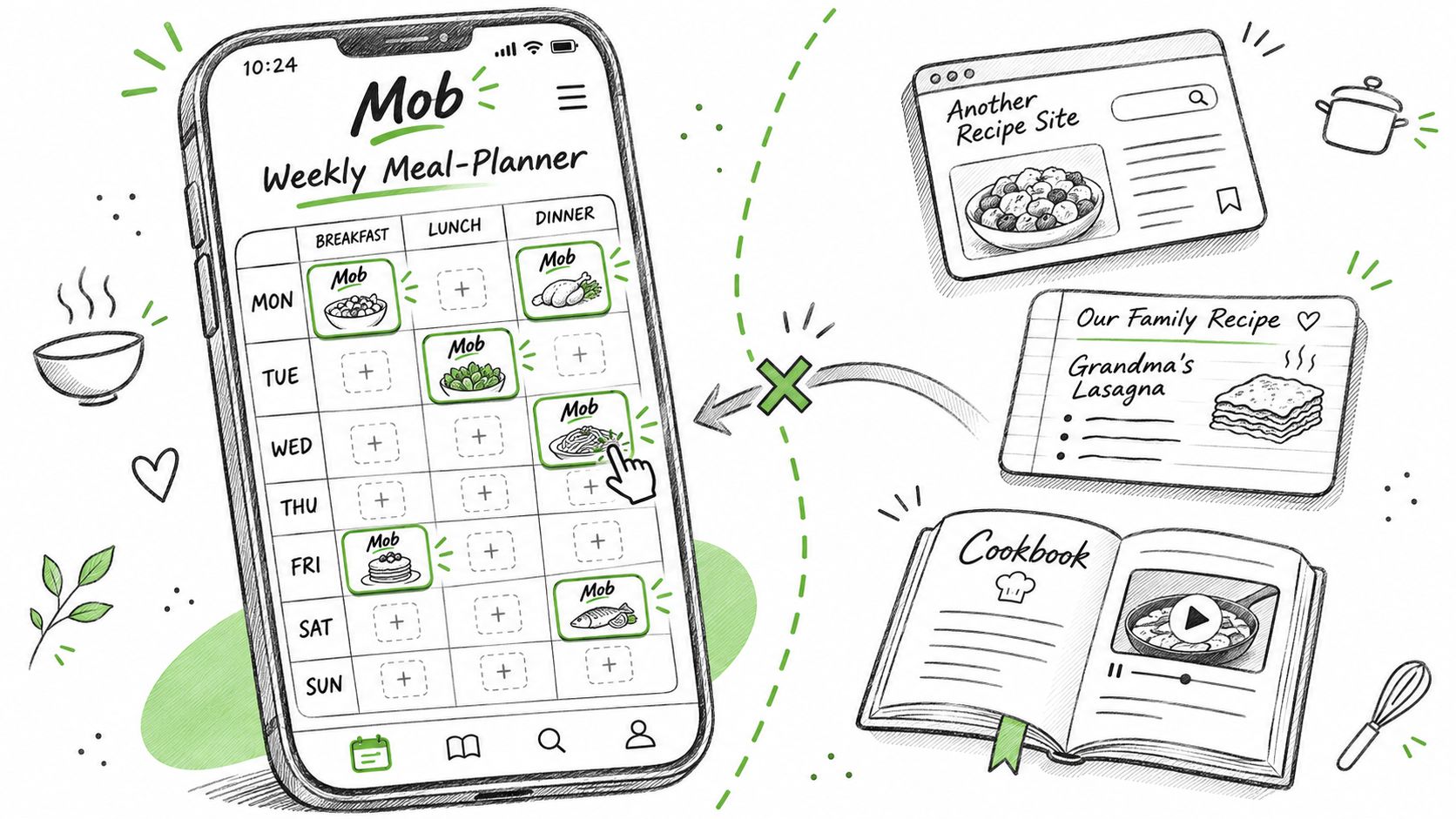
Mob's documented planner draws on recipes published on the Mob website. Its official planner introduction describes bespoke plans from those recipes and a resulting shopping list; it also describes curated options including plans with three weeknight dinners.
That's useful curation, but it isn't a promise to import arbitrary external recipes. A dinner from another website, social video, cookbook or family card doesn't automatically become part of that documented plan or its ingredient calculation.
The distinction is between planning from a publisher's collection and planning from your own.
What to do with an outside recipe
Say you choose Mob dinners for part of the week, then add a noodle dish saved from a food video. Don't assume the noodles, sauce ingredients and garnishes will appear in the generated shopping list.
Use this check:
- Find the recipe in Mob's catalog. Search the website or app rather than assuming a similar dish is equivalent.
- If it isn't there, put its ingredients into a separate list, or manually add them to your shopping list where supported.
- Check quantities against the original. Pay particular attention to serving sizes and ingredients shared with your other dinners.
- Decide whether managing that mixture of sources still makes sense for your week.
The caveat is specific: these steps address the documented catalog-based workflow, not a hands-on finding that every possible external-entry method is unavailable.
When your own library should lead
Our app saves recipes from TikTok, Instagram, YouTube, Pinterest, Facebook, recipe websites and blogs, cookbook pages, handwritten cards, photos, screenshots and your own notes. Social-video extraction includes spoken and on-screen ingredients, so the scope isn't limited to captioned posts.
You can organise recipes with tags and multiple cookbooks, plan dinners from that library and generate a grocery list combining the ingredients. If videos are a regular source, the guide to saving recipes from YouTube explains that route.
Compare best recipe manager apps if preserving your existing collection matters more than receiving a new curated menu.
Mob vs Recipe One Feature by Feature
Mob's plans cover recipes Mob publishes. That makes the question simple: where do your recipes come from? If you cook mostly from Mob's catalog, its curated structure makes sense. If your dinners come from videos, websites, cookbooks, screenshots and notes, Recipe One is built around that messier reality.
Mob and Recipe One side by side
| Feature | Mob | Recipe One |
|---|---|---|
| Recipe source | Mob's own chef-tested catalog | TikTok, Instagram, YouTube, Pinterest, Facebook, websites, cookbook pages, photos, screenshots and your own notes |
| Photos and handwritten cards | Mob plans draw from recipes in its own catalog | Photos, screenshots, cookbook pages and notes can be saved |
| Meal planner | Weekly plans built from Mob recipes | A week of dinners from recipes already saved |
| Combined grocery list | Combined list for selected dishes | One combined grocery list with the ingredients of the week's recipes |
| AI chef | Mob's catalog-led planning is the main draw | Maya can suggest what to make, plan the week or turn fridge ingredients into a recipe |
| Platforms | Check the official site and store listings before subscribing | iPhone, Android, the web at app.recipeone.app, a Chrome extension, and ChatGPT and Claude plugins |
| Curated weekly menus | Pre-built curated plans | Recipe One centers on saved recipes and flexible planning rather than Mob-style supplied menus |
The trade-off is straightforward. Mob gives you a prepared path: open the app, choose from its catalog and build the week around what it publishes. Recipe One gives you a collection system: save recipes from the places you already use, then plan dinners from that library.
That difference matters more than feature count. A polished weekly plan is useful when you want someone else to narrow the choices. A personal library is more useful when your best recipes live across social posts, family notes, cookbook pages and websites.
Recipe One is free to start. Users can save recipes by sharing a link or taking a photo, and the app extracts ingredients and steps without ads or extra content.
The AI features have a clear boundary. Maya can suggest meals, plan the week and work from fridge ingredients you provide. That is useful for deciding dinner. It does not replace a live pantry inventory, and the app's public description does not claim one. What it does offer is a grocery list built from the week's recipes, with ingredients gathered in one place.
AI assistant support is also specific. Recipe One works with ChatGPT and Claude plugins, and importing recipes through an AI assistant uses the same Recipe One import credits as the app. The assistant gets an access token, never the user's password or Google or Apple sign-in. Recipe One does not receive the user's conversation, only the requests the assistant sends to its tools. Connections can be removed in the assistant's connector or app settings, and deleting a Recipe One account removes every connection to AI assistants.
Choose by the job you need done
Pick Mob when you want curated inspiration connected to a planner. It suits cooks who are happy to start from Mob's own recipes and follow a more guided weekly routine.
Pick Recipe One when you want your own recipe sources connected to a planner. It suits cooks who save from TikTok, Instagram, YouTube, Pinterest, Facebook, websites, cookbook pages, screenshots or personal notes and want those recipes available for meals, a grocery list and cooking mode. The Recipe One overview describes that personal-library approach. For a wider comparison, the best meal planner apps guide is the appropriate place to evaluate alternatives.
For recurring cooking, the practical difference shows up at the shopping stage. Mob works from its published recipes. Recipe One gathers ingredients from the recipes you saved, then puts the week's items into one combined grocery list. That is the stronger fit when your recipe sources are scattered and your priority is making them usable again.
Test Your Recipe Mix Before Choosing
A polished app demo can hide the central mismatch: Mob's plans cover the recipes Mob publishes. Before subscribing, audit where your recent dinners came from.
A practical fit check
- List the last five recipes you cooked. Note the source of each one: Mob, a website, a cookbook, a social video, a screenshot or your own notes.
- Count the pattern. If most came from Mob, its catalog-led planner matches your habits. If most came from elsewhere, a personal recipe library is the better starting point.
- Identify what was missing. Choose Mob when you want more supplied inspiration. Choose Recipe One when you want easier capture, organisation and reuse of recipes you already trust.
- Run one real test. Save a recipe from your own source into Recipe One by sharing its link or snapping a photo. Check that the ingredients and steps appear without ads or extra content, then add it to a week plan.
A cookbook app guide is useful when printed recipes are the hardest part of your collection to organise. Cook from the saved recipe as well: Recipe One's cooking mode shows one big step at a time and keeps the screen on, so the test covers real use rather than storage alone.
Options beyond your phone
You can test the same library on the web app or save recipes from a desktop browser with the Chrome extension. Recipe One also works through ChatGPT and Claude plugins: search for Recipe One in ChatGPT Plugins or open Customize > Connectors in Claude. The connection setup guide explains sign-in and approval.
Keep the choice centred on recipe sources. Travel packing is a separate errand, though readers preparing for a self-catering trip can consult Everti's lightweight luggage picks for Australian travellers while arranging that part of the week.
Recipe One is free to start. Install it on iPhone or Android, save several recipes you expect to cook, and compare that experience with Mob's catalog-led approach before paying for either service.
Mob App Review FAQ
Is Mob worth it?
Yes, if you want to cook mainly from Mob's catalog and value curated dinner ideas. It is a weaker buy if your main goal is organising recipes you have already collected elsewhere. Mob's plans cover recipes Mob publishes, so the key question is where your recipes come from, not how polished the app looks.
Can Mob import recipes from other sites?
The reviewed official pages describe planning from recipes on Mob's website. They do not establish automatic importing of outside recipes into the planner and combined shopping calculation. If your week mixes videos, websites, cookbooks and family cards, use a separate library that can hold those sources in one place.
What does Mob cost?
This guide gives no price figures. For a November 2026 purchase decision, check Mob's official website and its official store listing for current pricing, availability and membership terms. Confirm whether the planner is included and how renewal and cancellation work before subscribing.
Does Recipe One have folders or a pantry inventory?
No. It uses tags and multiple cookbooks rather than folders, and it does not include pantry inventory. Asking Maya for a recipe using ingredients you provide does not create or maintain an inventory. Recipe One can save recipes from links, photos, screenshots, cookbook pages and your own notes, then turn a saved recipe into a weekly plan and grocery list.
What happened to Mealime?
Mealime closed on 10/21/2026, and its recipes moved to Meals Hub. If you used Mealime for meal planning, compare current options such as Mob and Recipe One using the checks above.
If your dinners come from videos, websites, cookbooks and family cards, Recipe One brings those recipes into a searchable library, a weekly plan and one combined grocery list. Visit to explore the workflow, then start with a recipe you already want to cook rather than another collection you may never use.