
You can feel the split the moment your recipe habits stop lining up. One folder is full of TikTok saves, Instagram screenshots, and a few YouTube links you meant to cook. Another folder is a tidy web-clipped cookbook you've built over years, and you don't want to break it just to move to a new app.
ReciMe vs Paprika comes down to where your recipes live, and how much cleanup you want after you save them. ReciMe is built around social and image-based capture, while Paprika is built around a mature web importer, offline storage, and deeper kitchen management. The right choice depends less on feature checkboxes and more on your real source mix, your devices, and whether you prefer a subscription or a one-time purchase. For current pricing and review details, check the App Store and Google Play listings, because those details change.
| Capability | ReciMe | Paprika |
|---|---|---|
| Import style | Social-first capture from video, image, and app content | Web-first capture from recipe webpages |
| Organization | Cookbooks and structured recipe records | Structured recipe library with pantry, calendar, and meal tools |
| Meal planning | Weekly planner with breakfast, lunch, dinner | Daily, weekly, and monthly calendar planning |
| Grocery lists | Combines ingredients, sorts by aisle or recipe | Combines ingredients, aisle sorting, pantry-linked workflow |
| Platforms | iPhone and Android | iOS, Android, Mac, Windows |
| Pricing model | Subscription model | One-time purchase per platform |
Why the Right Recipe App Depends on Where You Find Recipes
A lot of people shop for a recipe app as if all recipes arrive the same way. They don't. If you mostly save from TikTok, Instagram, Pinterest, or screenshots, the app has to turn messy, creator-driven content into something you can cook from. If you mostly use food blogs and recipe websites, the app's job is different, it needs to clip cleanly, stay organized, and keep your kitchen routine moving.
Social saves and web clips are different jobs
ReciMe and Paprika solve the same problem from opposite directions. ReciMe is designed for social-content capture, where the raw material might be a video, a post, a photo, or copied text. Paprika is the more established recipe-manager model, with a built-in browser and tools that fit a conventional recipe webpage workflow. That difference matters more than people expect, because the app you choose ends up shaping what you save in the first place.
Practical rule: match the app to the source, not the other way around.
This is why “best recipe app” comparisons often feel incomplete. They talk about meal planning and grocery lists, but they skip the first step, how the recipe gets into the library. If your weeknight ideas come from short-form video, a web clipper alone can feel like the wrong tool. If your recipe habit is built on food blogs, a social-first importer may be more than you need.
Readers should also avoid treating feature lists like market share data. The publicly available material doesn't support a defensible percentage comparison, so the honest question is functional: which workflow fits the way you already cook? That's the standard I'd use before changing apps, and it's the standard that makes the rest of the comparison useful.
ReciMe and Paprika at a Glance
ReciMe is built for cooks who collect recipes from social posts, images, and other apps, then want those recipes stored as structured records with supporting tools around them. Paprika is built for cooks who want a mature recipe manager with a browser-based import flow, offline access, and a more traditional kitchen system around the recipe itself.
Two different centers of gravity
ReciMe's public listings describe a pipeline that pulls recipes from Instagram, Facebook, TikTok, YouTube, Pinterest, images, and even existing apps. It also organizes saved recipes into cookbooks and supports meal planning, grocery lists, measurement conversion, and nutrition calculations. Paprika's public app materials describe a library-centered workflow with recipe importing, cloud synchronization, grocery-list creation, meal planning, pantry tracking, ingredient scaling, unit conversion, and timer support.
For readers comparing recime vs paprika, the simplest way to think about it is this. ReciMe starts with content capture. Paprika starts with cookbook management. One is tuned for recipes you discover in feeds and screenshots. The other is tuned for recipes you already know how to reach on the web.
| Capability | ReciMe | Paprika |
|---|---|---|
| Import sources | Social platforms, images, copied text, and supported apps | Recipe webpages through built-in browser and sharing routes |
| Organization model | Cookbooks and structured recipe records | Structured recipe library with pantry and kitchen tools |
| Meal planning | Weekly planner | Calendar-style planning |
| Grocery lists | Ingredient combining with aisle or recipe sorting | Ingredient combining with aisle sorting |
| Cooking tools | Measurement conversion, nutrition calculations | Serving scaling, unit conversion, timers, step highlighting |
| Data handling | Cloud storage and cross-device access | Local storage with offline viewing |
| Pricing style | Subscription | One-time purchase per platform |
For a deeper product overview of Paprika's workflow and positioning, the Paprika Recipe Manager 3 overview is a useful companion read.
How Each App Imports Recipes
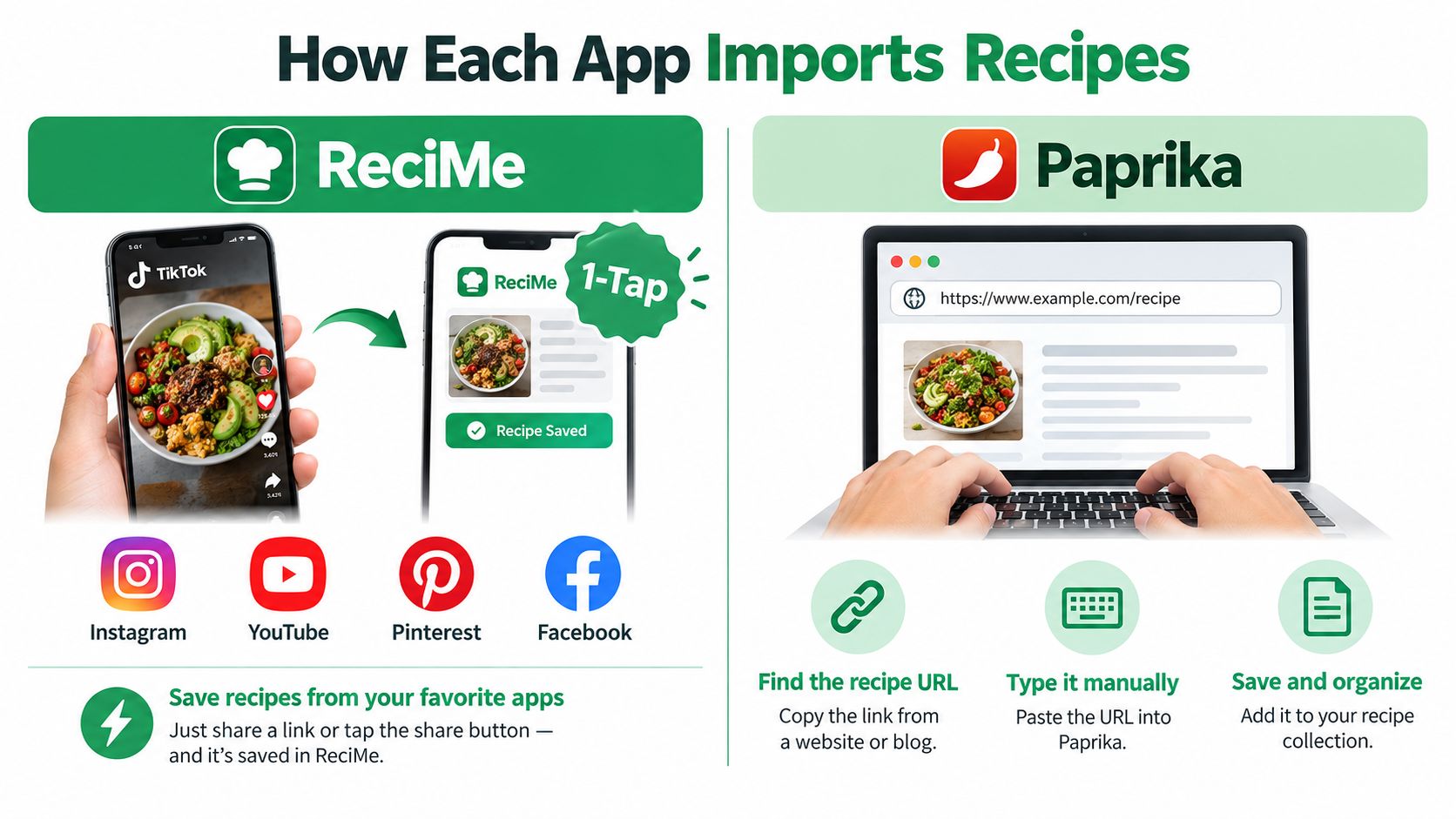
The import step is where these apps separate fast. If your recipes live in social feeds, screenshots, and copied text, ReciMe fits that mess better. If you mostly save recipes from webpages, Paprika's browser-first flow feels more natural.
ReciMe handles the modern recipe pile
ReciMe's documented import path accepts recipes from Instagram, Facebook, TikTok, YouTube, Pinterest, images, and other apps, including Paprika. It also handles screenshots, handwritten recipe photos, and text copied from apps like Notes, Google Docs, Notion, and Evernote. That matters because recipe hunting often happens in fragments, posts, reels, DMs, and saved screenshots.
The question is not whether it can import something. It is whether the app can turn a creator post into a searchable, structured recipe record. ReciMe's public materials say it pulls out ingredients, measurements, and steps, but there is no controlled public benchmark for accuracy or failure rates. I treat it as a strong capture workflow, not a promise of perfect cleanup.
Paprika fits recipe webpages better
Paprika's import flow is more conventional. Its built-in browser and sharing routes are designed for capturing a recipe from a recipe webpage, then saving it into the app's library. That suits anyone whose routine already centers on food blogs, indexed recipe pages, and desktop-style browsing.
The trade-off is clear. ReciMe covers more source types. Paprika is narrower, but more purpose-built for structured web pages. If you care about messy inputs like carousel images, captions, and screenshot recipes, the cleanup burden changes by source, and that is the choice that matters.
For a full walkthrough of ReciMe's capture workflow, including how it handles screenshot recipes, the ReciMe app review covers it step by step.
Organizing Your Library, Planning Meals, and Building Grocery Lists
Once the recipe is saved, the everyday question changes. You're not asking how to import it anymore, you're asking how the app helps you cook this week. That's where the organization model, meal planner, and grocery list matter most.
Library structure affects how often you'll reuse recipes
ReciMe stores recipes in cookbooks and pairs that with a weekly planner that categorizes meals as breakfast, lunch, or dinner. Paprika uses a more traditional recipe library and lets you move recipes into daily, weekly, or monthly calendar views. If you plan ahead in blocks, Paprika feels more like a classic kitchen binder. If you like grouping meals by type and keeping the library tied to what you've collected from social feeds, ReciMe feels more direct.
A good library only helps if you can find the recipe again without thinking about where it came from.
Grocery lists are close, but the surrounding workflow differs
Both apps combine ingredients into shopping lists, and both support aisle-style organization. ReciMe also lets you sort the list by recipe, which is handy if you shop by meal. Paprika adds pantry inventory tracking with expiration dates, which gives it a more established pantry-management angle for households that actually use that kind of system.
Paprika also goes further inside the cooking screen. It can scale servings, convert units, keep the screen awake while you cook, cross off ingredients, highlight the current step, and detect timers from directions. ReciMe's public feature set emphasizes measurement conversion and nutrition calculations instead. That makes Paprika the deeper cooking companion, while ReciMe stays focused on capture plus planning.
If your main pain point is shopping from a week's worth of recipes, the grocery list generator from recipes angle is worth comparing across tools, because the list is where saved recipes either become dinner or disappear into a folder.
Platforms, Pricing, and What Happens to Your Data
Preference turns into ownership here. Some cooks care most about one-time cost. Others care about syncing across devices. Others want desktop apps because the kitchen computer still matters. You should weigh the platform model before you commit, not after you've built a library.
Buying once feels different from paying ongoing
Paprika offers native apps for iOS, Android, Mac, and Windows, with a one-time purchase per platform. ReciMe uses a subscription model, with iPhone and Android apps and cloud storage that supports cross-device access. That's a real trade-off, not just a pricing note. One-time purchases can add up across devices, but they stop at the checkout. Subscriptions recur, but they often bundle sync and ongoing product updates into the same bill.
For someone comparing app subscriptions more broadly, even a pricing page like LunaBloom AI subscription tiers shows how common recurring software billing has become, although recipe apps and AI tools obviously solve different problems.
Data portability matters more than people think
Switching apps gets harder once your library is full. Paprika's offline-first model and local storage appeal to cooks who want dependable access even when connectivity is weak. ReciMe's cloud approach makes cross-device use simpler. ReciMe also documents support for importing recipes from Paprika, which lowers the friction if you're moving an existing library into a more social-first workflow.
If you're checking cost and access questions, the safest move is to verify current pricing and rating details directly in the App Store and Google Play listings. ReciMe's public free and paid details are also summarized on its pricing page, which is why the Is ReciMe free? question is really about how much of the workflow you want tied to a subscription model.
Saving a Social Recipe in Each App, Step by Step
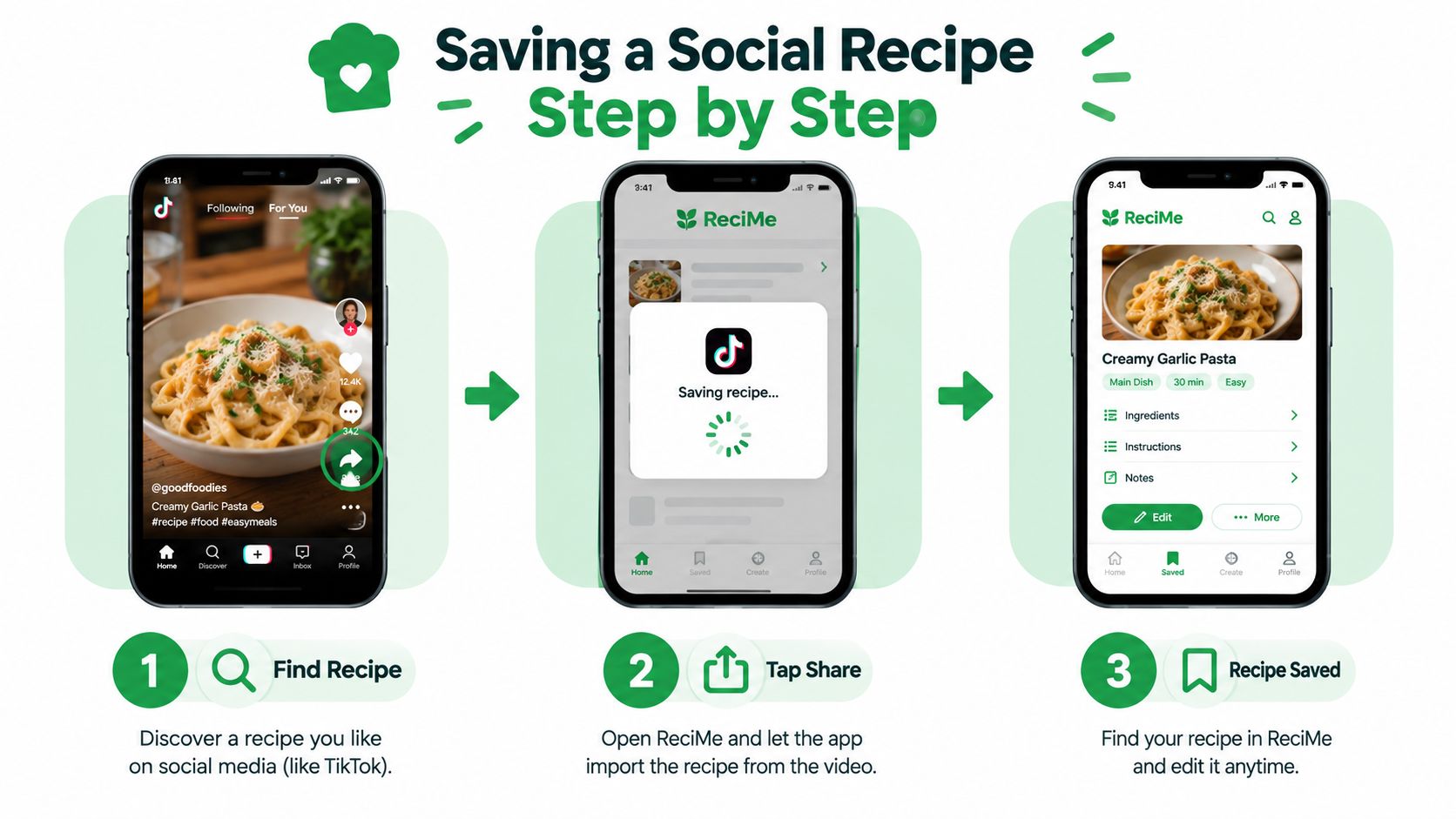
A concrete example makes the difference easier to see. You're watching a cooking video on TikTok or Instagram and the recipe looks worth keeping. What happens next depends on the app in your hand.
The social save path in ReciMe
With ReciMe, the normal move is to share the post or video into the app. From there, the recipe enters your library as a structured card with ingredients and steps, ready to organize into a cookbook or meal plan. That flow fits the way social recipes are discovered, because you don't have to rebuild the recipe from scratch before you can use it.
The web page path in Paprika
With Paprika, the usual route is to open the recipe's webpage in the built-in browser or use a share route from the recipe page itself. That works well when the source is a conventional recipe site. It's less aligned with the way social posts are surfaced, especially when the content is embedded in video captions, image carousels, or screenshots.
If you're moving from Paprika to ReciMe, start small. Import a handful of representative recipes, then check serving sizes, ingredient units, and the order of the instructions before you trust the library fully. That matters because migration is less about copying data and more about seeing whether your old cookbook still behaves the way you expect in the new app.
When to Consider Recipe One Instead
Some cooks do not need the full weight of a classic recipe manager. They want a simpler save-plan-shop loop that starts with whatever showed up in the feed and ends with a grocery list they can use.
A third option for social-first cooks
Recipe One is built around one-tap saving from social posts, videos, photos, and text, then moving those recipes into a searchable library, a weekly meal planner, and a grocery list generated from planned recipes. It works on iPhone and Android, and it also includes in-the-moment tools like Cook with Ingredients, cups-to-grams conversion, oven temperature conversion, and a rice-to-water ratio guide.
That makes it a fit if your recipe habit starts on mobile and you want the same saved recipe to turn into a plan and a shopping list without extra friction. It suits the same social-first cook ReciMe targets, so the key question is how much planner depth you need. If your recipes come mostly from social feeds, Recipe One sits closer to that workflow than a web-first manager. If your library already lives in web clippings and you want more desktop-style control, Paprika still makes more sense. You can also start with Recipe One and test whether its lighter workflow matches the way you truly cook.
Which App Should You Choose
The cleanest way to choose is by habit, not by hype. If your recipe life starts on TikTok, Instagram, YouTube, or Pinterest, ReciMe fits the front end of that workflow better because it's built to capture social content and turn it into structured recipes. If your library comes from recipe websites, and you care about offline access, pantry tracking, desktop apps, and a one-time purchase model, Paprika fits the older but still very strong web-based cookbook workflow.
Match the app to the kitchen you already have
A social-first saver usually wants the fastest path from post to pantry, not the deepest desktop system. An established cook with lots of web-clipped recipes usually wants stable organization and cooking tools that behave the same way every week. Those are different needs, and the apps reflect that difference clearly.
- Where do most of my recipes come from? If the answer is social feeds and screenshots, ReciMe has the edge. If the answer is recipe sites and blogs, Paprika feels more natural.
- Do I need desktop apps? Paprika supports Mac and Windows. ReciMe's public platform set is narrower.
- Do I prefer one-time pricing or a subscription? Paprika uses a one-time purchase per platform. ReciMe uses a subscription model.
- How much do I rely on offline access? Paprika is the stronger pick if offline viewing matters.
- Am I migrating an existing library? ReciMe's documented Paprika import support can make switching easier, but you should still test a few recipes first.
The beginner or busy parent who wants the simplest save-plan-shop path may want to look at Recipe One as a lighter third option, especially if most recipes arrive from social content and mobile saving. But for the direct recime vs paprika choice, the verdict stays situational: choose ReciMe for social capture, choose Paprika for mature web-based management.
Recipe One brings social saving, a searchable recipe library, weekly meal planning, and grocery lists into one mobile workflow, which makes it relevant if you want recipes to move cleanly from discovery to dinner. If that kind of save-then-plan-then-shop setup fits the way you cook, visit Recipe One and see how it handles the recipes you already collect.


