If you’ve been searching your phone's app store for the Allrecipes Dinner Spinner and coming up empty, you're not going crazy. The app is gone. The simple truth is that the dedicated Allrecipes mobile app was officially discontinued (as of March 20, 2023). While your saved recipes are safe, they now live on the company's mobile-friendly website, which marks a huge change in how they do things.
Keep every recipe in one place
Stop losing recipes. Save from any website, scan handwritten cards, and organize your kitchen with AI.


Quick Answers
- What happened to the Allrecipes app? The Allrecipes Dinner Spinner app was officially discontinued by parent company Dotdash Meredith. It has been removed from both the Apple App Store and Google Play Store.
- Are my recipes gone? No, your saved recipes are still safe on the Allrecipes website. Log in at allrecipes.com to access your Favorites.
- Best free alternative: Recipe One lets you save recipes from Allrecipes (and any website) into your own permanent digital cookbook. It uses AI to extract recipes and keeps your collection safe, organized, and synced across all your devices.
Why the Allrecipes App Was Discontinued
For millions of home cooks, the Allrecipes Dinner Spinner app was a trusted kitchen companion. Its sudden removal from the app stores left many users confused and frustrated. The decision wasn't due to a lack of popularity—in fact, the app was a massive success.
The real reason for its removal was a strategic shift by the parent company, Dotdash Meredith. They decided to consolidate their digital presence and focus all their resources on creating a single, unified experience through the Allrecipes website.
By getting rid of the standalone app, the company can now pour all its energy and money into perfecting one central hub. This move cuts down on the significant cost and complexity of developing and maintaining separate apps for iOS and Android, alongside their main website. Now, their team can focus on making the mobile site as fast, user-friendly, and feature-packed as possible, ensuring a consistent experience for everyone, regardless of their device.
From App Store Star to Web-First Focus
The change was definitely a surprise, especially when you look at the app's track record. All through the 2010s, as more people started using their phones for everything, the app became a giant in the food world. It really took off after a big update in April 2014, when Allrecipes started using customer feedback to make improvements. That led to an incredible 80% jump in five-star App Store ratings and helped it maintain a solid 4.5-star average.
But keeping that kind of success going across different platforms is a ton of work and costs a lot of money. It’s pretty common for companies to eventually bring everything under one roof to make their operations smoother and roll out updates more consistently.
By focusing on a single, powerful mobile website, a brand can ensure that every user—whether on a laptop, tablet, or phone—receives the latest features and security updates simultaneously, without the delays of app store approval processes.
This shift is meant to make things simpler for users in the long run. Now, there's just one place to go for all things Allrecipes, from your saved recipes to the latest articles. It's a strategic move designed to keep the platform healthy and growing for years to come.
Still, while the mobile website works well enough, many of us just prefer the feel and function of a real app. For cooks who miss that dedicated experience and are looking for a modern replacement, you might want to check out our guide on the top recipe apps available today. One fantastic option for building your own permanent digital cookbook is Recipe One, which is built specifically to save recipes from any website and keep them organized for good.
The Journey From App to Digital Food Hub
To really get what happened to the Allrecipes app, you have to look at the platform's incredible growth. It didn't stay a simple recipe-sharing site for long; it ballooned into a massive digital food media brand. This evolution is the real story behind their big move away from a dedicated app.
Over the years, Allrecipes became so much more than just recipes. They built an entire food ecosystem, pulling in lifestyle content, magazines, and even features like integrated grocery delivery. This turned the platform into a household name with a huge, diverse audience that connected with the brand everywhere—not just on a single mobile app.
All this expansion really called for a more unified strategy. Juggling separate platforms for iOS, Android, and the website just got too complex and inefficient. By retiring the app, Allrecipes could pour all its energy and resources into perfecting one central hub: its powerful, mobile-friendly website.
Milestones in a Changing Food Landscape
The website's traffic numbers tell the story. They absolutely exploded, cementing Allrecipes' place as a giant in the food world.
Back in late 2019 and early 2020, Allrecipes officially became America's largest digital food brand. The real turning point was December 2019, when the site hit an all-time high of 60.3 million unique visitors in a single month—the most in its 23-year history at the time.
That kind of massive growth made it clear they needed a sustainable, centralized platform that could handle tens of millions of users without a hitch. The timeline below really captures the key moments in this transition.
As you can see, the journey went from a popular, highly-rated app in the 2010s to today's complete focus on a web-based community.
Why One Platform Is Better for Users
By focusing all their efforts on a single web platform, Allrecipes can make sure every single user gets the same great experience, whether they're on a desktop at home or on their phone at the grocery store. This move means faster updates, more consistent features across the board, and a much stronger foundation for whatever comes next.
While this decision makes perfect sense from a business standpoint, a lot of us still miss the convenience and dedicated feel of a standalone app. Let's be honest, managing your entire recipe collection on a website can sometimes feel a bit disorganized and less permanent.
If you're looking for a more powerful way to organize your cooking life, it's worth exploring different kinds of recipe management software. A great alternative is a dedicated recipe keeper like Recipe One, which lets you save recipes from any website (including Allrecipes!) into your own personal, lifelong digital cookbook.
How to Access Your Recipes Without the App
So, the app is gone, but what about your recipes? Here's the good news: your entire collection of saved recipes and shopping lists is still safe and sound. Allrecipes simply moved everything over to its mobile-friendly website.
Getting to your recipes now just involves a small change in habit. It’s a pretty easy switch, and you can still get that quick, convenient access you're used to.
First things first, just open your phone’s web browser—Safari on an iPhone, Chrome on an Android, you know the drill—and head over to the Allrecipes website. You'll need to log into your account with the same email and password you used for the app.
Once you’re in, just tap on your profile icon. You should see a section labeled something like 'Favorites' or 'Saved Recipes' where all your culinary treasures are waiting.
Create a Home Screen Shortcut for App-Like Access
Still miss the simplicity of just tapping an icon to open your recipe collection? I get it. Luckily, there’s a great little trick for that. You can create a direct shortcut to the Allrecipes website right on your phone's home screen, making it feel almost exactly like the old app.
This simple move gives you one-tap access, saving you from opening your browser and typing in the address every single time. Here’s how to do it:
- For iOS Users: Open Safari, go to the Allrecipes website, and tap the 'Share' icon (it’s the little box with an arrow pointing up). Scroll down a bit and tap 'Add to Home Screen'. You can give the shortcut a name, and then it's ready to go.
- For Android Users: Pop open Chrome, head to the Allrecipes site, and tap the three-dot menu icon in the top-right corner. From that menu, just choose 'Add to Home screen' to create your shortcut.
This whole situation is a perfect example of why it's so important to have a reliable system for your most-loved recipes. A website is great, but it can change without warning, forcing you to adjust. For a more permanent solution you have full control over, it might be worth exploring the best way to store recipes in a personal digital cookbook.
Using a web shortcut is a fantastic workaround. It gives you the speed and feel of an app while using the mobile site, putting your entire recipe library just a touch away. You’ll be ready to get cooking in no time.
Why a Dedicated Recipe App Is Still a Good Idea
While the Allrecipes website is still a fantastic resource, the whole app fiasco really shines a light on a huge risk: keeping your entire recipe collection locked up in a single, third-party platform. When a company decides to switch things up, your entire cooking routine and access to your favorite dishes can vanish overnight. It leaves you scrambling, and that’s exactly why having a dedicated recipe keeper is such a game-changer.
Think of it as your own personal digital cookbook. The key difference? You own and control it completely. It’s not tied to any one website or brand, so you never have to lose sleep over a platform redesign, a beloved feature getting axed, or an app disappearing from the store ever again. It’s a permanent, stable home for your culinary library.
Future-Proofing Your Recipe Collection
The biggest win with a dedicated recipe keeper is independence. You can snag recipes from literally anywhere—Allrecipes, your favorite food blogs, a YouTube video, even an old family recipe typed out in an email—and bring them all together in one tidy, organized place. This puts you back in the driver's seat.
A modern recipe app offers some serious advantages that a simple browser bookmark folder just can't compete with:
- Universal Saving: Clip recipes from any website with a single click. The app does the hard work, automatically pulling the ingredients and steps into a clean, easy-to-read format.
- Offline Access: Your entire collection is saved right on your device. That means you can pull up that ingredient list in the middle of the grocery store, even when the Wi-Fi is terrible.
- Superior Organization: Go way beyond basic folders. Use tags (like "weeknight," "vegetarian," or "30-minute meal"), add ratings, and jot down your own notes to find the perfect dish for any occasion in seconds.
- Integrated Tools: Many apps come with built-in meal planners and grocery list generators that automatically pull ingredients from the recipes you've chosen for the week.
The whole point is to build a reliable, personal cooking archive. When you build your collection in an app that you control, you’re making sure your favorite recipes are always there, always organized, and always safe from some company’s unexpected decision.
This approach is all about future-proofing your recipes. Instead of being a digital tenant on someone else's property, you become the owner of your own digital cookbook.
For anyone ready to take back control, checking out a modern recipe saver like Recipe One is the perfect next step. It’s a small change that offers some serious, long-term peace of mind in the kitchen.
Meet Recipe One: The Best Alternative
When the Allrecipes app vanished, it left a real gap for home cooks who relied on that quick, dedicated mobile experience. If you're looking for a solid alternative that gives you back control, Recipe One is the perfect solution. It's a modern digital cookbook designed to not just fill the void, but actually upgrade how you manage your recipes for good.
Think of Recipe One as your own personal, permanent recipe library that belongs entirely to you. It was built from the ground up on a simple idea: your recipe collection should be yours, safe from any single company's app updates or business decisions. It puts you back in the driver's seat.
A Central Hub for All Your Recipes
One of the standout features of Recipe One is its one-click recipe importer. This little tool is a game-changer. It can effortlessly grab recipes from pretty much any website out there, including all those favorites you still have saved over on Allrecipes.com. Instead of being stuck with one source, you can pull inspiration from your favorite food blogs, cooking sites, and even social media, bringing it all together in one organized place.
So, let's say you spot a fantastic chicken recipe on Allrecipes, a killer dessert on a baking blog, and a great salad idea from a video you saw online. With Recipe One, you can save all three in seconds. No more tedious copy-and-pasting. The app intelligently pulls the ingredients, instructions, and photos, then formats everything into a clean, consistent layout. It’s how you build a truly personal and searchable library.
Recipe One isn’t just a place to dump recipes; it’s about creating a living cookbook that grows and evolves with you. It puts you in charge, making sure your collection is always there when you need it, perfectly organized, and safe from unexpected app changes.
More Than Just a Recipe Box
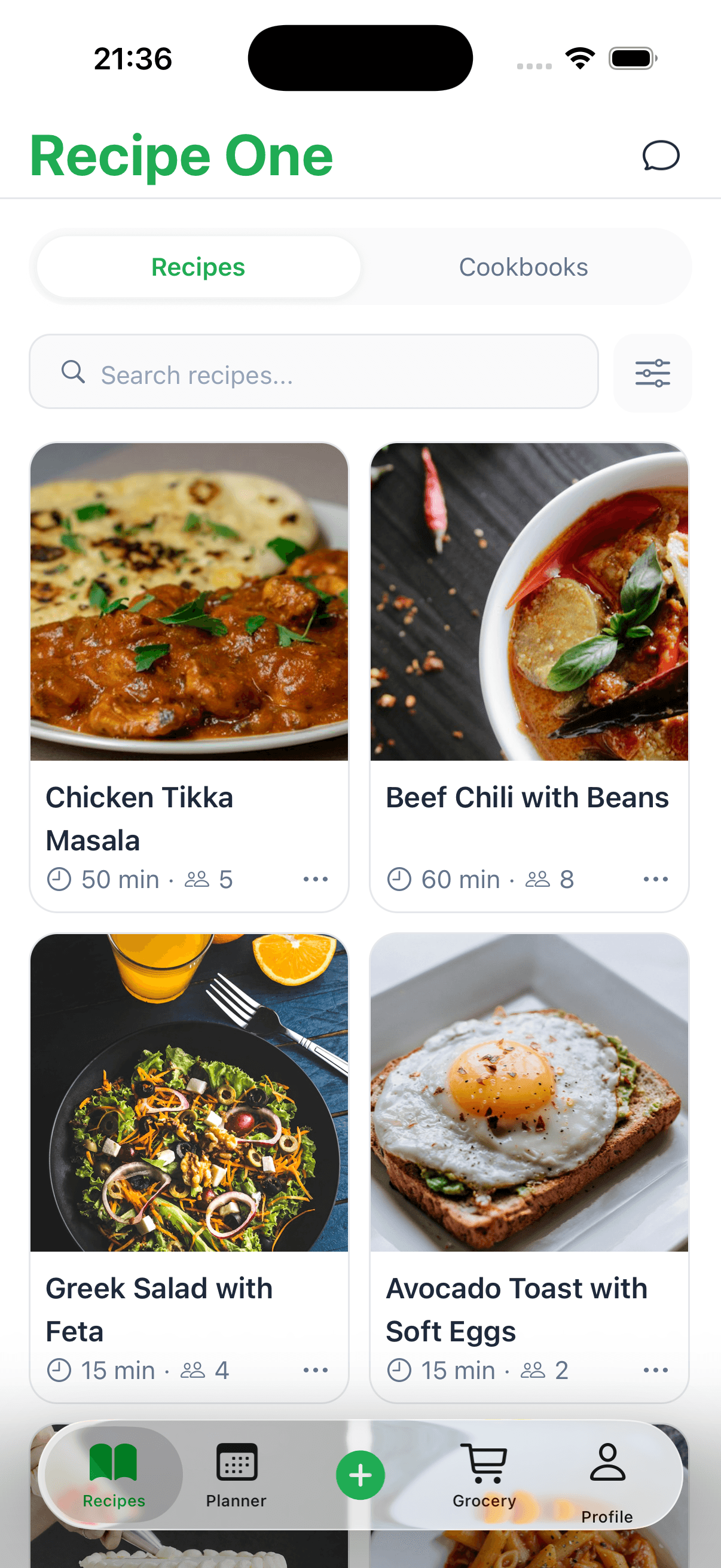
Recipe One goes way beyond simple storage. It's packed with tools that make the entire cooking process easier. The design is clean and intuitive, so organizing your collection is actually enjoyable. You can use custom tags, create folders for different meals or cuisines, and add your own notes to tweak recipes over time. This means you can find exactly what you're looking for, whether it's a "quick weeknight meal" or a "gluten-free dessert."
Here’s a glimpse of how it can change your daily routine:
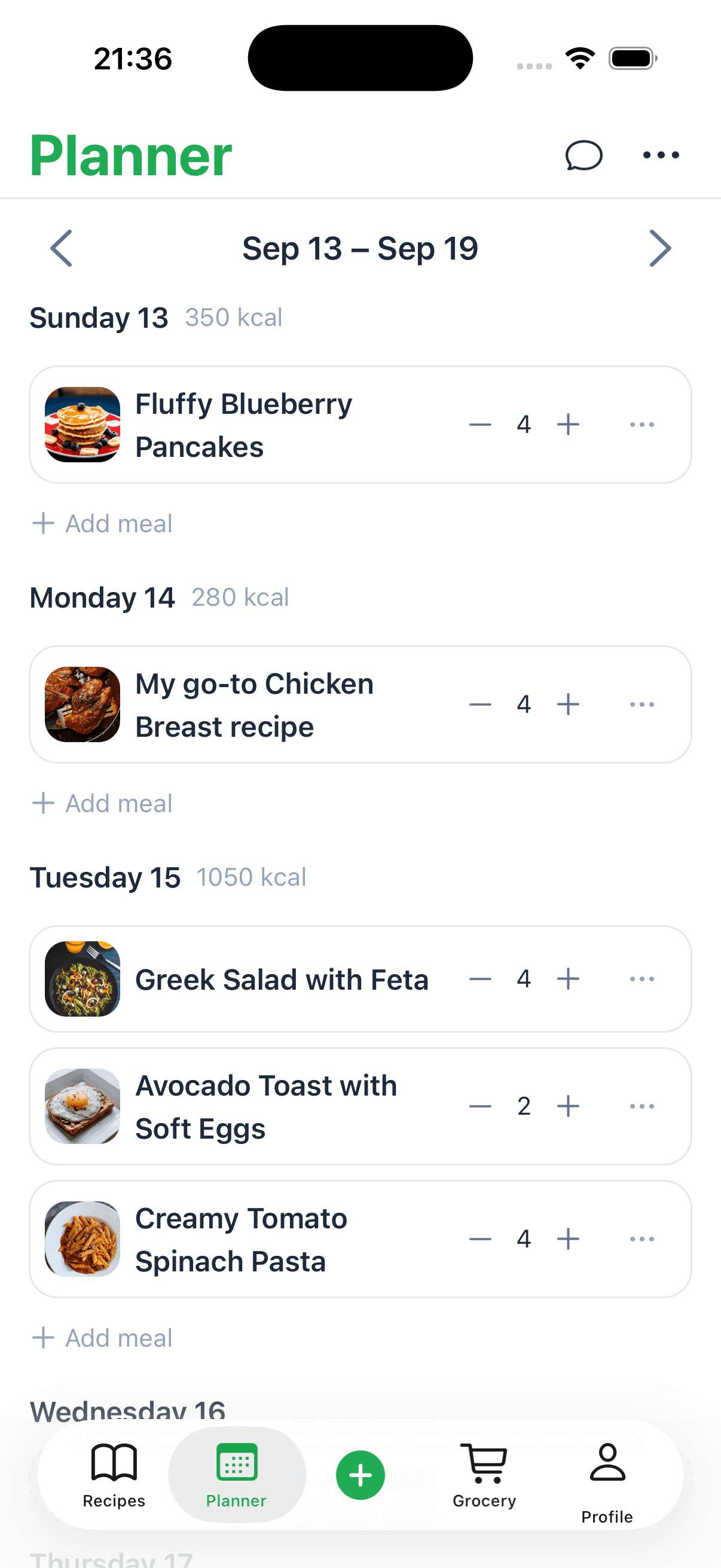
- Effortless Meal Planning: Just drag and drop recipes onto a weekly calendar to map out your meals in advance.
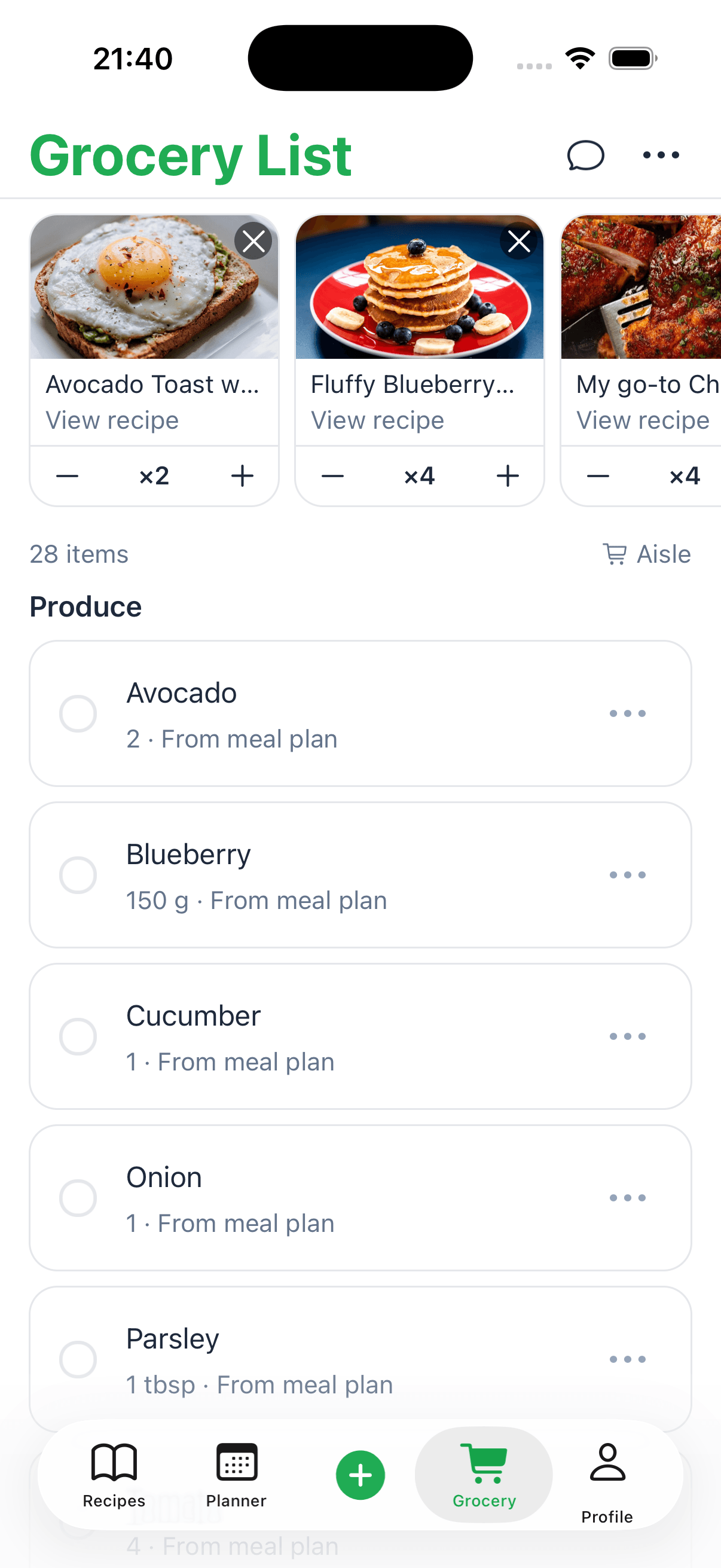
- Automatic Grocery Lists: Once your meal plan is set, the app instantly generates a shopping list. It even combines all the ingredients and sorts them by category to make your trip to the store faster.
- Universal Accessibility: Your entire collection syncs across all your devices. Your recipes and lists are always with you, whether you’re on your tablet at home or checking your phone at the supermarket.
For anyone who really misses the smooth functionality of the old Allrecipes app, Recipe One is the perfect fit. It gives you the independence and powerful features you need to build a lasting, personal, and super-organized digital cookbook. You can learn more about its features on the official Recipe One site and start building your forever recipe library today.
How to Move Your Recipes to Recipe One
Alright, so you're ready to make the switch? With the Allrecipes app no longer an option, finding a permanent home for your treasured recipes is a smart move. Getting everything over to a dedicated recipe keeper like Recipe One is actually pretty simple, and it guarantees your collection will be safe, organized, and truly yours for good.
The easiest way I do this is with the share sheet or by pasting a link. I open a saved recipe, tap Share, and choose Recipe One, or I paste the link into the app.
A Step-by-Step Migration Guide
Open the Allrecipes website on your phone, log in, and find your saved recipes (usually under "Favorites").
From there, it's a breeze:
- Open a Recipe: Tap the first recipe you want to move over.
- Tap Share or Paste the Link: With the recipe page open, tap Share and choose Recipe One, or copy the link and paste it into Recipe One.
- Confirm the Save: Recipe One grabs the title, ingredients, steps, and main photo. I hit “Save,” and it lands in my collection.
- Repeat for Your Collection: I work down my favorites list and repeat these steps for every recipe I want to keep.
Think of it like moving your favorite books from a public library shelf to a personal bookshelf at home. You’re not just saving a link; you’re making a permanent, personal copy that you can access whenever you want, even if you’re offline.
As you get your collection moved over, it's a great time to organize your digital files to make your new digital cookbook easy to use. Once everything is in Recipe One, you can start adding your own personal touch. Create custom tags like "quick dinner" or "holiday baking," sort recipes into collections, and add your own notes. This is how you turn a bunch of scattered links into a beautifully organized, searchable cookbook that belongs to you and you alone.
A Few Quick Questions
It's natural to have questions when a go-to app suddenly changes. Let's clear up some of the most common points of confusion about the Allrecipes app and what you can do now.
Is the Allrecipes App Really Gone Forever?
Yes, the old "Dinner Spinner" app has been officially retired. You won't find it on the Apple App Store or Google Play Store anymore. Allrecipes has decided to put all its energy into its mobile-friendly website instead. The good news? Your recipes are safe! You can still find everything by logging into your account on the Allrecipes website using your phone's browser.
But Why Did They Ditch the App?
It was a strategic business decision to streamline operations and cut costs. Maintaining separate apps for iOS and Android is expensive and complex. By focusing on a single mobile website, Allrecipes' parent company can deliver updates and new features to all users simultaneously, ensuring a consistent experience everywhere. This makes sense given that a whopping 85.09% of Allrecipes' visitors were already coming from mobile devices. If you're curious about their user stats, Expanded Ramblings has a good breakdown.
What's the Best Replacement for the Allrecipes App?
While using the Allrecipes website works, many people miss the dedicated app experience. For those looking for an alternative that offers more control and better organization, a dedicated recipe keeper is the best choice.
An app like Recipe One is a fantastic alternative. It lets you save all your favorites from Allrecipes (and any other site) into your own personal cookbook that isn't tied to a single company's decisions. You get to own and control your recipe collection for good. Cooks leaving Allrecipes for a dedicated manager often compare Paprika with a Paprika alternative that captures social and video recipes.
Ready to build a recipe collection that can't be taken away? With Recipe One, you can save recipes from anywhere online with just a click, organizing them into a personal, searchable library that's yours for good. Start building your forever cookbook with Recipe One today!